
1. Before you start
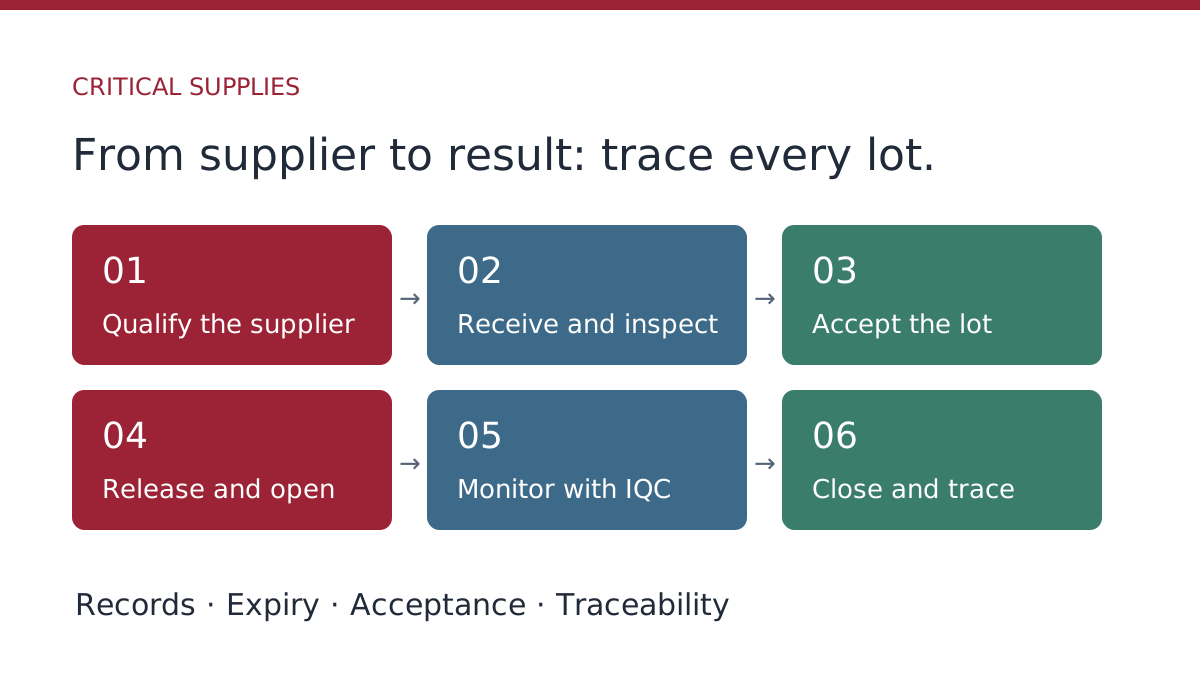
The critical supplies module follows reagents, calibrators and consumables from the supplier to the control runs that used each lot. It follows the supply life cycle: approved supplier, product, receipt, acceptance, opening and use, monitoring and closing.
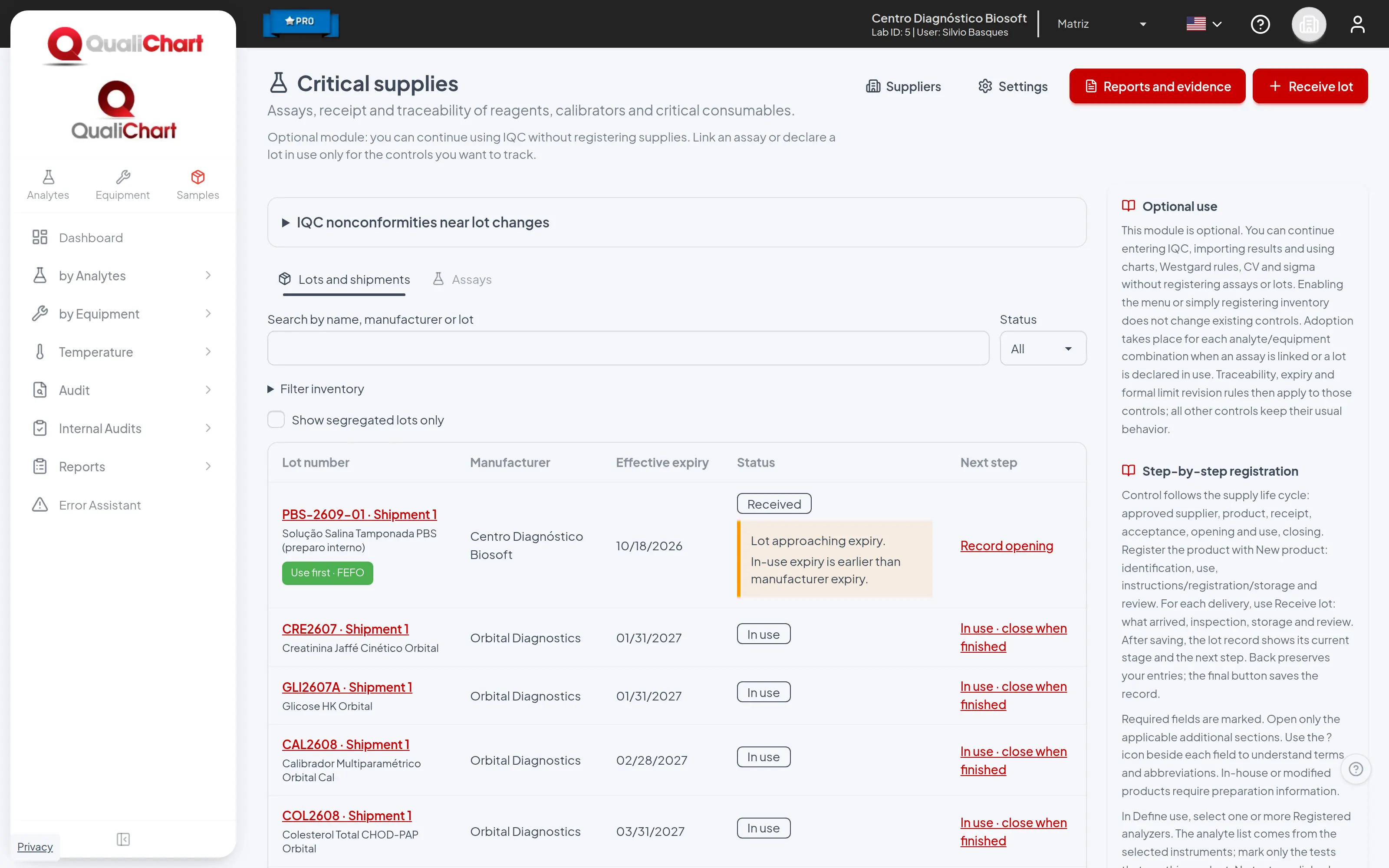
- Click the building icon in the QualiChart header and choose Critical supplies.
- The list shows each lot and shipment with its status, effective expiry and next step. Click the next step to go straight to the pending action.
- If the laboratory has no records yet, the screen shows the three-step path: suppliers, products and receipt.
2. Register and evaluate suppliers
- In Suppliers, click New supplier and enter the name, tax ID, contact and scope of supply.
- Record the initial evaluation: mark each criterion (regulatory status, quality system, documentation, transport and cold chain, delivery times and support) as conforming, nonconforming or not applicable.
- Choose the conclusion (approved, approved with restriction or disqualified) and the date until which the approval is valid. Nonconformities and items not applicable require a note.
- To change the status later, record a periodic or extraordinary evaluation. Earlier evaluations are kept.
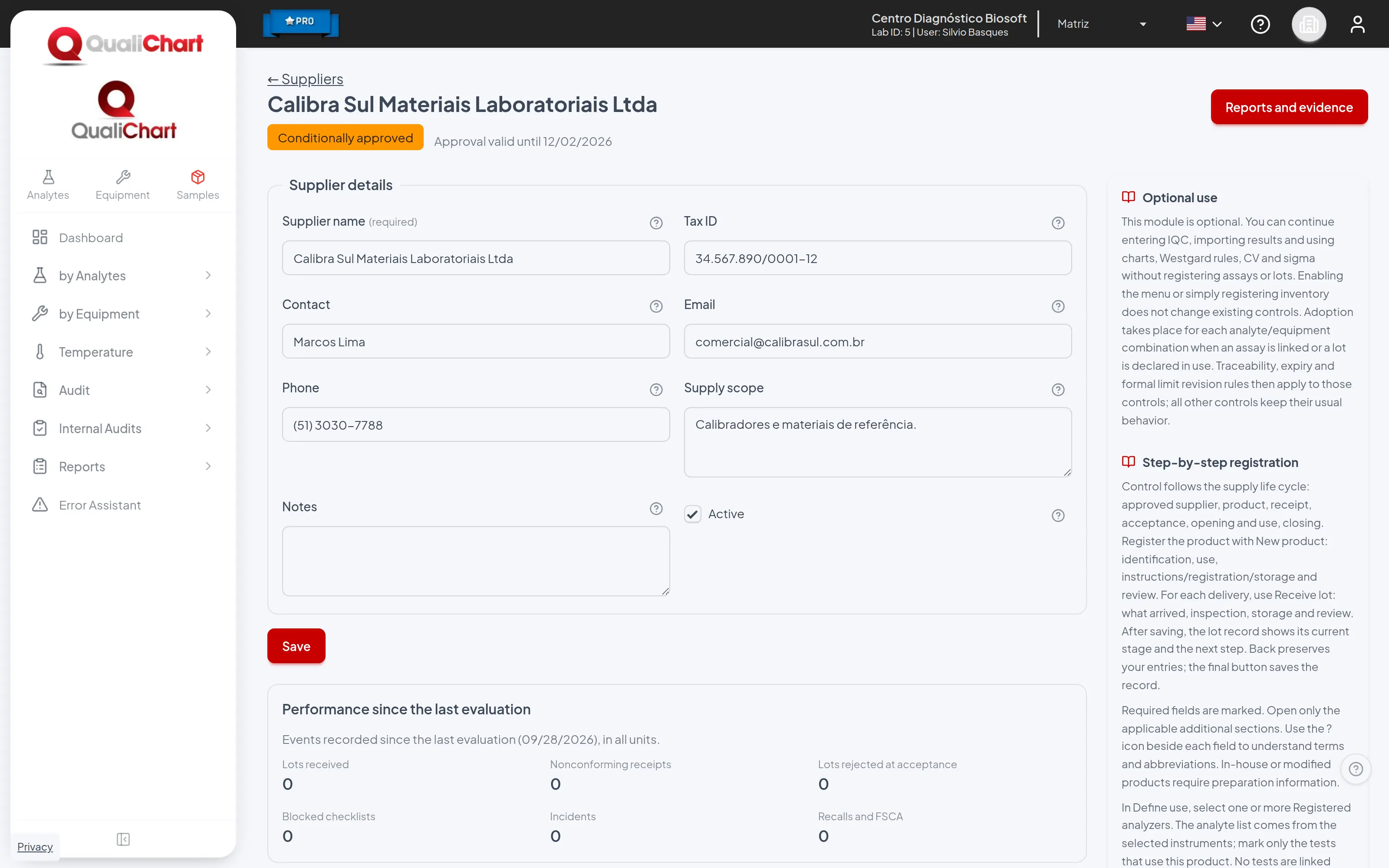
Only suppliers approved on the receipt date can deliver lots.
3. Register the products
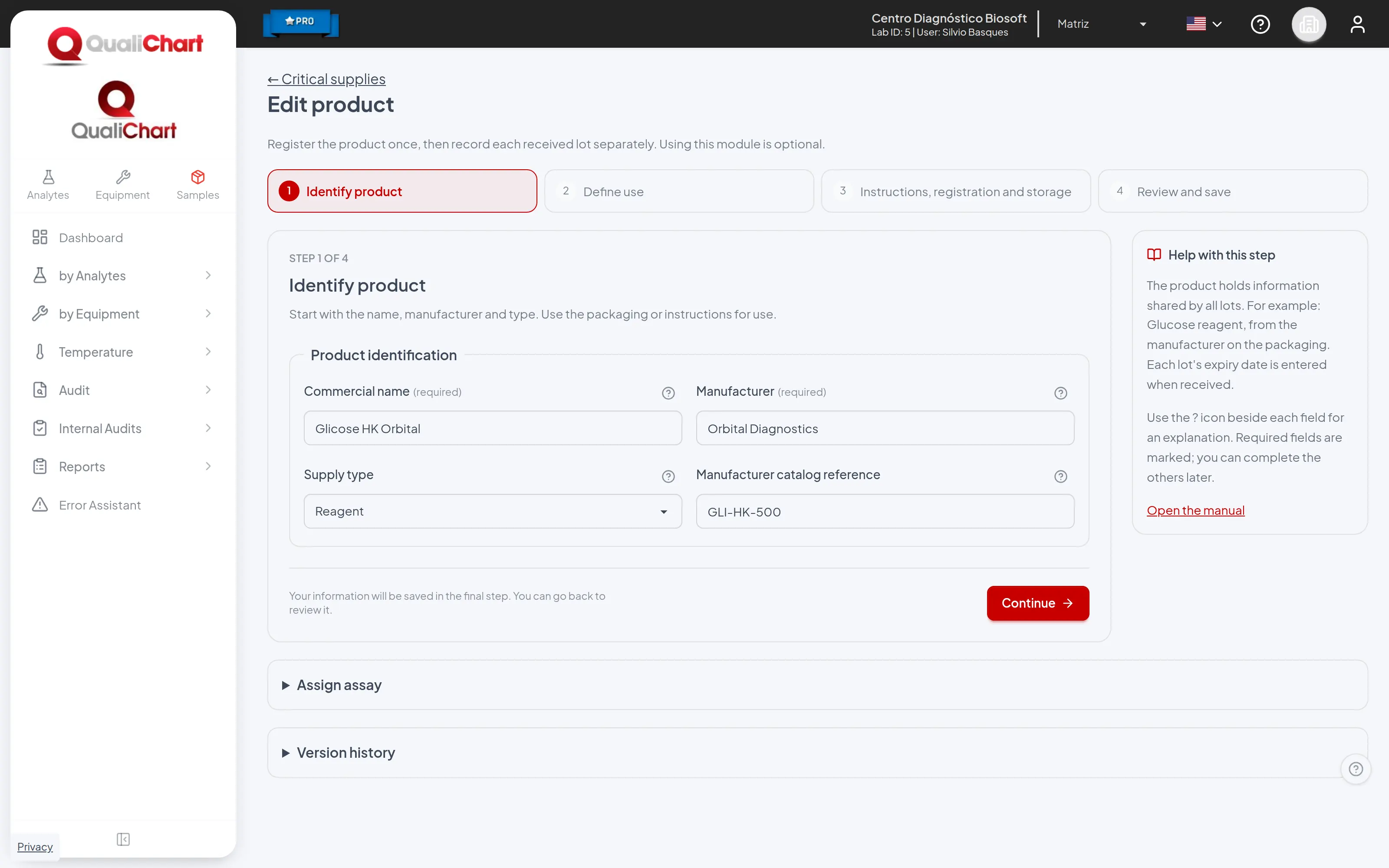
- On the Assays tab, click New product.
- Identify product: trade name, manufacturer, type (reagent, calibrator or consumable) and reference.
- Define use: analyzers and tests that use the product and, for each analyte, the method and the measuring range.
- Instructions, registration and storage: Anvisa registration and its validity, instructions version, storage temperature range and whether each lot requires acceptance before use.
- Review and save. Later changes create a new version; earlier runs stay linked to the version in effect when they were entered.
4. Receive the lot
- Click Receive lot.
- What arrived: product, supplier, lot number, shipment, manufacturer expiry, receipt date and quantity. If the package has a GS1/UDI code, use Extract lot and expiry from UDI.
- Inspection: package condition, transport temperature, invoice and lot certificate, when available.
- Storage: temperature equipment, location and in-use stability. Only equipment whose range fits within the product range is shown as compatible.
- Review and save.
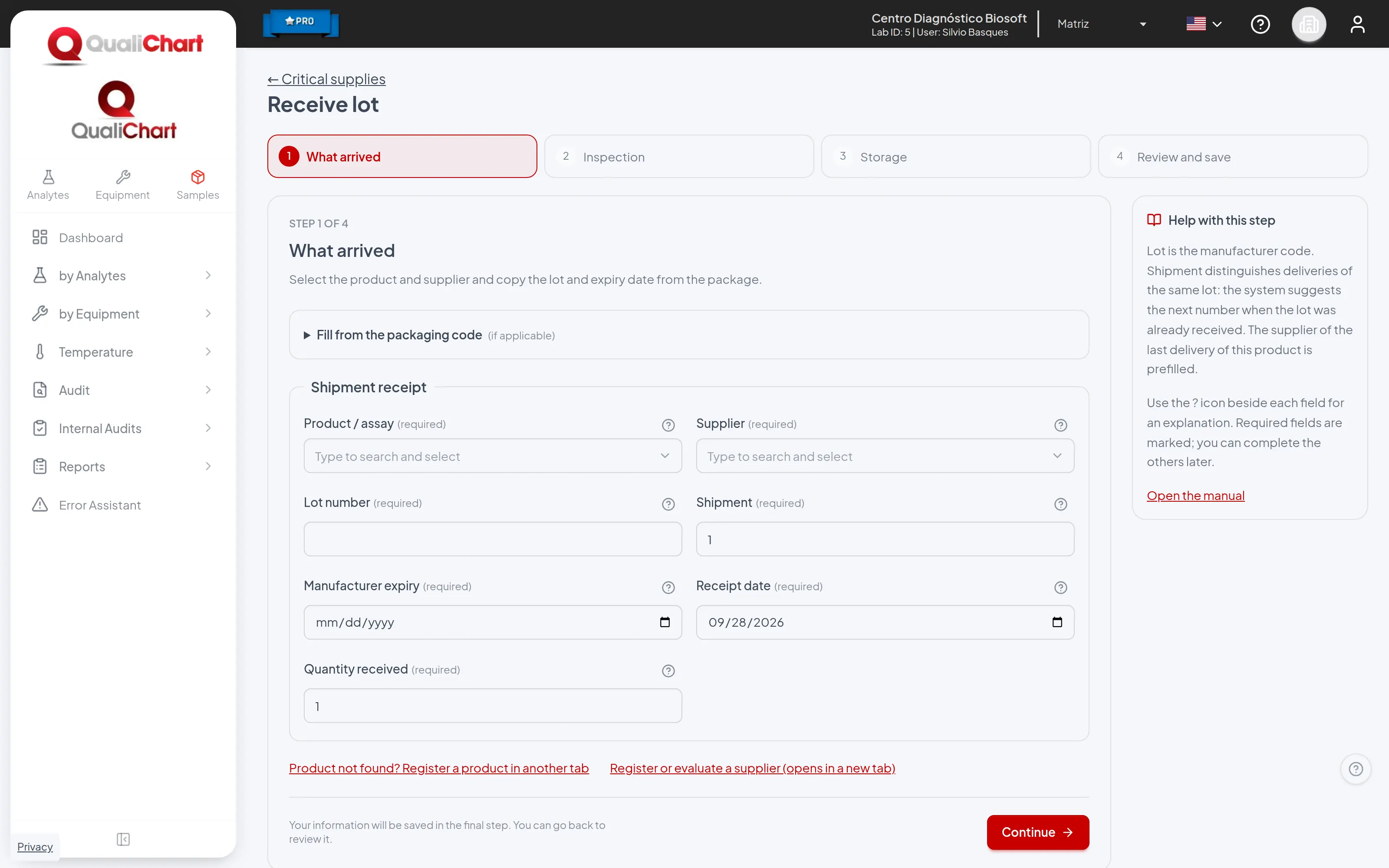
The system suggests the supplier of the product's last delivery, the next shipment number of the same lot and the storage conditions declared for the product.
5. Perform the lot acceptance
The lot record shows the stages Received, Acceptance, Release, In use and Closed, with the current stage highlighted and the Next step card.
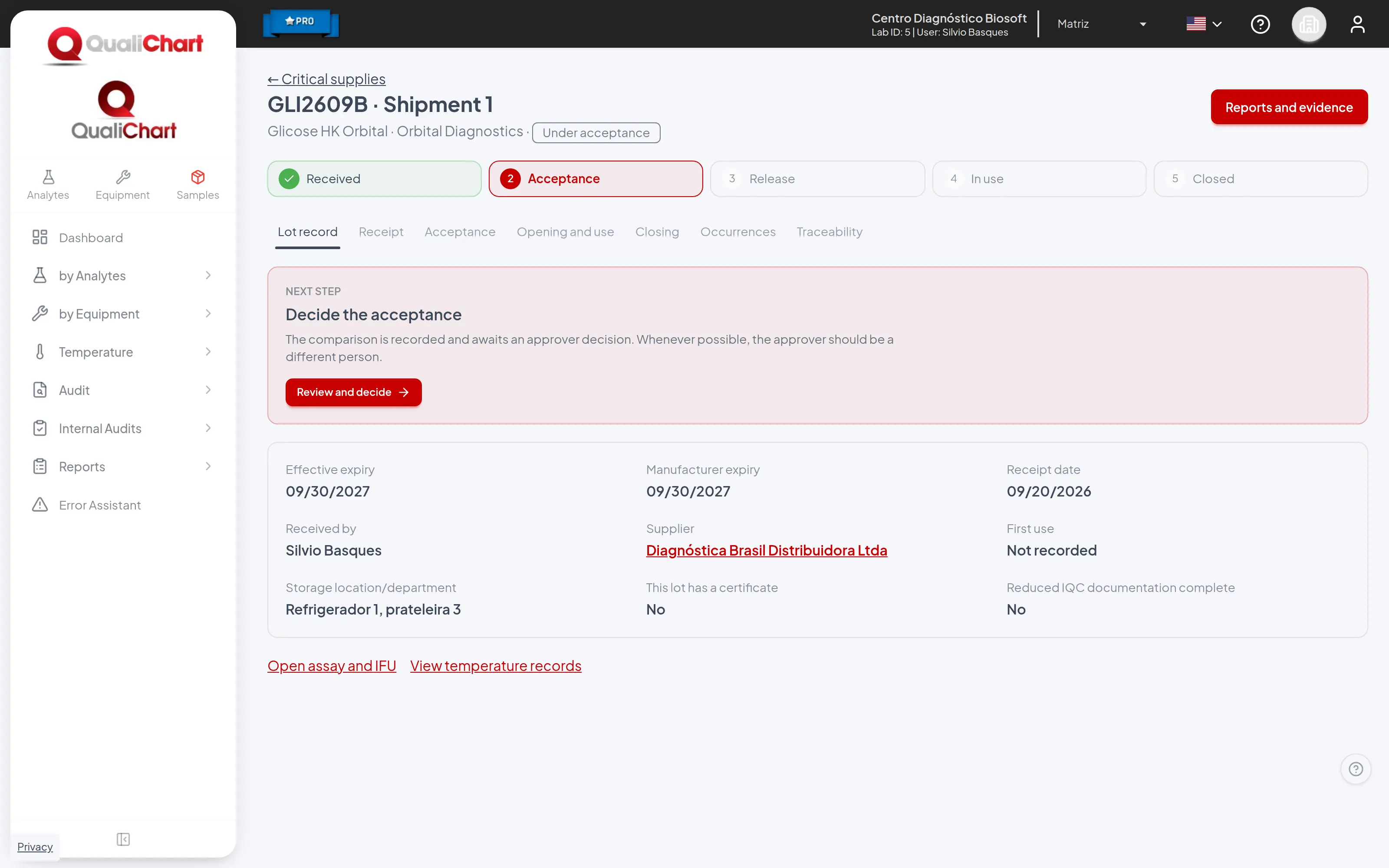
- On the Acceptance tab, enter the reason and the strategy. Patient samples are the recommended option.
- Define the criterion before measuring: source, maximum difference and unit.
- Type the paired results on the current and the new lot. The difference of each pair, the mean difference and the dispersion are calculated as you type.
- A user with approval permission writes the justification and decides: approve, approve with restriction or reject. If the laboratory requires segregation of duties, whoever performed the comparison cannot approve it.
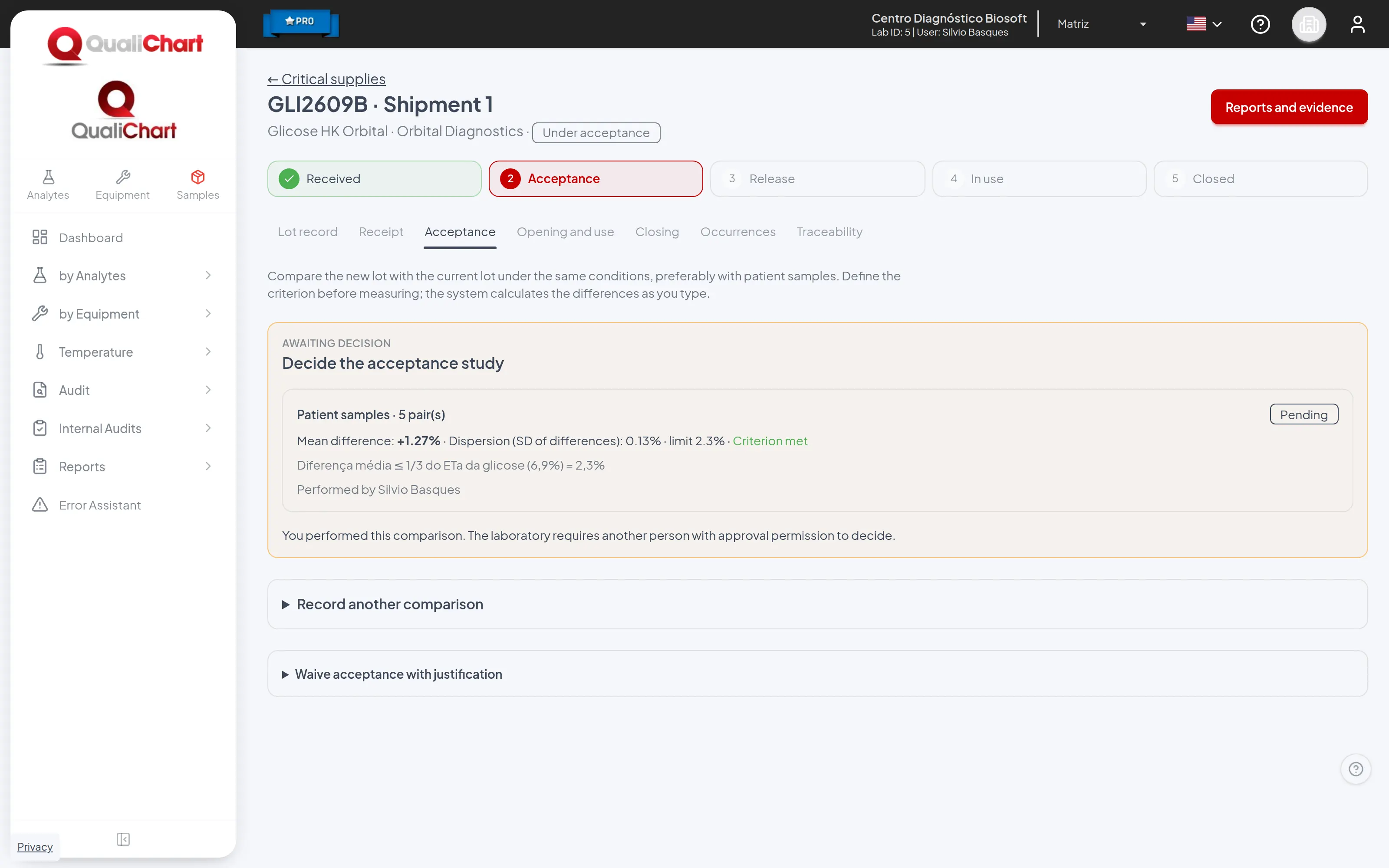
Rejecting the study segregates the lot, unless another study is pending or was approved after it, such as a study redone after a typing error. A waiver of acceptance requires approval permission and a justification, and appears in the reports.
6. Open the lot and declare its use on controls
- On the Opening and use tab, record the opening with the checklist, when the laboratory requires it.
- In Entry into use on controls, select the controls that start using the lot. Controls using another lot of the same product come preselected, because the new lot will replace it.
- Click Confirm entry into use. A complete reagent change creates a pending calibration verification.
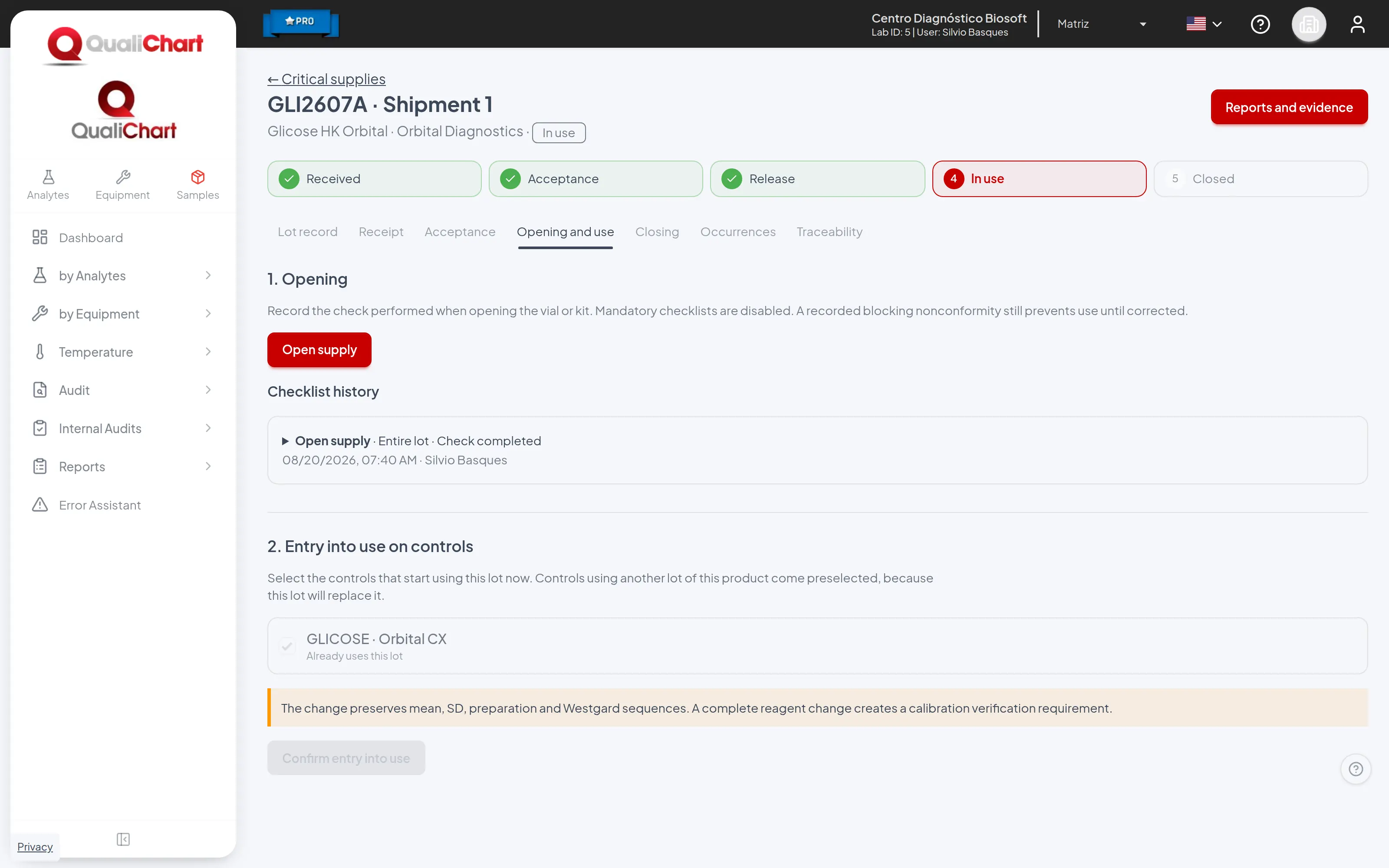
The change keeps the control's mean, SD, preparation and Westgard rule sequences.
Consumables and solutions without analytes are not declared on controls: the opening checklist starts the use of the lot.
7. Enter IQC as usual
- The operator does not choose the lot when entering the control: the lot in use is recorded automatically on every run, on the panel, in bulk entry, in imports and through the API.
- Suspended, recalled or expired lots are blocked. The panel explains why and what to do before entering results.
- In the CSV import, the optional sixth column gives the reagent lot, which must be in use on the control.
8. Follow up on the control panel
The control panel stays focused on IQC. Next to the control name, the Supplies link shows a counter when there is something to check, and the Lot changes option marks the changes on the Levey-Jennings chart. Click a mark to open the details of that change.
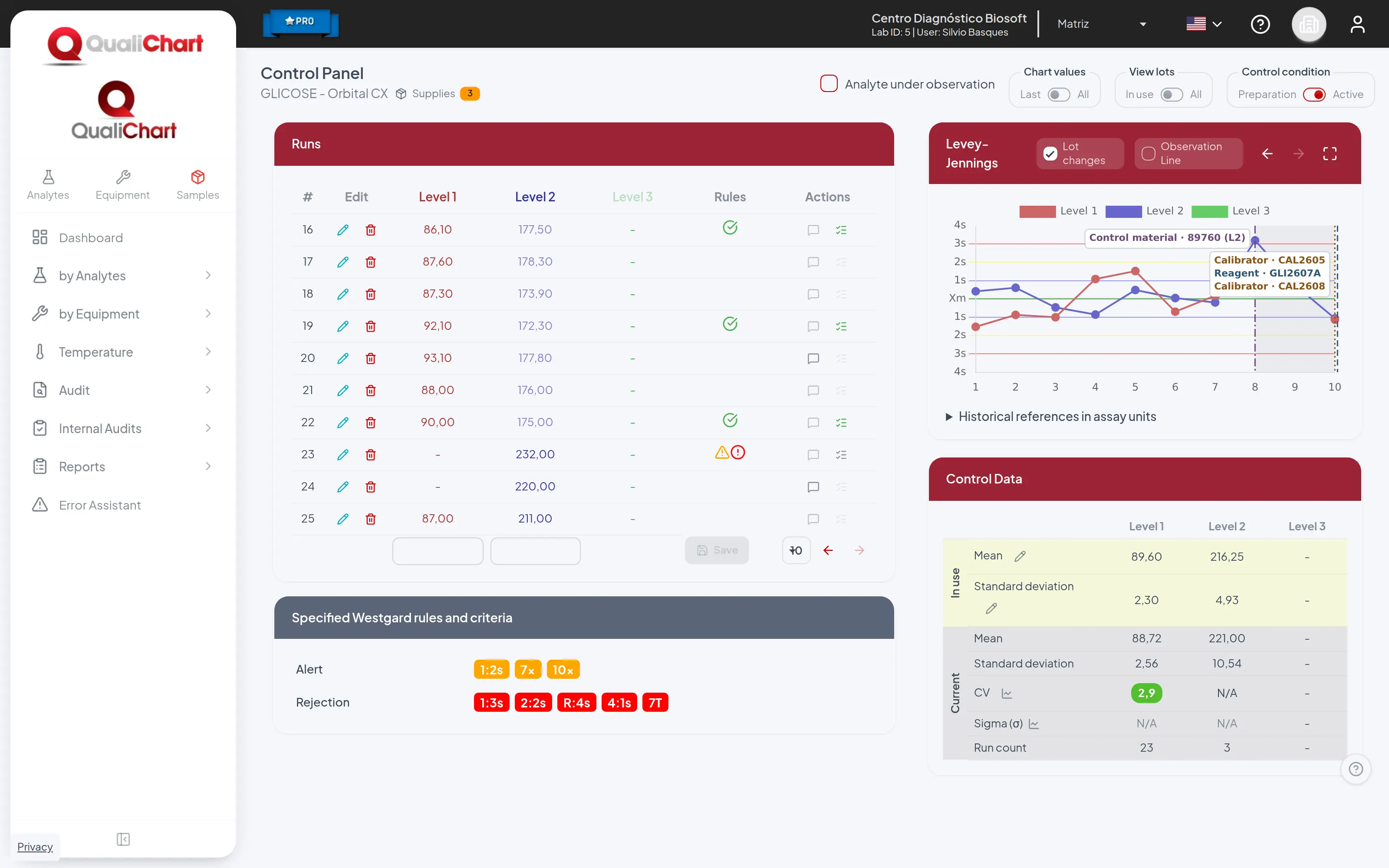
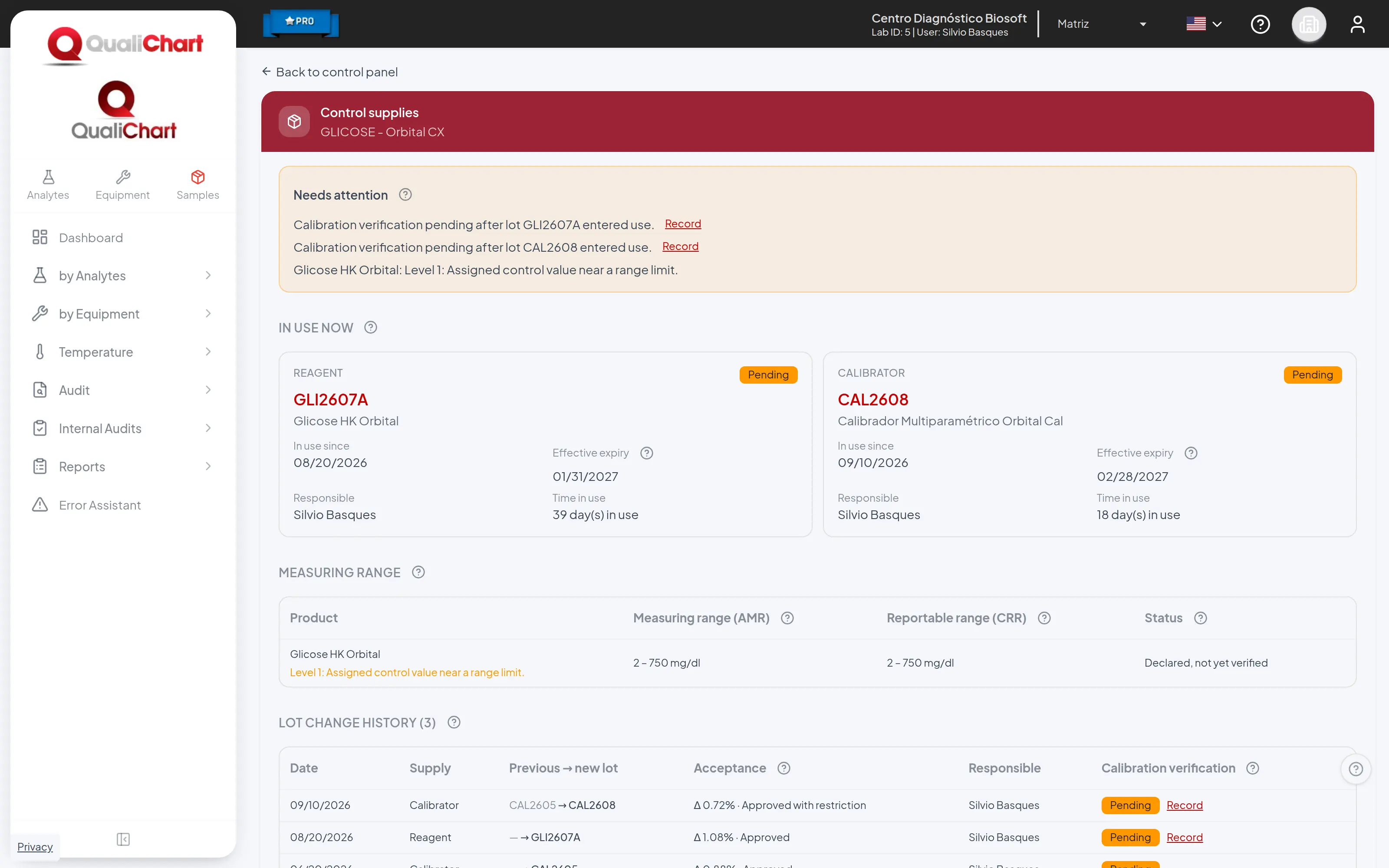
The link opens the control's supplies screen, in reading order:
- Needs attention: blocked entries, pending calibration verification, mean and SD review requested by the acceptance, lot alerts and shifts above the limit, each with the action that resolves it. The link counter adds up exactly these items.
- In use now: reagent, calibrator and consumable, with start date, effective expiry, person in charge and time in use.
- Measuring range: the range entered for the product and an alert when the control value is close to one of its limits.
- Lot change history: the acceptance difference and the calibration status of each change.
When a Westgard rule is violated right after a lot change, the critical analysis suggests the cause Lot change, which the team confirms or replaces.
9. Change the mean and SD in use
- On the control panel, click the pencil of Mean or Standard deviation in Control Data. Any user can make the change.
- Choose the level and the material in use, the reason and the new values.
- Describe the supporting statistics and justification and save.
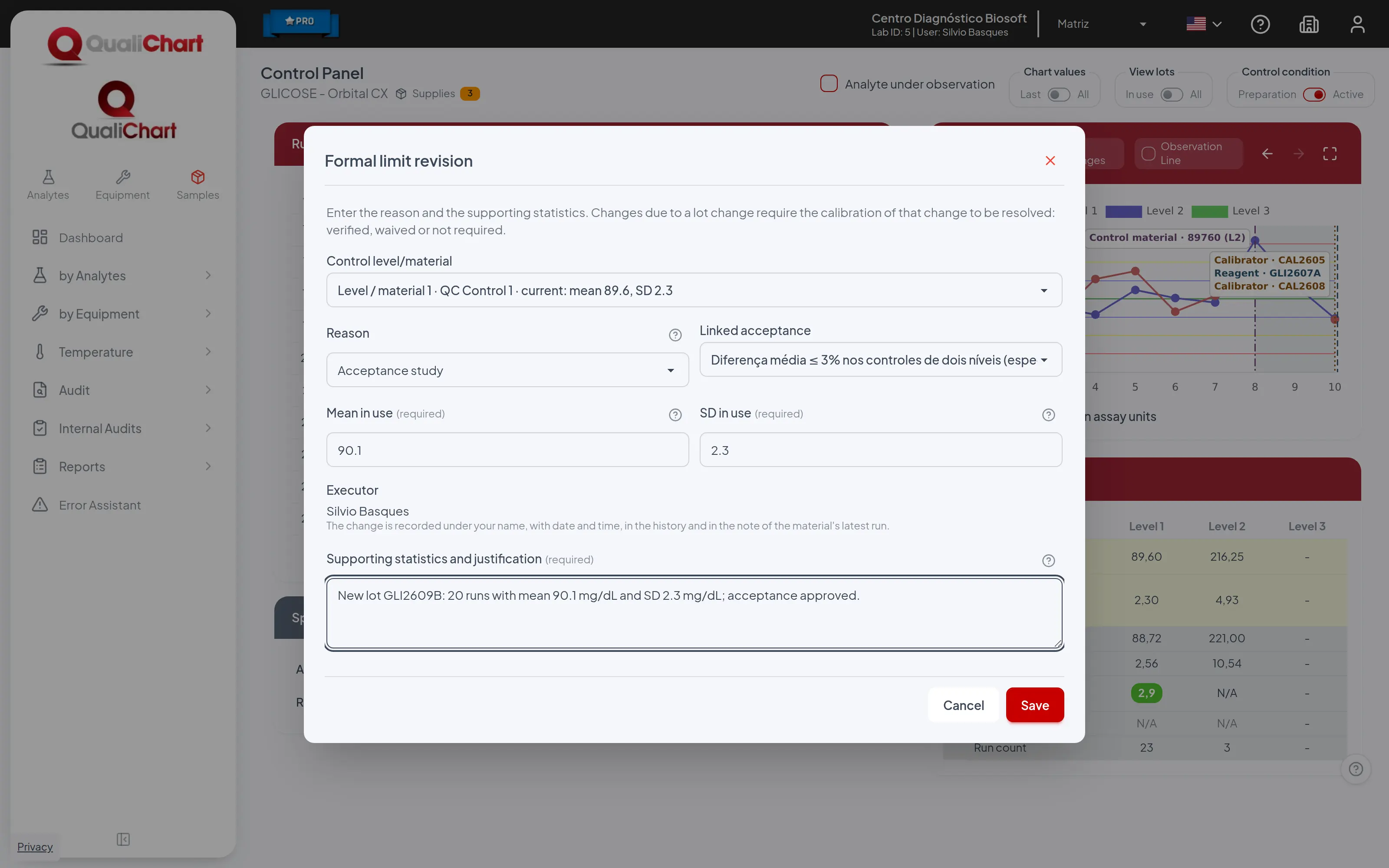
The change is recorded in the name of the signed-in user, with date and time, in the limit history and in the note of the latest run, so it shows on the chart. A new generation of the control material also enters the limit history. Supply events that affect the control, such as a lot change or a recall, are noted on the latest run.
10. Record occurrences and close the lot
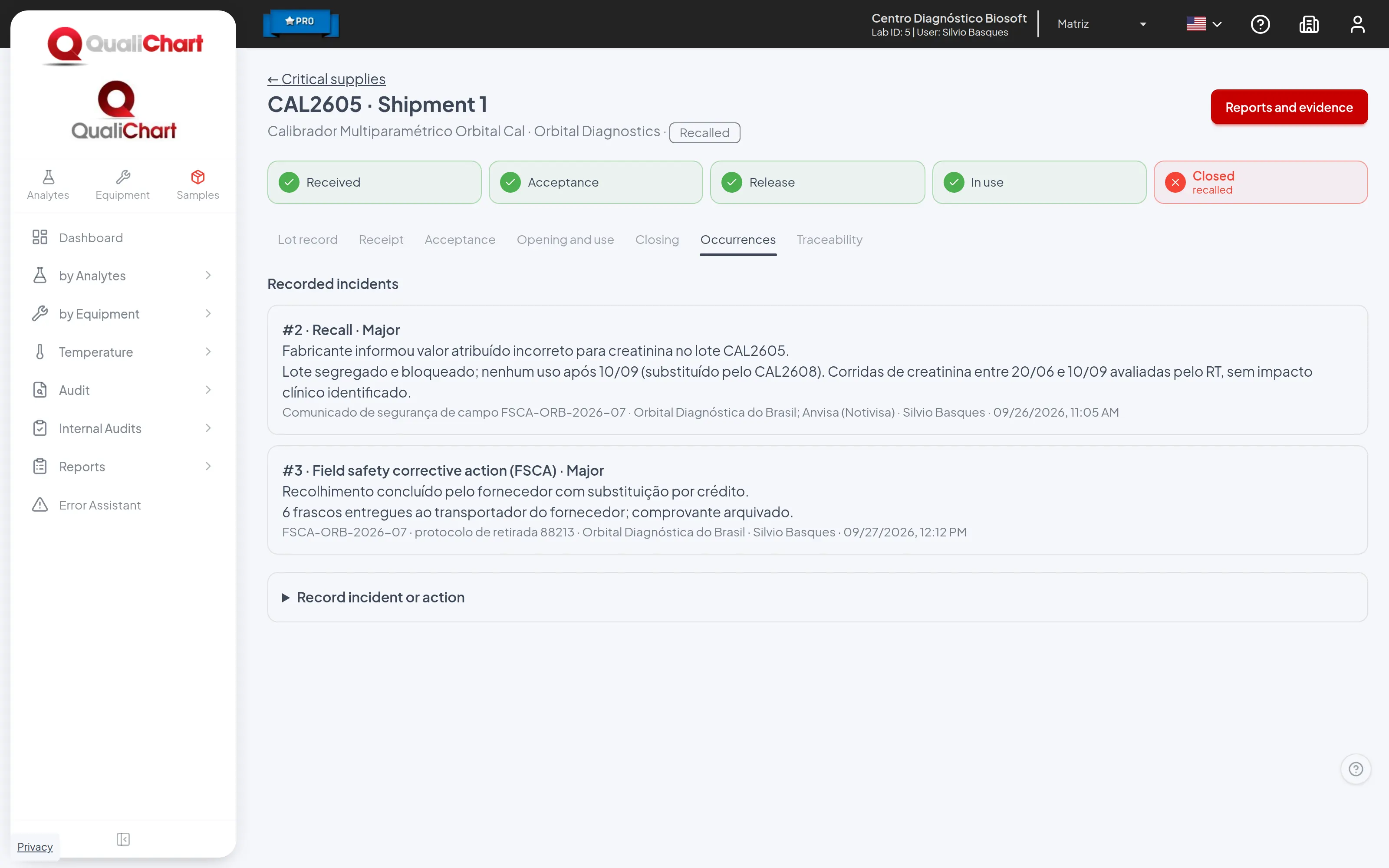
- In Occurrences, record an incident, recall or field safety corrective action (FSCA) with description, severity, notification reference, action and evidence.
- A critical incident suspends the lot. A recall reaches every shipment of the same manufacturer batch, ends its use, blocks new runs until a replacement is declared and prevents new receipts of that batch.
- In Traceability, see the runs that used the lot.
- In Closing, record the closing checklist and the withdrawal from use with its reason: exhausted, expired or replaced. The checklist suggests the open package; closing the whole lot asks for confirmation, and a record made by mistake can be corrected.
11. Generate reports and evidence
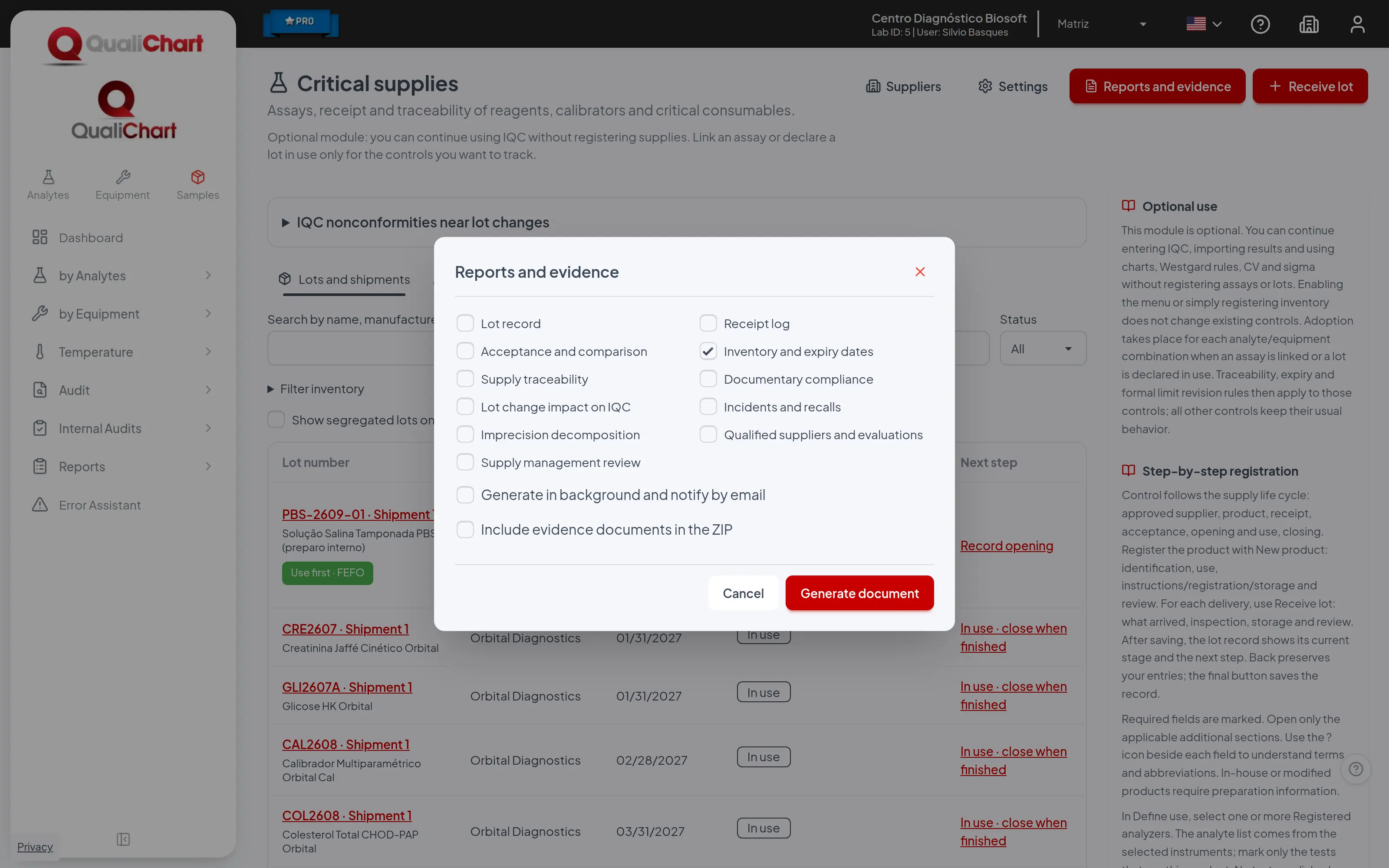
- Click Reports and evidence on the supply list, on the lot or supplier record, or in Reports, Critical supplies.
- Choose the report: only the parameters it uses are shown.
- Click Generate document. On the lot record, the period already covers the life of the lot. Unfiltered reports over long periods, the evidence package of several lots or the background option send the file by e-mail.
Every critical supply PDF has the same header: laboratory, branch, director and technical manager from the laboratory record, the coverage period in reports that use a period, one line for each filter filled in, and the issue date and time. The footer numbers the pages. The document is printed on A4, in the language selected in the system: portrait for records and short lists and landscape for wide tables.
Reports with a period ask for Start and End and compare the date indicated in each of them with that period. The others show the status on the issue date and, in the report center, do not ask for a period.
The Include evidence documents in the ZIP option appears in the reports that keep attachments: suppliers, documentary compliance, receipt log, acceptance and comparison, lot record and incidents. The ZIP contains the PDF and the evidence folder, with each file named after the document number followed by the original name; the supplier and incident reports print that same name. With documents, the package is sent by email unless a lot is chosen or, in the supplier report, a single supplier.
Check Generate in background and notify by email for long reports. The email includes a link valid for 7 days and attaches the file when it is smaller than 10 MB. Run-based reports also go to the background automatically when no filter narrows the query and the branch has more than 1,000 runs in the period.
When there is no data, the PDF shows No records for the selected period and filters or, in reports without a period, No records for the selected filters. The audit trail is only available to administrators and to users with the View audit trail permission; the other reports can be issued by any user with access to Critical supplies.
The examples below were generated with the demonstration data, for the period from 06/01/2026 to 09/28/2026, with the Total Cholesterol product in the acceptance report and lot COL2609 in the lot record and traceability reports.
| Report | Group | Content | Period |
|---|---|---|---|
| Qualified suppliers and evaluations | Suppliers and products | Registered suppliers, current status, approval in force and evaluation history (ISO 15189, 6.8). | Status on issue |
| Documentary compliance | Suppliers and products | Documentary status of products (registration, instructions for use, acceptance requirement) and of each lot (approved supplier, acceptance, opening, monitored storage). | Status on issue |
| Receipt log | Receipt and stock | Receipt log for the period: lot, shipment, expiry, quantity, supplier, invoice, transport temperature, condition and who received it. | Start and End |
| Inventory and expiry dates | Receipt and stock | Current stock position: lots not closed, effective expiry, days to expiry and lots to segregate. | Status on issue |
| Prepared reagent labels | Receipt and stock | Labels for prepared or aliquoted reagents with name, concentration, lot, preparation date, responsible, expiry, storage and hazards. | Status on issue |
| Acceptance and comparison | Acceptance and use | Lot comparisons recorded in the period, with result pairs, criterion, mean difference, decision and responsible people (CLSI EP26). | Start and End |
| Lot record | Acceptance and use | Complete record of each lot: receipt, acceptances, checklists, use on controls and occurrences. | Status on issue |
| Supply traceability | Acceptance and use | Runs in the period with the reagent and calibrator lot recorded on each. Use it to respond to a recall. | Start and End |
| Lot change impact on IQC | Monitoring and occurrences | Lot changes in the period with calibration status, violations near the change and the shift observed after it. | Start and End |
| Imprecision decomposition | Monitoring and occurrences | Imprecision decomposition for controls using the module: within-lot, between-lot and total SD and CV. | Start and End |
| Incidents and recalls | Monitoring and occurrences | Occurrences, recalls and field actions in the period, with actions taken and the runs that used the lot. | Start and End |
| Supply management review | Management and audit | Indicators for periodic management review: nonconforming receipts, acceptances, occurrences, QC nonconformities near changes and suppliers to re-evaluate. | Start and End |
| Supply audit trail | Management and audit | Changes recorded in the supply module in the period, with user, record and changed fields. Requires the View audit trail permission. | Start and End |
11.1 Qualified suppliers and evaluations
Brings together, for each of the laboratory's critical supply suppliers, its record, its status on the issue date and the full history of evaluations (initial, periodic and extraordinary). For each evaluation it shows the conclusion, the validity, who recorded it, the rationale, the evidence document, the six criteria and the performance considered. It serves as evidence of supplier qualification and re-evaluation in audits and as support for planning the next re-evaluations.
RDC 978/2025 (arts. 79 to 81) requires control and qualification criteria for suppliers and, where applicable, sanitary regulatory documents. ISO 15189:2022 (clause 6.8) requires qualification, selection, performance evaluation and re-evaluation, with records of the resulting actions. The report shows each supplier's status on the issue date and the record of each evaluation, with criteria, conclusion, validity, rationale, name of the evidence document and performance considered; sanitary regulatory status appears only as an evaluated criterion and as an attached document.
Where to issue it and filters
Reports › Critical Supplies, Report field, "Suppliers and products" group. It is also in the "Reports and evidence" dialog, opened by the button of the same name on three screens: Critical supplies (the report must be checked), Suppliers (already checked) and the supplier record (already checked, among four reports, and restricted to that supplier). The Lot record does not offer this report. Any user with access to the Critical supplies module can issue it.
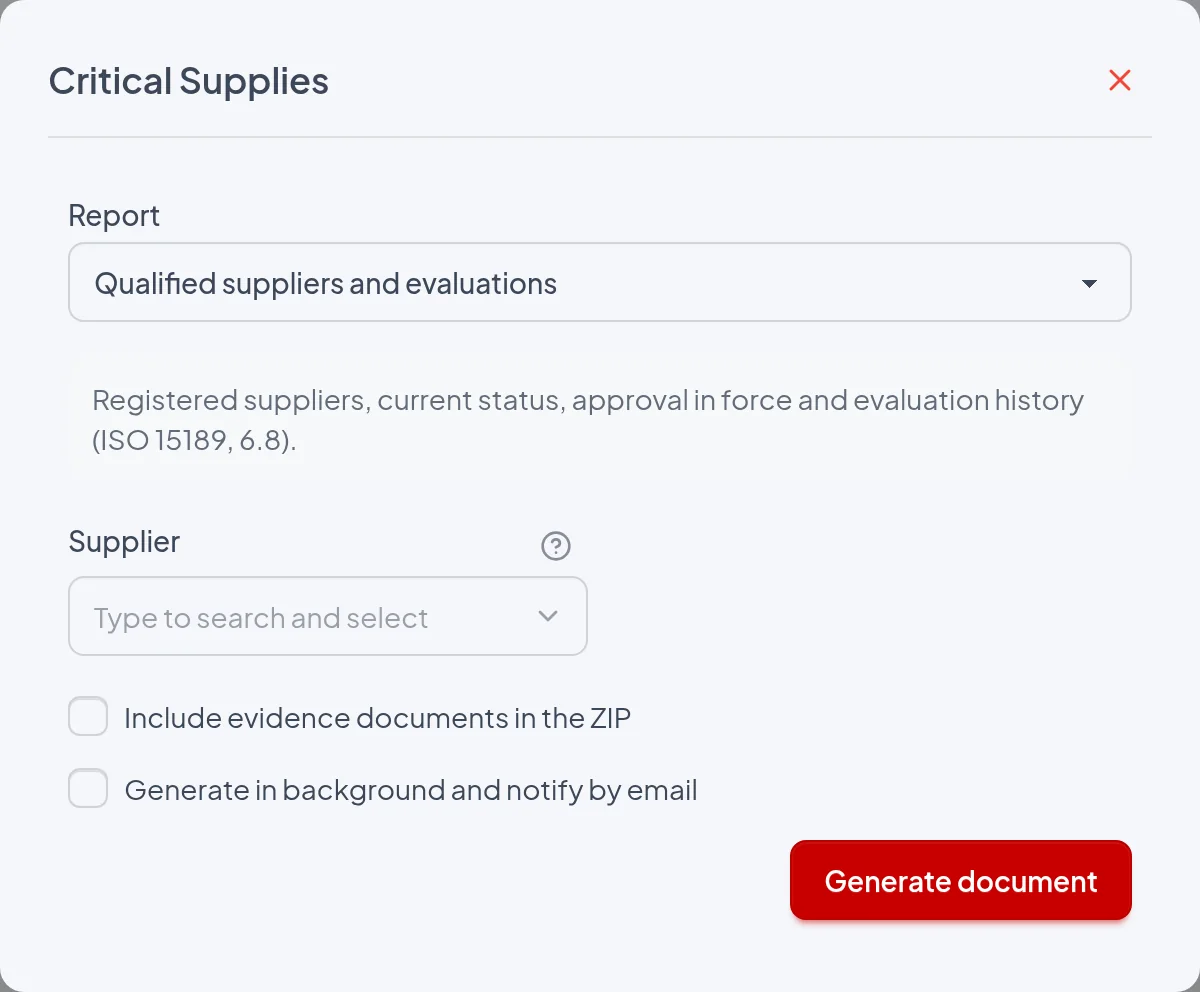
- Supplier: Exists only in the report center; left blank, all of the laboratory's suppliers are included, active or inactive, in any status and in alphabetical order. When filled in, only that supplier's block is printed and the header gains the line "Supplier: ‹name›". The "Reports and evidence" dialog has no such field: opened from the supplier record, the report is already restricted to that supplier; opened from the lists, it covers all of them.
- Include evidence documents in the ZIP: Generates a ZIP ("Qualified suppliers and evaluations.zip", or "Critical supplies.zip" with several reports checked in the dialog) with the PDF and the evidence/ folder, which contains the files attached in "Evidence document" of all evaluations of the listed suppliers, with the same name printed in the table. With a single supplier (Supplier field in the report center, or supplier record with only this report checked), the ZIP is downloaded immediately. In all other cases the package is generated in the background and sent by email, as the message "With documents, the package is sent by email unless a lot is chosen or, in the supplier report, a single supplier." warns.
- Generate in background and notify by email: The report is processed later and the screen shows "Report queued. You will receive an email notification.". The result is always a ZIP; the email contains a download link valid for 7 days and, when the file is smaller than 10 MB, also the attachment relatorio.zip. When unchecked and without documents, the PDF "Qualified suppliers and evaluations.pdf" is downloaded immediately.
Does not use a period: the report center does not show Start and End for this report and the PDF has no period line. In the "Reports and evidence" dialog, Start and End only appear when another report with a period is checked, and they do not change this one. The block's Status and "Approval valid until" are calculated on the issue date, and the Evaluations table lists all evaluations ever recorded, with no date cutoff.
The report
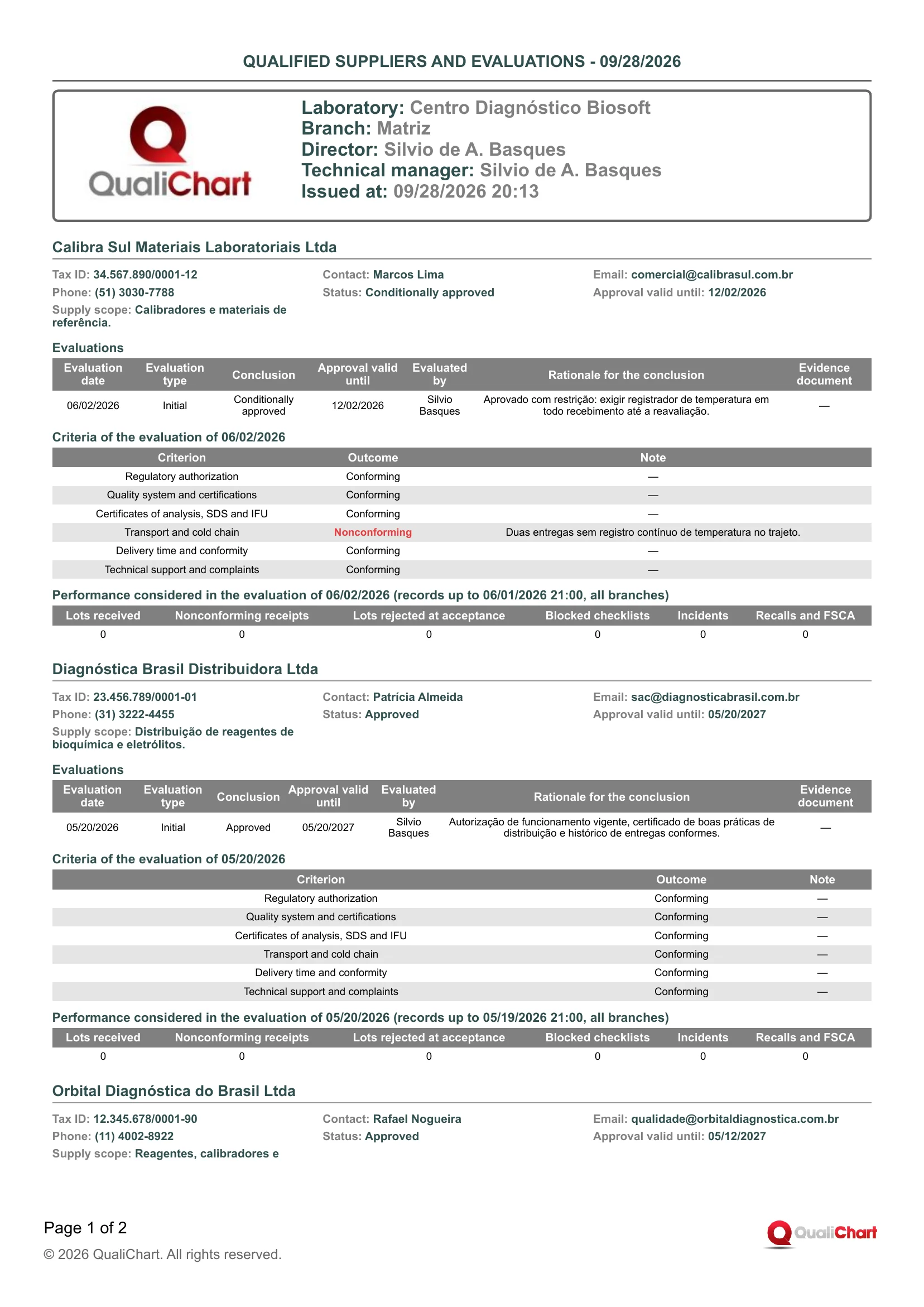
The demo PDF (Centro Diagnóstico Biosoft, Matriz branch, issued at 09/28/2026 20:13), with no supplier chosen, has two pages with four suppliers in alphabetical order, each with only the Initial evaluation recorded by Silvio Basques, no evidence document and all six counters at 0. Calibra Sul Materiais Laboratoriais Ltda is "Conditionally approved" with "Approval valid until" 12/02/2026, Transport and cold chain "Nonconforming" ("Duas entregas sem registro contínuo de temperatura no trajeto.") and performance "(records up to 06/01/2026 21:00, all branches)", as it is the first evaluation. Rápida Log Suprimentos Ltda is "Disqualified", with "Approval valid until: —", Conclusion in red and Nonconforming in Regulatory authorization and in Transport and cold chain. The Orbital Diagnóstica do Brasil Ltda block starts at the end of page 1 and its tables move entirely to page 2.
| Field | Data source | Use |
|---|---|---|
| Header | ||
| Supplier | Supplier chosen in the Supplier field of the report center, or the supplier of the record from which the dialog was opened. The line is printed only when this filter is present. | Indicates that the document covers a single supplier, as in an audit dossier. Without the line, it covers all of the laboratory's suppliers. |
| Block for each supplier | ||
| (block title) | The "Supplier name" field of the supplier record, Supplier details group. | Identifies the supplier. Check that the name matches the one on receipts and invoices. |
| Tax ID | The "Tax ID" field of the supplier record. Shows "—" when empty. | Identifies the legal entity. Compare it with the invoice and with the sanitary regulatory documents (AFE) of the qualification. |
| Contact | The "Contact" field of the supplier record. | Person to contact for complaints, recalls and re-evaluations. |
| The "Email" field of the supplier record. | Channel for formalizing complaints and requesting documents at re-evaluation. | |
| Phone | The "Phone" field of the supplier record. | Quick contact for occurrences and recalls. |
| Status | Calculated on the issue date from the Active field of the record and the most recent evaluation, as on the Suppliers screen. It can be Inactive, Not evaluated, Disqualified, Evaluation expired (approval whose validity has already passed), Approved or Conditionally approved. | Only a supplier that is Approved or Conditionally approved on the date can have receipts recorded. Evaluation expired calls for re-evaluation, Disqualified requires a new qualification and Conditionally approved requires applying the control described in the rationale. |
| Approval valid until | The "Approval valid until" field of the most recent evaluation; if it was left blank in an approval, the Evaluation date plus the "Supplier re-evaluation interval (months)" from Critical supplies › Settings applies. Shows "—" with no evaluation or when the last one disqualified. | Used to plan the periodic re-evaluation; a date already past goes with the Evaluation expired Status. To see which suppliers expire within the alert period, use the "Supply management review" report. |
| Supply scope | The "Supply scope" field of the supplier record. | Check that the products received are within the scope for which the supplier was qualified. |
| Evaluations | ||
| Evaluation date | The "Evaluation date" field in Record evaluation, on the supplier record. It does not accept a future date, and a date earlier than the last evaluation is accepted only in an Extraordinary evaluation with a rationale. | Sorts the table from most recent to oldest. Shows whether there was an initial evaluation before the first receipts and re-evaluations within the deadline. |
| Evaluation type | The "Evaluation type" field in Record evaluation: Initial (only one, and necessarily the first), Periodic or Extraordinary. | Shows whether periodic re-evaluation takes place. Extraordinary indicates a re-evaluation triggered by an event, such as an occurrence, a recall or the correction of a previous evaluation. |
| Conclusion | The "Conclusion" field in Record evaluation: Approved, Conditionally approved or Disqualified (in red). The system does not accept Approved with any Nonconforming criterion. | Shows the sequence of decisions about the supplier. Restrictions or disqualification should have corresponding actions in the receipts. |
| Approval valid until | The "Approval valid until" field of that evaluation, which must be later than the Evaluation date and, when left blank in an approval, is filled in from the configured re-evaluation interval. Shows "—" for Disqualified. | Shows how long each decision was valid. Used to check whether there was a current approval on the date of a past receipt. |
| Evaluated by | User who recorded the evaluation in QualiChart, with the Approve acceptance permission. Not editable. | Shows who is accountable for the record. If someone else conducted the evaluation, this should be stated in the rationale or in the evidence document. |
| Rationale for the conclusion | The "Rationale for the conclusion" field in Record evaluation, mandatory for Conditionally approved and Disqualified. Shows "—" when empty. | Shows the basis for the decision and, in a conditional approval, the additional control required. In an approval without text, the basis lies only in the criteria and the evidence. |
| Evidence document | File attached in the "Evidence document" field in Record evaluation, printed as "‹number›-‹file name›". Shows "—" with no attachment. | Links the evaluation to the document (AFE, certificates, questionnaire, visit report). With "Include evidence documents in the ZIP", the file goes into the evidence/ folder under that same name. |
| Criteria of the evaluation of ‹date› | ||
| Criterion | The six fixed criteria answered in Record evaluation, always in the same order, from Regulatory authorization to Technical support and complaints. | Shows what was checked. The date in the title links the table to the corresponding row of the Evaluations table. |
| Outcome | Option selected for the criterion: Conforming, Nonconforming (in red) or Not applicable. | A Nonconforming result only goes with Conditionally approved or Disqualified. Check that the rationale addresses each nonconformity. |
| Note | The "Note" field that appears on the criterion when the result is not Conforming, and is then mandatory. Shows "—" when empty, as in Conforming criteria. | Shows the reason for the nonconformity or for not applying. Used to check the consistency between criterion, conclusion and actions in the receipts. |
| Performance considered in the evaluation of ‹date› | ||
| (records from ‹date› to ‹date›, all branches) | Interval printed in the title: from the date and time the previous evaluation was entered in the system until this one was entered; for the first evaluation it reads "(records up to ‹date›, all branches)". These entry times may differ from the Evaluation date. | Shows exactly what the six counters cover. Each event falls only in the interval in which it was recorded, without being counted in two evaluations. |
| Lots received | Receipts of lots from this supplier, in all branches, recorded in the interval of the title, saved together with the evaluation. Older receipts without a recording time are included by Receipt date. | Gives the volume supplied in the interval. A 0 may only indicate that the evaluation was recorded before the receipts. |
| Nonconforming receipts | Of the lots received in the interval, those with "Condition on receipt" other than Intact. | Compare with Lots received: a high proportion supports restriction or disqualification. |
| Lots rejected at acceptance | Lots from this supplier with Rejected status whose acceptance with a Rejected conclusion was decided in the interval. | Indicates analytical performance problems in the lots delivered. |
| Blocked checklists | Checklists of lots from this supplier, recorded in the interval, that blocked use and were not corrected. | Points to failures in opening or closing lots from this supplier. |
| Incidents | Occurrences with "Event type" Incident on lots from this supplier, recorded in the interval. | Shows events that should weigh in the re-evaluation. |
| Recalls and FSCA | Occurrences with "Event type" Recall or Field safety corrective action (FSCA) on lots from this supplier, recorded in the interval. | They usually justify an Extraordinary evaluation. Check that the conclusion addressed them. |
Reading cautions
- The block's Status and "Approval valid until" apply to the issue date; to know whether the supplier was approved on a past date, use the Evaluation date and the "Approval valid until" of each row in the Evaluations table.
- The report is not the approved list: it also includes Inactive, Not evaluated, Evaluation expired and Disqualified suppliers, there is no filter by Status, and the "Approved list (includes conditional)" exists only as a filter on the Suppliers screen.
- Suppliers are registered per laboratory, so the report lists those of the whole laboratory and the counters add up all branches, even though the header shows the Branch from which it was issued.
- Evaluations are permanent: a correction is entered as a new Extraordinary row, the original remains in the table, and an extraordinary evaluation dated earlier than the last evaluation appears below the later ones without changing the current Status.
- The six criteria are fixed in QualiChart, and the laboratory's own criteria must be recorded in the Note, in the Rationale for the conclusion or in the evidence document.
- The PDF does not include the Notes field of the record, the content of the evidence documents (only the file name) or the accumulated performance after the last evaluation, which appears on the supplier record under "Performance since the last evaluation".
11.2 Documentary compliance
Brings together in a single document the documentary status of products (Anvisa registration, instructions for use, acceptance requirement, record version and alerts) and of the branch's lots (supplier approved at receipt, acceptance, opening checklist, monitored storage and alerts). Use it to identify record gaps before an audit or inspection and in the management review of supply control.
RDC 978/2025 requires products that are regularized and used as specified by the manufacturer (arts. 88 and 102, with regularization defined by RDC 830/2023), qualified suppliers (arts. 79 to 81), a record of receipt (art. 100) and monitored storage (arts. 95, 96 and 104), and ISO 15189:2022 (clauses 6.6 and 6.8) and CLSI EP26 address supplier evaluation and lot acceptance. The report brings together what was declared and recorded in QualiChart on these points and flags pending items, but it does not query Anvisa, does not show temperature records and, on its own, does not prove compliance.
Where to issue it and filters
Reports › Critical Supplies, Report field, "Suppliers and products" group, "Documentary compliance" option. It also appears in the "Reports and evidence" dialog, opened by the button of the same name on the Critical supplies and Suppliers lists; clear the report that comes already selected if you want only this one, and note that there are no filters there, so all active products and all lots of the branch are included. The report is not in the Lot record dialog or in the dialog of a supplier's record. Any user with access to the critical supplies module can issue it.
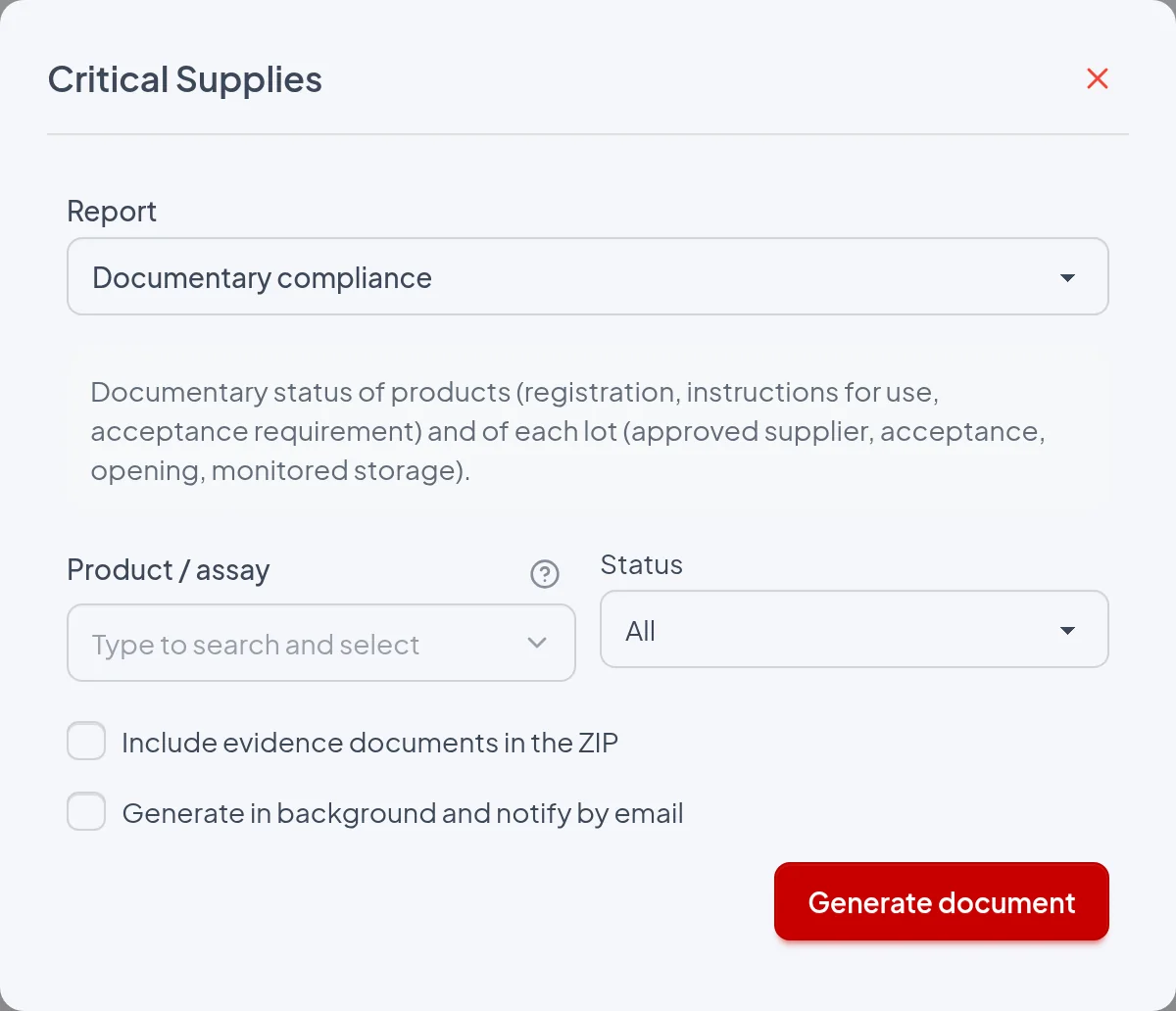
- Product / assay: Limits both tables to the chosen product and prints "Product: ‹name›" in the header. The search also returns inactive products, which only appear in the Products table if they have a lot listed in the branch. Left blank, Products shows all active products of the laboratory (from all branches, including drafts and products without lots) and Lots shows all non-archived lots of the session's branch.
- Status: Limits the Lots table to the chosen status and prints "Status: ‹value›" in the header; in the Products table, all active products remain and inactive ones only appear if they have a lot in that status. The options are All, Received, Under acceptance, Approved, In use, Suspended, Rejected and Recalled, without Closed. All (default) shows all non-archived lots, including closed ones.
- Include evidence documents in the ZIP: Adds the evidence/ folder to the ZIP, with files named ‹document number›-‹file name›: the attachments of the listed lots (Transport evidence, Certificate attachment, Initial training evidence) and, for each lot, the Instructions for use and the range verification evidence of the product version in force at receipt. Acceptance documents, checklists, occurrences, supplier evaluations and documents of products without a listed lot are not included. Since this report has no lot filter, generation always goes to the background with email notification, and the screen shows "With documents, the package is sent by email unless a lot is chosen or, in the supplier report, a single supplier.".
- Generate in background and notify by email: Schedules the generation, shows "Report queued. You will receive an email notification." and sends by email a link to a ZIP with the PDF (and the attachments, if requested). Unchecked and without attachments, the PDF downloads immediately as "Documentary compliance.pdf"; in the "Reports and evidence" dialog, with more than one report selected, it downloads "Critical supplies.zip" with one PDF per report. Issued on its own, this report never goes to the background because of volume.
It has no period: the Start and End fields do not appear, nothing is filtered by date and the header has no period line. It shows the situation at the time of issue (lot status, product version in force and alerts calculated with today's date); only the Supplier approved at receipt column looks back, comparing the Receipt date with the supplier's evaluations. Issued again later, it may show different values.
The report
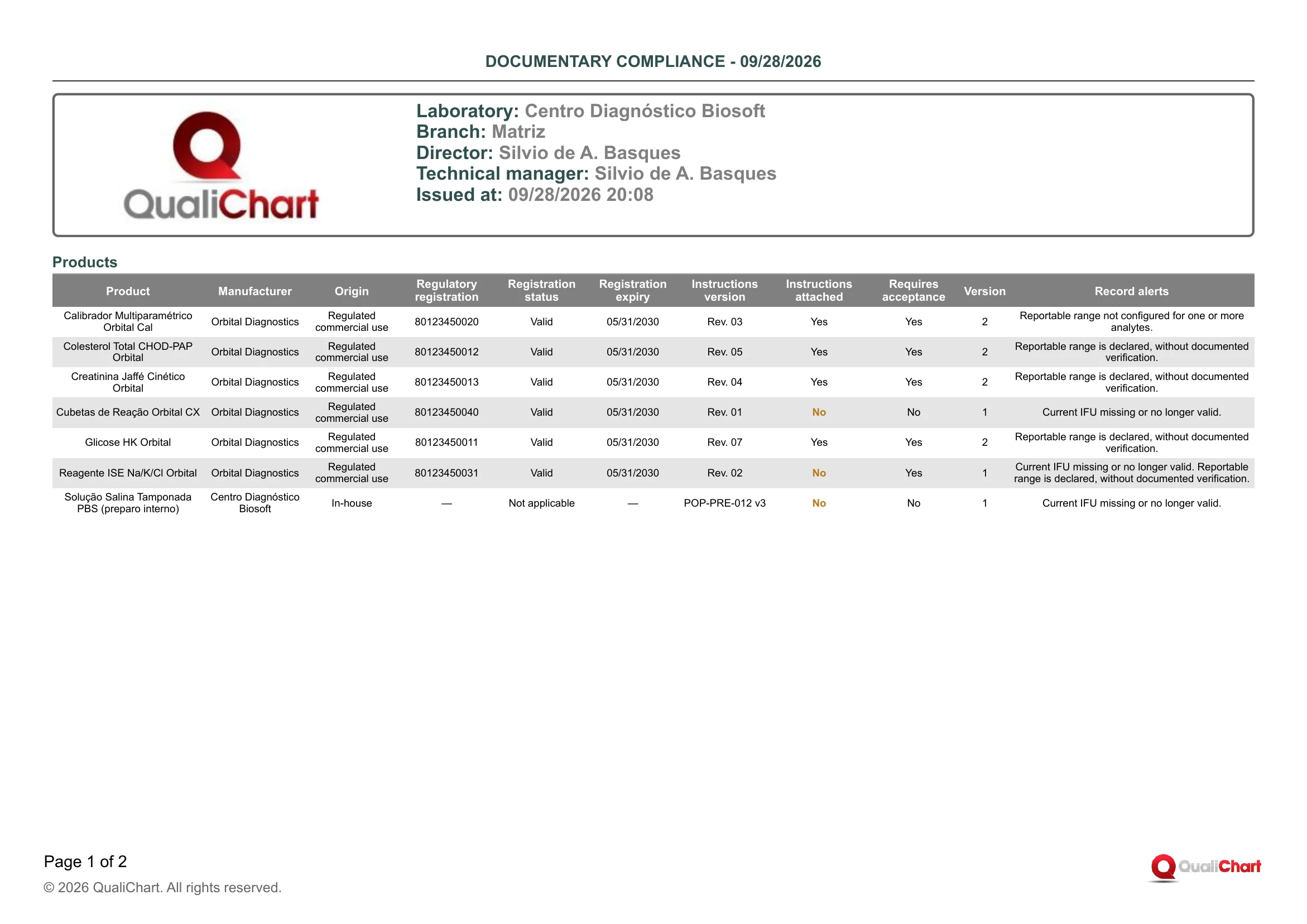
PDF issued on 09/28/2026 20:08 for Centro Diagnóstico Biosoft, Matriz branch, without filters: Products fills page 1 and Lots, with 12 rows, moves whole to page 2. Six Orbital Diagnostics products have Registration status "Valid" until 05/31/2030, and "Solução Salina Tamponada PBS (preparo interno)" has Origin "In-house", Regulatory registration "—" and "Not applicable"; Instructions attached shows "No" in orange for Cubetas de Reação Orbital CX, Reagente ISE Na/K/Cl Orbital and PBS, with the alert "Current IFU missing or no longer valid.". In the lots, Accepted is "No" in orange for COL2608 · Shipment 2 (Rejected) and GLI2609B · Shipment 1 (Under acceptance) and "Not required" for CUV2606, CUV2609 and PBS-2609-01. Only COL2609 · Shipment 1 and PBS-2609-01 · Shipment 1 have alerts ("Lot approaching expiry. In-use expiry is earlier than manufacturer expiry."), and the Rejected lot COL2608 · Shipment 2 shows "—".
| Field | Data source | Use |
|---|---|---|
| Header | ||
| Product | Product / assay filter of the report center, printed as "Product: ‹name›". Only appears when the filter is used. | Confirms that both tables cover a single product. Without this line, all active products are included. |
| Status | Status filter of the report center, printed with the status name (e.g., "Status: In use"). Does not appear with All. | Indicates that the Lots table was limited to one status. In the Products table, it only changes which inactive products appear. |
| Products | ||
| Product | Commercial name field of the product record (Critical supplies › Assays tab, Identify product step). Includes active products and inactive products with a lot in the Lots table, in alphabetical order. | Identifies the product; active products appear even without a lot in the branch. Draft and inactive status are flagged in Record alerts. |
| Manufacturer | Manufacturer field of the Identify product step, in free text. | Check it against the instructions for use and the label. For in-house products, the typed name appears, such as the laboratory's own name in the example. |
| Origin | Product origin and intended use field (Instructions, registration and storage step) of the version in force: Regulated commercial use, CE-IVD, Research use only (RUO), In-house or Modified CE-IVD. | Defines the evidence to require: Anvisa registration for commercial use and CE-IVD, justification and technical manager for In-house or Modified CE-IVD. RUO has no regularization for diagnostic use and its use must be justified. |
| Regulatory registration | ANVISA registration/notification field (Regulatory registration (Anvisa) group). Shows "—" when empty or when registration does not apply (In-house, Modified CE-IVD, RUO or Registration status Not applicable). | Check it against the labeling and Anvisa's public database. "—" on a Regulated commercial use product is a record gap. |
| Registration status | Registration status field (Valid, Expired, Pending or Not applicable), which is automatically set to Not applicable when the origin does not require registration. It turns red when registration applies and the number is missing, the status is not Valid or the Registration expiry has passed. | Red is a pending item to resolve before receiving new lots. Update the status in the product record. |
| Registration expiry | Registration expiry field, in the same group. Shows "—" when empty or when registration does not apply. | Schedule a new check before it expires. An expired date turns Registration status red and triggers the regularization alert. |
| Instructions version | Instructions version field (IFU and effective dates group) of the version in force. Shows "—" when empty. | Check it against the instructions for use supplied with the kit in use. If the manufacturer changed the instructions, update the record, which creates a new Version. |
| Instructions attached | Calculated on the version in force: Yes when there is a file in Instructions for use and Instructions valid until is empty or has not passed. Otherwise, No in orange. | No calls for attaching the current instructions for use to the record. Yes only confirms the file and the date, not that the content matches the instructions of the kit in use. |
| Requires acceptance | Acceptance required before use field (Release of each lot group) of the version in force. | Reference for reading the Accepted column. If Yes, each shipment needs an approved acceptance, or one waived with justification, before use (CLSI EP26). |
| Version | Number of the record version in force; the system creates a new version on each change to the product definition (instructions for use, registration, storage, requirements). Shows "—" if the product has no version yet. | Links the report to the specification in force, which can be consulted in the record's Version history. A recent version may call for a review of the SOP and training. |
| Record alerts | Calculated on the issue date and printed in sequence ("—" when there are no alerts): inactive product, draft, record validity expired, Anvisa regularization, CE marking (when Laboratory operates in the EEA is checked), instructions for use, reportable range not configured or without documented verification, and IQC with expired lot allowed. Inactive is printed as "Inactive product: it accepts no new receipts or use declarations.". | List of pending items: attach the instructions for use, update the regularization, document the range verification of each analyte, take the product out of draft and review the permission for expired lots. An inactive product only appears here while it has a listed lot. |
| Lots | ||
| Product | Product chosen at receipt (Lot record › Receipt tab, What arrived step), with the current Commercial name. | Groups the lots. The table is sorted by this name and then by Manufacturer expiry. |
| Lot | Lot number and Shipment fields of the receipt, printed as "‹lot› · Shipment ‹n›". | Each shipment has its own row, because each delivery has its own receipt and acceptance. |
| Status | Current lot status, updated by the module workflow: Received, Under acceptance, Approved, In use, Suspended, Rejected, Recalled or Closed. Archived lots do not appear. | Suspended, Rejected and Recalled lots must be segregated: check the physical stock. Closed indicates that use has ended. |
| Supplier approved at receipt | Calculated with the receipt's Supplier: Yes (green) when the evaluation in force on the Receipt date (the one with the latest Evaluation date up to that day) had the conclusion Approved or Conditionally approved and an Approval valid until date that had not passed. Otherwise, No in red; the supplier record being active today does not count. | No is shown for a lot without a supplier (old records) or when a retroactive evaluation changed the status on that date. Investigate and record the justification. |
| Accepted | Calculated from the latest decision in the Acceptance tab: Yes (green) when it is Approved, Approved with restriction or Waived with justification and no study recorded after it is awaiting a decision. Otherwise, No in orange when acceptance is required (the product requires it or Condition on receipt is other than Intact) and Not required, uncolored, in the other cases. | No in orange is a pending item: decide the study before use or confirm that the lot is segregated. A new pending study or a later rejection overrides an earlier Yes. |
| Opening checklist | Yes when there is at least one opening checklist (Lot record › Opening and use tab › Open supply) with the outcome Check completed, for the lot or for a package, not superseded by a correction. No when no opening was ever recorded or all resulted in Blocking issue. | A lot In use with No indicates use without an opening record, which is only possible with Require checklists to release and close lots unchecked in Settings. It does not show whether the package is still open or whether all packages were recorded. |
| Monitored storage | Yes when the Temperature equipment linked at receipt (Storage step) is active and not deleted in temperature control. No without equipment or with inactive or deleted equipment. | No calls for linking an active equipment. Yes only confirms the link, not the temperature records or the range compatibility, which appears in Alerts. |
| Alerts | Calculated on the issue date and printed in sequence ("—" when there are no alerts): lot expired or approaching expiry (Expiry warning lead time (days) in Settings, default 30), in-use expiry earlier than the manufacturer's, expired or incomplete certificate, receipt condition without approved acceptance, supplier not approved today and storage equipment problems. Closed, Rejected and Recalled lots only receive "In-use expiry is earlier than manufacturer expiry.". | List of actions: segregate expired lots, schedule replacement, complete the acceptance, re-evaluate the supplier, correct the storage and complete the certificate. The effective expiry takes into account the Manufacturer expiry, the Assigned preparation expiry and the Stability after opening (days) of opened packages. |
Reading cautions
- It is a snapshot of the time of issue, so if it is reissued later the result changes: for audits, keep the issued PDF.
- The Products table covers the whole laboratory (all branches, including drafts and products without lots) and only includes inactive products with a listed lot, while the Lots table covers only the session's branch, without archived lots.
- Regulatory registration, Registration status and Registration expiry are declared values that the system does not check with Anvisa, so an expired registration may show "Valid" in red, and selecting Not applicable suppresses the alert even on a Regulated commercial use product.
- Supplier approved at receipt uses the evaluation in force on the Receipt date and Alerts uses the supplier's current status, so the two columns may differ and both are legitimate.
- The ZIP includes the instructions for use of the product version in force at each lot's receipt, which may not be the one assessed in the Instructions attached column; acceptances, checklists, occurrences and supplier evaluations are in the Lot record, Acceptance and comparison and Qualified suppliers and evaluations reports.
11.3 Receipt log
Lists in chronological order each critical supply delivery (lot + shipment) received at the branch in the period, with the data recorded in Receive lot: product, lot, shipment, expiry, quantity, supplier, invoice, transport temperature, condition, storage and who recorded it. It serves as evidence of receipt records in audits. The Summary counters let you track nonconforming receipts, overall or for one supplier.
RDC 978/2025, art. 100, requires recording at receipt the lot number, the conformity of the transport conditions, the receipt date and whatever is needed for traceability, and ISO 15189:2022, clause 6.6, covers the receipt, storage and segregation of stock. The report gathers these records by period and counts the deliveries with a condition other than Intact, the basis of the "Nonconforming receipts by supplier" indicator suggested in the guide, but it does not assess transport: the printed condition is the one recorded by whoever received the delivery.
Where to issue it and filters
Side menu Reports › Critical Supplies (visible when the critical supplies module is enabled), Report field, "Receipt and stock" group, "Receipt log" option. Also in the "Reports and evidence" dialog, opened by the button of the same name on the Critical supplies list, the Suppliers list and a supplier's record, by checking the "Receipt log" box, since the box checked by default is a different one (Inventory and expiry dates or Qualified suppliers and evaluations). The Lot record does not offer this report. Any user with access to the module can issue it, with no specific permission.
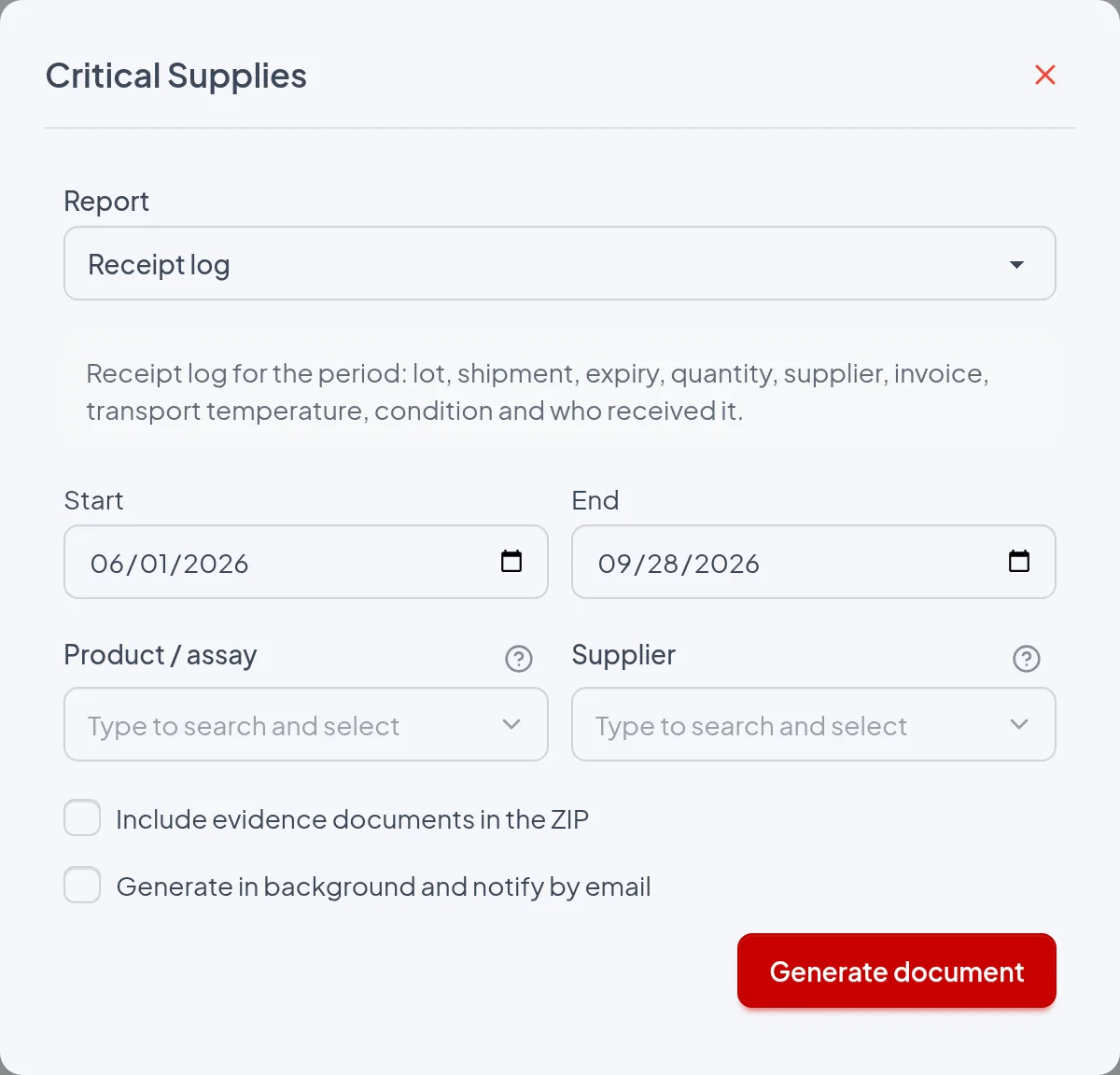
- Start / End: Required: deliveries with a Receipt date between the two dates, inclusive, are included, and the range appears in the header as Period. If Start is later than End, the Generate document button is disabled, and the "Reports and evidence" dialog shows "The end date must be on or after the start date.". The default is from one month ago to today in Reports › Critical Supplies and from January 1 of the current year to today in the "Reports and evidence" dialog.
- Product / assay: Optional and available only in Reports › Critical Supplies. Limits the list and the Summary counters to deliveries of the chosen product and prints the Product line in the header.
- Supplier: Optional in Reports › Critical Supplies: limits the list and the counters to deliveries recorded with that supplier and prints the Supplier line in the header. When opened from a supplier's record, the "Reports and evidence" dialog applies that supplier without showing the field; when opened from the lists, it does not filter by supplier. Deliveries with no recorded supplier are left out when the filter is used.
- Include evidence documents in the ZIP: Generates a ZIP with the PDF and the evidence/ folder, which contains, for each delivery in the log, the attachments recorded for the lot (Transport evidence, Certificate attachment, Initial training evidence) and the documents of the product record version in force on the receipt date (Instructions for use, Verification evidence). The screen warns: "With documents, the package is sent by email unless a lot is chosen or, in the supplier report, a single supplier.". Since this report has no lot filter, the package with documents is always sent by email, even with the background box unchecked.
- Generate in background and notify by email: When checked, the screen shows "Report queued. You will receive an email notification." and the email contains a link valid for 7 days to the ZIP with the file Receipt log.pdf, which is also attached when the ZIP is under 10 MB. When unchecked, the file Receipt log.pdf is downloaded immediately; in the "Reports and evidence" dialog, with several reports checked, you get the ZIP Critical supplies.zip with one PDF per report. On its own, this report is never sent to the background because of data volume.
The period is compared with the Receipt date entered in the "What arrived" step of Receive lot (or on the Receipt tab of the Lot record), including Start and End. That date can be backdated, and neither the date and time the record was entered nor the acceptance, opening or use dates count. The same date determines which deliveries bring their attachments to the evidence ZIP.
The report
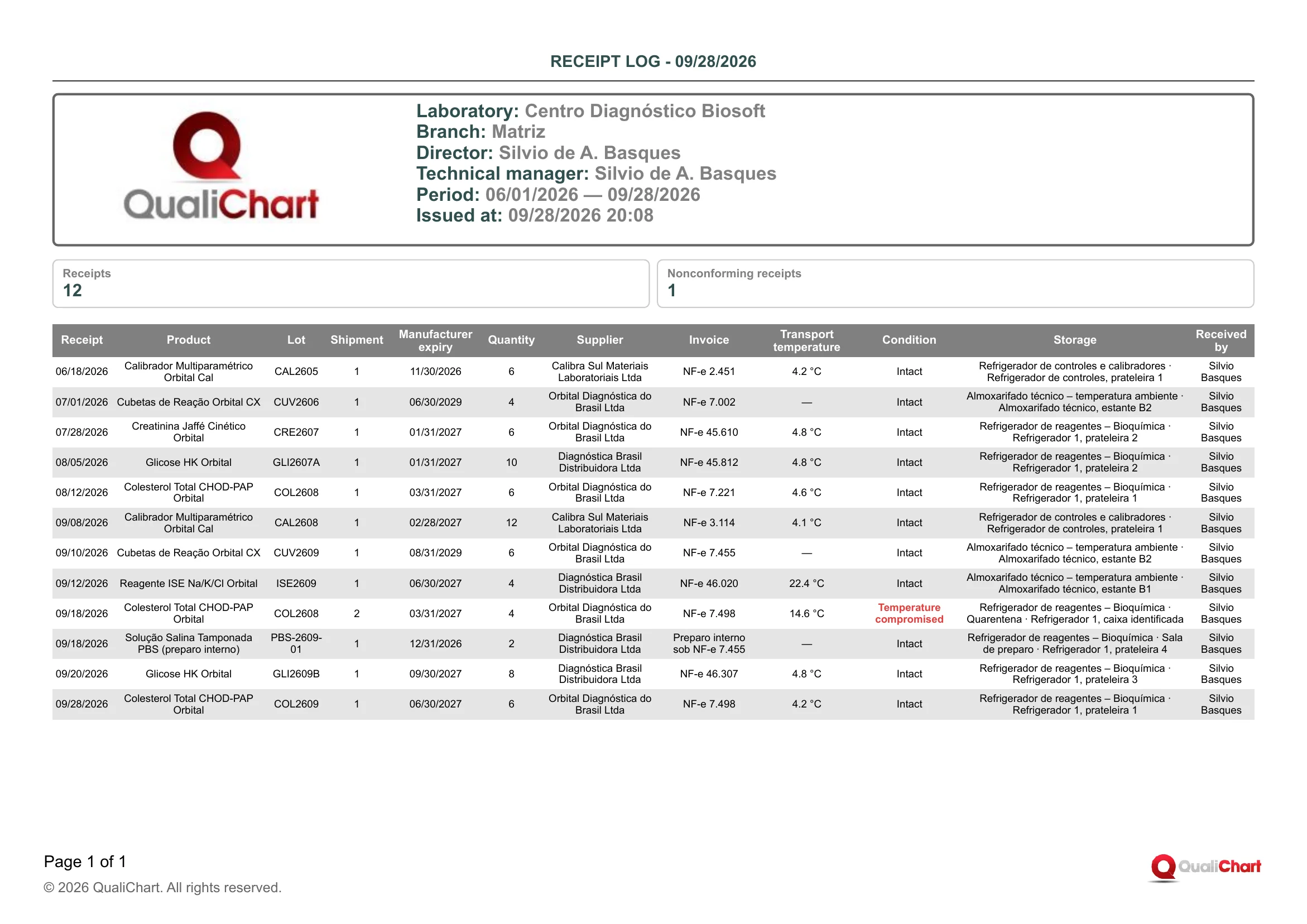
In the demo laboratory (Centro Diagnóstico Biosoft, Matriz branch), with the period 06/01/2026 — 09/28/2026 and no other filters, the PDF issued on 09/28/2026 20:08 has one page and shows Receipts 12 and Nonconforming receipts 1. The first row is from 06/18/2026: Calibrador Multiparamétrico Orbital Cal, lot CAL2605, shipment 1, expiry 11/30/2026, quantity 6, Calibra Sul Materiais Laboratoriais Ltda, NF-e 2.451, 4.2 °C, Intact, received by Silvio Basques. The only nonconforming one is shipment 2 of lot COL2608 of Colesterol Total CHOD-PAP Orbital, received on 09/18/2026 at 14.6 °C, with "Temperature compromised" in red and stored in "Refrigerador de reagentes – Bioquímica · Quarentena · Refrigerador 1, caixa identificada", while shipment 1 of the same lot arrived on 08/12/2026 at 4.6 °C, Intact. The cuvettes CUV2606 and CUV2609 and the internal preparation PBS-2609-01 are printed with temperature "—", and the PBS shows the text "Preparo interno sob NF-e 7.455" under Invoice.
| Field | Data source | Use |
|---|---|---|
| Header | ||
| Period | Start and End dates chosen when issuing, printed as MM/DD/YYYY — MM/DD/YYYY. | Confirm that the range covers the audited period. Deliveries outside it do not appear. |
| Product | Product / assay filter of Reports › Critical Supplies, with the product name. Only printed when the filter is used. | Indicates that the list and counters apply to a single product, as in the delivery history of a reagent or calibrator. |
| Supplier | Supplier filter of Reports › Critical Supplies, or the supplier of the record from which the dialog was opened. Only printed when there is a filter. | Indicates that the list and counters apply to a single supplier, as in its periodic re-evaluation. |
| Summary | ||
| Receipts | Calculated: number of rows in the table, that is, of deliveries (lot + shipment) in the period and filters. | Volume of deliveries in the period, not of units. The quantity received is in the Quantity column. |
| Nonconforming receipts | Calculated: deliveries with a Condition other than Intact (Damaged, Temperature compromised or Discrepant), with or without later acceptance. | Indicator of nonconforming receipts; with the Supplier filter, it becomes the indicator by supplier. The decision on each delivery is in the Lot record. |
| Delivery table | ||
| Receipt | Receive lot, "What arrived" step, Receipt date field, which does not accept a future date. | Delivery date required by RDC 978/2025, art. 100. Defines the period and the order of the list. |
| Product | "What arrived" step, Product / assay field. The current Commercial name from the record is printed. | Identifies the supply received. |
| Lot | "What arrived" step, Lot number field, typed or read from the GS1/UDI code in "Fill from the packaging code". | Traceability key to locate the lot in a recall and open the Lot record or Supply traceability. |
| Shipment | "What arrived" step, Shipment field: 1 for the lot's first delivery and 2, 3... for the following ones. The system suggests the next number. | Distinguishes deliveries of the same lot, each with its own inspection and, where applicable, acceptance. |
| Manufacturer expiry | "What arrived" step, Manufacturer expiry field, which cannot be earlier than the Receipt date. | Shows whether the lot arrived with enough shelf life. This is the expiry of the unopened product; the effective expiry is in Inventory and expiry dates. |
| Quantity | "What arrived" step, Quantity received field, with up to three decimal places and no trailing zeros. | Check it against the invoice and the purchase order. The supply unit (kit, vial) is not printed. |
| Supplier | "What arrived" step, Supplier field, which only accepts an active supplier, approved or conditionally approved, with an evaluation valid on the date. The current name from the record is printed, or "—" for older lots without a supplier. | Shows who each delivery came from and supports the count of nonconforming receipts by supplier. |
| Invoice | "Inspection" step, "Delivery documents and details" section, Invoice or equivalent document field (free text). "—" is printed when empty. | Links the delivery to the fiscal document for cross-checking with the stockroom or the finance department. |
| Transport temperature | "Inspection" step, Transport temperature (°C) field, with one decimal place. "—" is printed when not entered. | Evidence of the transport condition (RDC 978/2025, art. 100). Compare it with the product's storage range, as the report does not make this comparison. |
| Condition | "Inspection" step, Condition on receipt field: Intact, Damaged, Temperature compromised or Discrepant. Printed in red when it is not Intact. | Highlights nonconforming deliveries. For each row in red, check the Condition notes and the acceptance decision in the Lot record. |
| Storage | "Storage" step: Temperature equipment and Storage location/department, separated by " · ". "—" is printed when both are empty. | Shows where the lot was stored, including in quarantine, and links the lot to the equipment's temperature monitoring. |
| Received by | Filled in by the system with the user who first saved the receipt in Receive lot. Later edits do not change this name. | Identifies who recorded the delivery in the system, not necessarily who physically inspected it. |
Reading cautions
- Only deliveries from the connected branch and from non-archived lots are included, but lots in any status are listed, including rejected, recalled and closed ones, without showing their current status or the acceptance decision (see the Lot record or the Acceptance and comparison report).
- The Condition is the assessment of whoever recorded the receipt: the system does not compare the transport temperature with the product's range, and "—" in the temperature only means it was not entered.
- Condition notes, Transport evidence, Third-party receipt location, Packaging code (GS1/UDI), Declared storage conditions, Acquisition cost and the certificate and preparation data are not printed and remain in the Lot record.
- The report shows the current values of the record and the current product and supplier names, because a correction replaces the original value, which remains only in the Supply audit trail.
- Internal preparations are also recorded in Receive lot and are therefore included in the list and in the Receipts counter, with the supplier chosen in the record.
- If the Storage location/department text contains " · " (for example "Quarentena · Refrigerador 1"), the PDF alone does not show where the equipment name ends in the Storage column.
11.4 Inventory and expiry dates
Lists, on the issue date, the branch's lots that are still in stock, with storage, effective expiry, days to expiry, alerts and whether to segregate them. Use it for periodic stock checks, to consume first what expires first, and to confirm that lots that are suspended, rejected, recalled, expired or received in a nonconforming condition not yet assessed are out of use.
The guide, based on ISO 15189:2022 (clause 6.6), calls for keeping lots not yet accepted, released lots, and rejected or expired lots physically and documentarily separate, quarantining a shipment with a temperature excursion until it is assessed, and using whichever expiry ends first; RDC 978/2025 prohibits revalidating after the expiry date has passed (art. 102). The report shows the effective expiry and flags for segregation lots that are suspended, rejected, recalled, expired or with a receipt condition not yet assessed, but it does not flag intact lots still awaiting acceptance, does not prove physical separation and does not replace the temperature records of arts. 95, 96 and 104.
Where to issue it and filters
Reports › Critical Supplies (visible when the critical supplies module is enabled), Report field, group "Receipt and stock" › "Inventory and expiry dates". It is also in the "Reports and evidence" dialog, opened by the button of the same name: it comes checked on the Critical supplies screen, unchecked in the Suppliers list and on the supplier record, and is not offered on the lot record. The dialog does not have the Product / assay, Status and Storage location/department filters and, with several reports checked, downloads a single "Critical supplies.zip" with one PDF per report. Only lots of the selected branch are included.
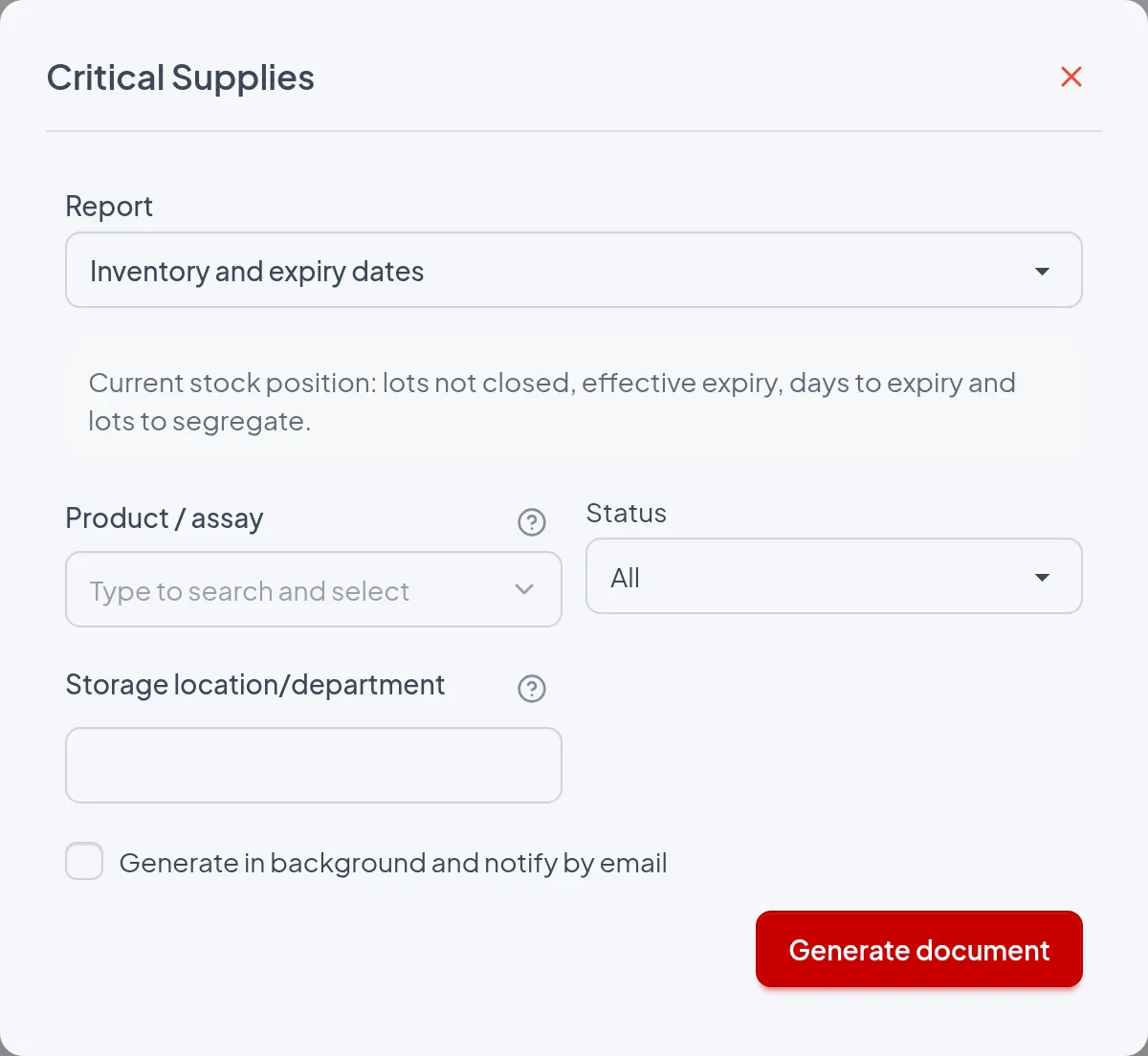
- Product / assay: Shows only the lots of the chosen product and prints "Product: ‹name›" in the header. When blank, all products are included.
- Status: "All" (default) or one status: Received, Under acceptance, Approved, In use, Suspended, Rejected or Recalled. With a status chosen, it prints "Status: ‹option›" and the summaries count only those lots. There is no Closed option because closed lots never enter the inventory.
- Storage location/department: Free text searched, case-insensitively, in the lot's Storage location/department and in the name of its Temperature equipment; prints "Location: ‹text›". A short term such as "Refrigerator" may bring lots from several pieces of equipment. When blank, all locations are included.
- Supplier (implicit, from the supplier record): Generated from the "Reports and evidence" dialog on the supplier record, the inventory includes only that supplier's lots and prints "Supplier: ‹name›". The report center does not have this filter for this report.
- Start / End: Not shown in the report center for this report and, in the dialog, only shown when another checked report has a period. They do not change the inventory.
- Include evidence documents in the ZIP: Not shown in the report center for this report; in the dialog, only shown when another report with evidence is checked. The inventory adds no documents to the ZIP.
- Generate in background and notify by email: Does not change the content. When checked, the user receives by email a link, valid for 7 days, to a ZIP containing "Inventory and expiry dates.pdf"; when unchecked, the PDF downloads immediately under that name.
There is no period: the report shows the position at the time of issue, and Days to expiry, Segregate and Alerts are calculated on that date. The "Period" line is not printed, and the Start and End dates, when sent, are ignored. To keep the status of a given day, issue and file the PDF on that day.
The report
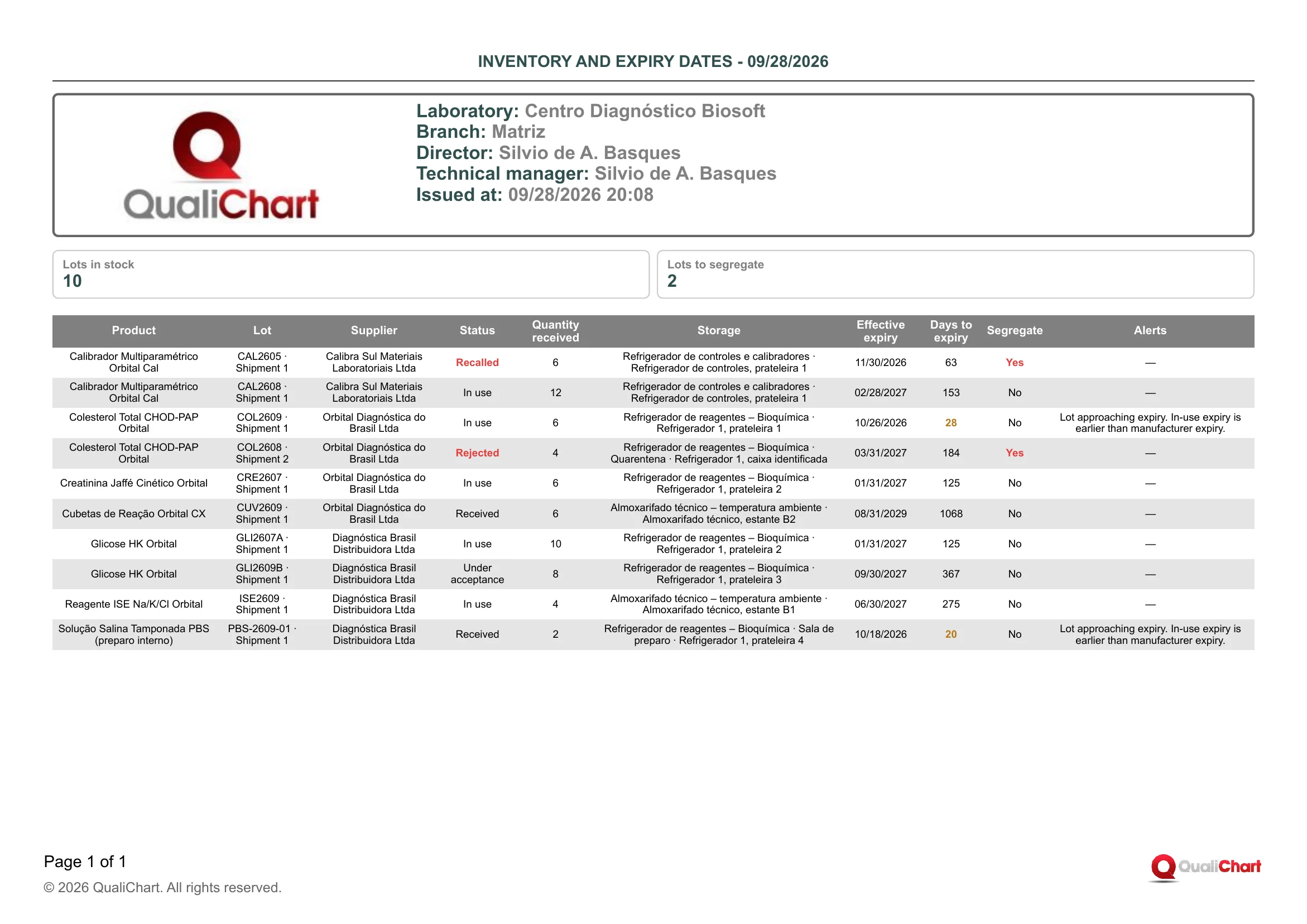
In the demo PDF (Centro Diagnóstico Biosoft, branch Matriz, issued at 09/28/2026 20:08, no filters), the summaries show 10 lots in stock and 2 to segregate: CAL2605 · Shipment 1 (Calibrador Multiparamétrico Orbital Cal, Recalled, 63 days) and COL2608 · Shipment 2 (Colesterol Total CHOD-PAP Orbital, Rejected, in "Refrigerador de reagentes – Bioquímica · Quarentena · Refrigerador 1, caixa identificada"), both with Status and "Yes" in red and Alerts "—". COL2609 · Shipment 1 (10/26/2026, 28 days) and PBS-2609-01 · Shipment 1 (Solução Salina Tamponada PBS (preparo interno), 10/18/2026, 20 days) have their days in orange and the alerts "Lot approaching expiry. In-use expiry is earlier than manufacturer expiry.". For Colesterol, COL2609 comes before COL2608 (03/31/2027) because the rows follow the effective expiry. CUV2609 · Shipment 1, in Almoxarifado técnico – temperatura ambiente, does not expire until 08/31/2029 (1068 days).
| Field | Data source | Use |
|---|---|---|
| Header | ||
| Product | Product / assay filter of the report center; prints the product's Commercial name. Only shown when the filter is used. | Confirms that the inventory covers only that product. Without the line, all products are included. |
| Supplier | Supplier of the record from which the "Reports and evidence" dialog was opened (Critical supplies › Suppliers › supplier record). Only shown in that case. | Shows the stock that came from that supplier, for example before re-evaluating it or when facing a problem with it. |
| Status | Status filter of the report center, when other than "All". | Indicates that the table and summaries count only lots with that status, for example Rejected to check what is awaiting return or disposal. |
| Location | Text typed in the Storage location/department filter, printed as typed. Only shown when the filter is filled in. | Identifies the inventory of a refrigerator, room or department. |
| Summary | ||
| Lots in stock | Calculated: number of rows in the table, that is, the branch's lots still in stock within the filters. Includes suspended, rejected, recalled and expired lots. | It is a count of lots, not of quantities. Compare it with the physical count, lot by lot. |
| Lots to segregate | Calculated: number of rows with Segregate = Yes. | How many lots must be kept apart and identified as unusable. The system does not record the physical separation. |
| Lot table | ||
| Product | Commercial name from the product record (Critical supplies › Assays tab). It is linked to the lot by the Product / assay field in Receive lot. | Groups the lots of the same supply. Within a product, the top row expires first and should be used first. |
| Lot | Lot number and Shipment entered in Receive lot, What arrived step. Printed as "‹number› · Shipment ‹n›". | Identifies the package on the shelf. Each shipment of the same lot has its own row. |
| Supplier | Supplier field of the What arrived step. Lots without a supplier show "—". | Locates each supplier's stock. Combine it with the supplier alert. |
| Status | Set by the lot workflow (receipt, acceptance, use declaration and Occurrences tab): Suspended comes from an Incident with Critical severity, Rejected from a rejected acceptance and Recalled from a Recall. Shown in red when Segregate = Yes. | Received and Under acceptance indicate a lot that has not yet entered use. Suspended, Rejected and Recalled cannot be used. |
| Quantity received | Quantity received field of the What arrived step, with up to three decimal places and without the unit (kits, bottles). | Reference for what arrived in the shipment, not the current balance. The system does not deduct consumption; count the packages on the shelf. |
| Storage | Temperature equipment and Storage location/department from the Storage step of the receipt, separated by " · ". Shows "—" if neither was filled in. | Tells where to look for the lot during the physical check. The equipment name always comes first. |
| Effective expiry | Calculated: the earliest date among the Manufacturer expiry, the Assigned preparation expiry, and the opening date plus the Stability after opening (days). The opening comes from the opening checklists of packages not yet closed or, when there is no opening checklist, from the first use. | It is the actual last date of use, which can be well before the manufacturer's. Do not use the lot after it. |
| Days to expiry | Calculated: effective expiry minus the issue date, in calendar days. Orange from 0 up to the Expiry warning lead time (days) in the Laboratory policy (default 30) and red when negative. | Guides the order of consumption and restocking. A negative value indicates an expired lot, to be removed. |
| Segregate | Calculated: "Yes", in red, when the Status is Suspended, Rejected or Recalled, when Days to expiry is negative, or when the Condition on receipt was not Intact and there is not yet an acceptance that is approved, approved with restriction or waived. Otherwise, "No". | Lists what must be isolated and identified as unusable. "No" does not mean the lot is released: check Status and Alerts. |
| Alerts | Calculated on the issue date: lot expired or approaching expiry, in-use expiry earlier than the manufacturer's, expired or incomplete certificate, receipt condition not yet assessed, supplier without a current approval, and storage without equipment that is active, monitored or compatible with the product's range. For Rejected or Recalled lots only the in-use expiry alert can appear; "—" when there is no alert. | Each alert calls for an action: remove or prioritize the lot, assess the receipt condition with an acceptance study, complete the certificate, re-evaluate the supplier or fix the storage equipment. |
Reading cautions
- The report leaves out Closed lots, shipments already closed as Exhausted, Expired or Replaced even if a recall reaches them later, lots with a completed closing checklist for the Entire lot (even if their Status is still In use or Approved), archived lots and lots from other branches.
- Rejected and Recalled lots do not go through Withdrawal from use and only leave the list when the closing checklist for the Entire lot, with the material's destination, is recorded on the Closing tab; without it they remain in "Lots in stock" and "Lots to segregate" even after being returned or discarded.
- A recall recorded on one shipment marks as Recalled all in-stock shipments of the same lot of the product, which then count in "Lots to segregate".
- An opened bottle with no opening checklist or recorded use, or a product without Stability after opening (days) filled in, appears with the manufacturer expiry.
- Storage alerts compare only the registered ranges of the equipment and the product, without looking at temperature readings, and the supplier alert uses the supplier's status on the issue date, not on the receipt date.
- The "Show segregated lots only" option in the lot list uses a different rule (it includes lots closed by an Entire lot checklist and shipments closed before the recall, and excludes those awaiting assessment of the receipt condition), so its count may differ from "Lots to segregate".
11.5 Prepared reagent labels
Prints labels to identify the bottles of a reagent prepared or aliquoted in the laboratory, using the data from the lot registration, with no need to retype anything. Each label shows the product, lot and shipment, effective expiry, hazards, storage conditions, concentration, preparation date and person responsible. Use it after recording the preparation on the lot, and reprint it whenever the effective expiry changes, for example after opening.
RDC 978/2025 requires prepared or aliquoted reagents to have a label with name, concentration, lot, preparation date, person responsible, expiry, storage conditions and hazards (art. 101) and prohibits revalidating a product after its expiry has passed (art. 102). The label prints these eight items from the lot registration, using whichever expiry ends first, but it does not prevent printing an incomplete label (Concentration and Hazards are not mandatory) or a label for an expired lot, which is printed with the STATUS notice.
Where to issue it and filters
Reports › Critical Supplies (the item only appears when the critical supplies module is enabled): in the Report field, choose "Prepared reagent labels", in the "Receipt and stock" group. It is also available from the "Reports and evidence" button on a lot's screen (Critical supplies › Lots and shipments tab › lot), where "Lot record" is already checked: check "Prepared reagent labels" and uncheck the record if you only want the labels. In this dialog the lot is already set and the "Copies of each label" field appears. The report dialogs of the supplies list and of the suppliers do not offer this report.
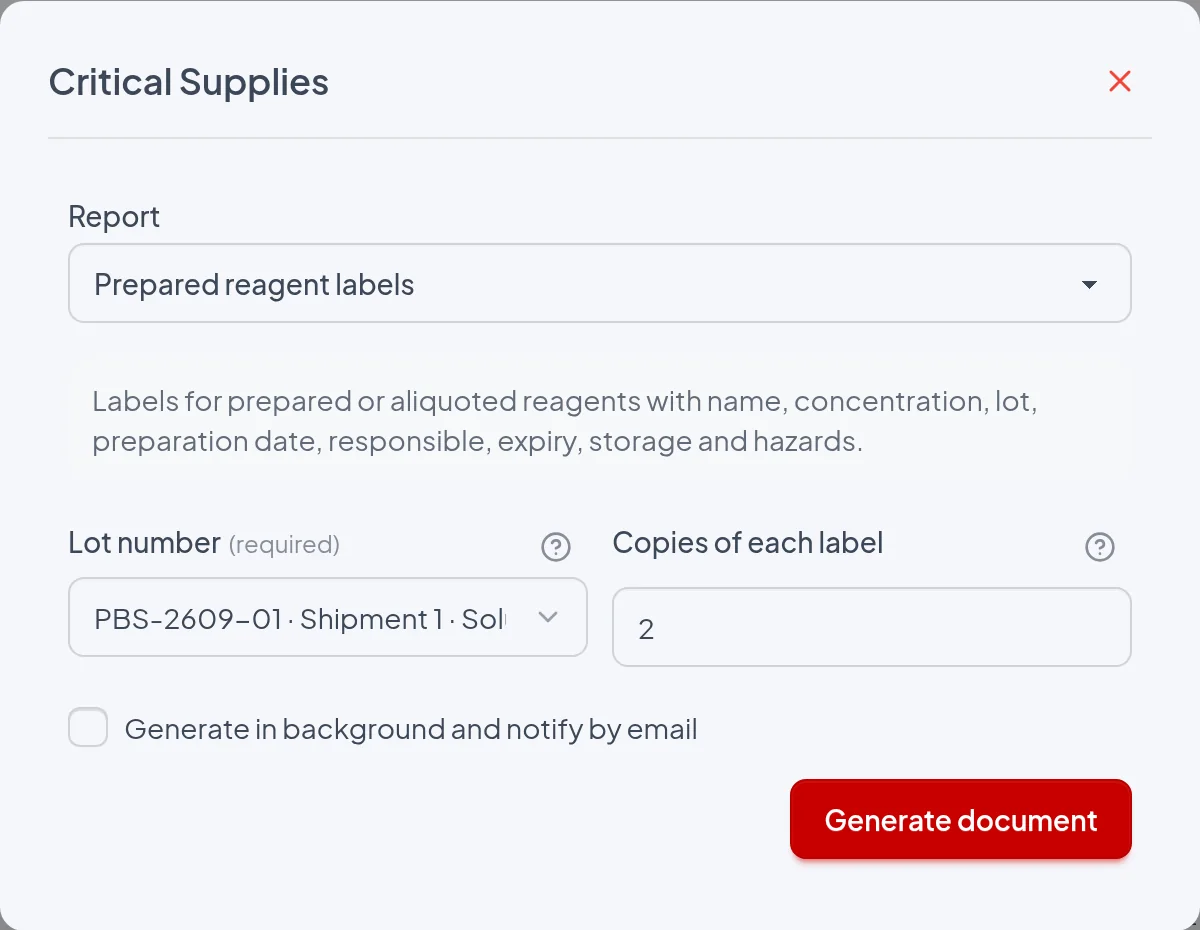
- Lot number: Required: selects the single lot whose labels will be printed. Without it, the Generate document button is disabled. The list shows the non-archived lots of the current branch, of any type and status; if the lot is archived or does not belong to the current branch, the sheet only shows "No records for the selected filters.".
- Copies of each label: Whole number from 1 to 100 (default 1); if blank, zero, with decimals or above 100, the Generate document button is disabled in both dialogs. The label is repeated that number of times, in sequence, and all copies are identical. In the lot screen dialog, the field only appears when Prepared reagent labels is checked.
- Start / End: They do not appear in the report center for this report, and the labels ignore any period. In the lot screen dialog, they only appear if another report with a period is also checked, with no effect on the labels.
- Include evidence documents in the ZIP: Not offered in the report center for this report. In the lot screen dialog, it appears when another report with evidence (such as the Lot record) is checked, and the documents in the ZIP are only those of that other report.
- Generate in background and notify by email: When unchecked, the PDF is downloaded immediately as "Prepared reagent labels.pdf"; in the lot dialog, with other reports checked, you get "Critical supplies.zip" with one PDF per report. When checked, the request is queued and the user receives by email a link to the ZIP, valid for 7 days and attached to the email when it is smaller than 10 MB. Without this box, this report never goes to the background, because it always has a lot set.
The period does not apply: the label shows the lot registration at the time of issue. The Effective expiry and the STATUS: EXPIRED notice are calculated with the date of the day the document is generated.
The report
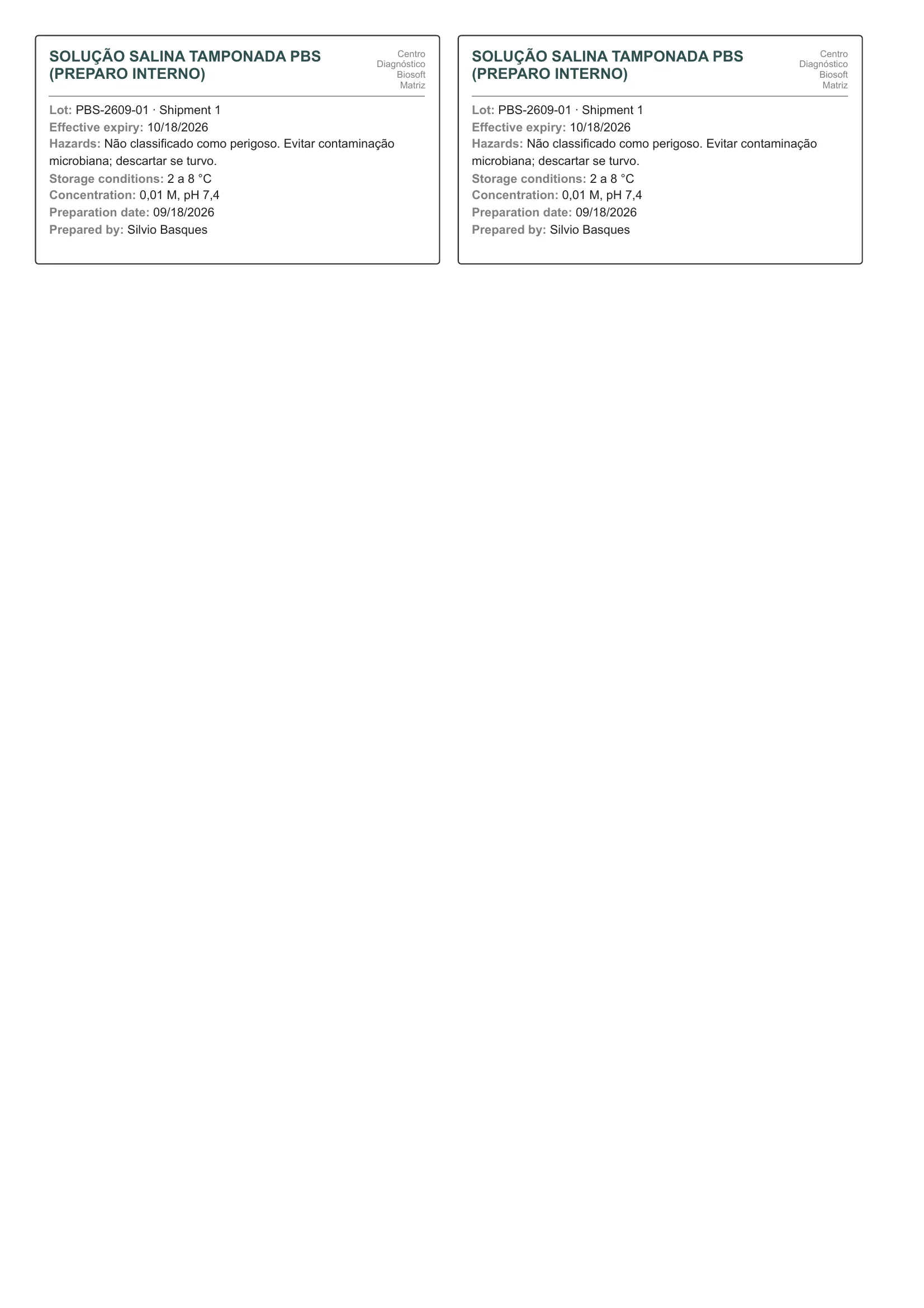
In the demonstration PDF (lot PBS-2609-01, 2 copies) there is one A4 page with two identical labels side by side at the top of the sheet. Each one shows "SOLUÇÃO SALINA TAMPONADA PBS (PREPARO INTERNO)" and, on the right, "Centro Diagnóstico Biosoft" and "Matriz", followed by "Lot: PBS-2609-01 · Shipment 1", "Effective expiry: 10/18/2026", "Hazards: Não classificado como perigoso. Evitar contaminação microbiana; descartar se turvo.", "Storage conditions: 2 a 8 °C" and "Concentration: 0,01 M, pH 7,4". The last lines are "Preparation date: 09/18/2026" and "Prepared by: Silvio Basques". There is no STATUS notice, because the lot is neither blocked nor expired, and no Receipt line, because the preparation was recorded.
| Field | Data source | Use |
|---|---|---|
| Top of each label | ||
| (no label) Product name | Commercial name field of the product (Critical supplies › Assays tab, Identify product step), with the current name in the registration. Printed in bold capitals, with no font size reduction. | Identifies the preparation on the bottle; check that it matches the chosen lot. Long names take up more lines and leave less space for the data. |
| (no label) Laboratory and branch | Name of the laboratory and of the branch selected at issue, in small type in the upper right corner. Since only lots of the current branch are included, it is the branch that received the lot. | Shows where the material was prepared, which helps when there are bottles from several branches in the same area. |
| Body of each label | ||
| STATUS | Lot status at issue, in a red box right below the divider line, such as "STATUS: RECALLED". It appears for a Suspended, Rejected, Recalled or Closed lot (showing that status, even if also expired) or for a lot with an Effective expiry earlier than the issue date (showing "EXPIRED"). | Warns that the material cannot be used: the label only serves to identify material segregated for disposal or return. Received, Under acceptance, Approved or In use lots within their expiry do not have this notice. |
| Lot | Lot number and Shipment fields on the lot screen (Receipt tab, What arrived step), printed as "number · Shipment n". | Links the bottle to the lot record, to the runs that used it and to any recall. For in-house preparation, it is the number assigned by the laboratory. |
| Effective expiry | Calculated at issue as the earliest of the Manufacturer expiry, the Assigned preparation expiry and the date of each opening not yet closed plus the Stability after opening (days); without an opening checklist, it counts from the lot's first use. It is the same value shown on the lot record. | This is the expiry that must appear on the label; after it, RDC 978/2025 (art. 102) prohibits revalidation. Reprint after recording the opening, because the expiry may become shorter. |
| Hazards | Hazards field in the Preparation or aliquoting in the laboratory section (Receipt tab, Storage step), free text and not mandatory. If blank, "—" is printed. | Handling warning for the preparation (toxicity, corrosiveness, biological hazard, disposal). A "—" indicates a mandatory label item is missing: fill it in before printing. |
| Storage conditions | Declared storage conditions field (Receipt tab, Storage step), mandatory at receipt. It is suggested from the product's storage range and can be edited. | States how to store the bottle (for example, "2 to 8 °C"). Check that the storage equipment meets this range. |
| Concentration | Concentration field in the Preparation or aliquoting in the laboratory section (Receipt tab, Storage step), free text and not mandatory. If blank, "—" is printed. | Identifies the concentration or composition of the preparation, a mandatory label item. A "—" indicates incomplete registration. |
| Preparation date | Preparation date field in the Preparation or aliquoting in the laboratory section. The line appears when there is a Preparation date or a Prepared by entry, with "—" if only the person responsible is filled in. | Shows when the material was prepared or aliquoted. Used to check the assigned expiry and to trace the preparation. |
| Prepared by | Prepared by field in the same section (active users with the Prepare materials permission or administrators), with the user's current name; in older records, the name that was typed. Printed together with the Preparation date, with "—" if only the date is filled in. | Identifies the person responsible for the preparation, a mandatory label item. A "—" indicates the person responsible is missing from the registration. |
| Receipt | Receipt date field (Receipt tab, What arrived step). It replaces Preparation date and Prepared by when the lot has no recorded preparation. | Indicates a label for a lot without recorded preparation, such as a commercial product, with no preparation date or person responsible. If the material was aliquoted or prepared, fill in the preparation section and reprint. |
Reading cautions
- The Effective expiry and the STATUS notice apply to the day of issue, and a label printed before opening or before correcting the preparation expiry is not updated: reprint it when the product has a Stability after opening (days).
- The report accepts any lot, including a commercial product without recorded preparation, whose label shows Receipt instead of Preparation date and Prepared by and usually comes out with Hazards and Concentration as "—", which does not meet art. 101: when aliquoting, fill in the Preparation or aliquoting in the laboratory section before printing.
- The STATUS notice does not block printing, and lots still Received or Under acceptance (not released) are printed without any mark.
- Print at actual size (100%, without fitting to page) and check the PDF first: with long texts the data font drops to as low as 6.5 px and, if it still does not fit, the label grows beyond 52 mm with a dashed border and no longer matches pre-cut label sheets.
- All copies are identical, with no bottle numbering, per-bottle opening date, issue date, barcode or logo, and the supply audit trail does not record who printed or how many copies.
- In the English and Spanish versions only the labels and the date format change (mm/dd/yyyy in English); the product name and free texts are printed as typed.
11.6 Acceptance and comparison
Brings together the lot and shipment acceptance studies recorded in the period, as well as acceptance waivers. For each one it shows the result pairs, the criterion, the calculated mean difference, the decision, the responsible people and the evidence document. It serves to demonstrate in an audit that each listed shipment was evaluated against a defined criterion and received a justified decision.
RDC 978/2025 requires IQC at least at every lot change and every shipment of single-use products (arts. 183 and 184) and a system for approving all supplies (arts. 130 and 158), without prescribing a comparison with patient samples; ISO 15189:2022 (clause 6.6) covers acceptance testing, and CLSI EP26 recommends defining the criterion before measuring and comparing the lots under the same conditions. The report shows the recorded studies, criteria, decisions and responsible people, but it does not replace the IQC of art. 183 and does not list lots used without acceptance; an approver different from the executor is good practice, not a requirement of RDC 978/2025.
Where to issue it and filters
Reports › Critical Supplies › Report field › "Acceptance and use" group › Acceptance and comparison. It is also in the "Reports and evidence" dialog, opened by the button of the same name on the Critical supplies list, on the Suppliers list and in the lot screen header; there you must check the "Acceptance and comparison" box, because a different report is selected initially. On the lot screen the report is already filtered by that lot/shipment, and it is not offered on a supplier's record. Any user with access to the supply module can issue it, without special permission.
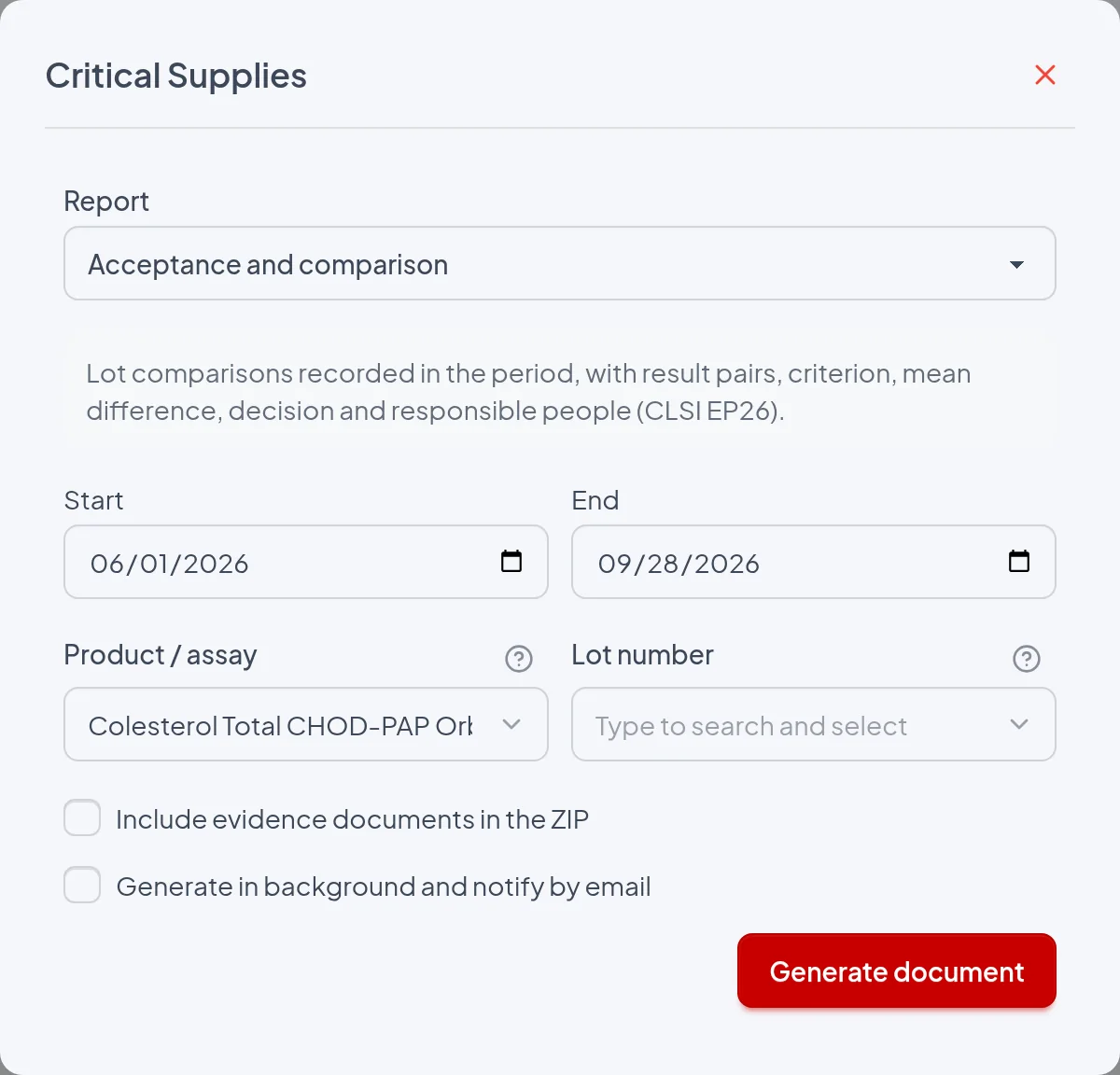
- Start: First day of the period, inclusive and required. Default: one month before today in the report center, January 1 of the current year in the Reports and evidence dialog opened from the lists, and the lot's receipt date on the lot screen. It also limits which evidence documents go into the ZIP.
- End: Last day of the period, inclusive; the default is today. If Start is later than End, the Generate document button is disabled.
- Product / assay: Restricts the report to the lots of the chosen product and prints the Product line in the header; when blank, all products are included. Choosing a product clears Lot number, which then lists only that product's lots. Only available in the report center.
- Lot number: Restricts the report to a single shipment, chosen from a list in the format "lot · Shipment n · product", and prints the Lot line in the header. When blank, all shipments that match Product / assay are included. On the lot screen this filter is applied automatically.
- Include evidence documents in the ZIP: Delivers a ZIP with "Acceptance and comparison.pdf" and the evidence/ folder, containing the files attached to the studies and waivers included in the report; the PDF does not change. With no lot chosen, the dialog warns "With documents, the package is sent by email unless a lot is chosen or, in the supplier report, a single supplier." and the request must go to the background.
- Generate in background and notify by email: Queues the request and shows "Report queued. You will receive an email notification."; the email contains a link to a ZIP valid for 7 days, attached as relatorio.zip when it is under 10 MB. When unchecked, the download is immediate, except with documents and no lot chosen. The automatic email delivery above 1,000 runs, which applies to run-based reports, does not apply to this one.
The period is compared with the Date column, the moment the study or waiver was recorded, with both boundary days included in the issuer's time zone. The decision date (Decided on), the receipt date and the sample measurement date are not used, so a study recorded before Start and decided within the period is left out. Shipments with no study recorded in the period do not produce a block.
The report
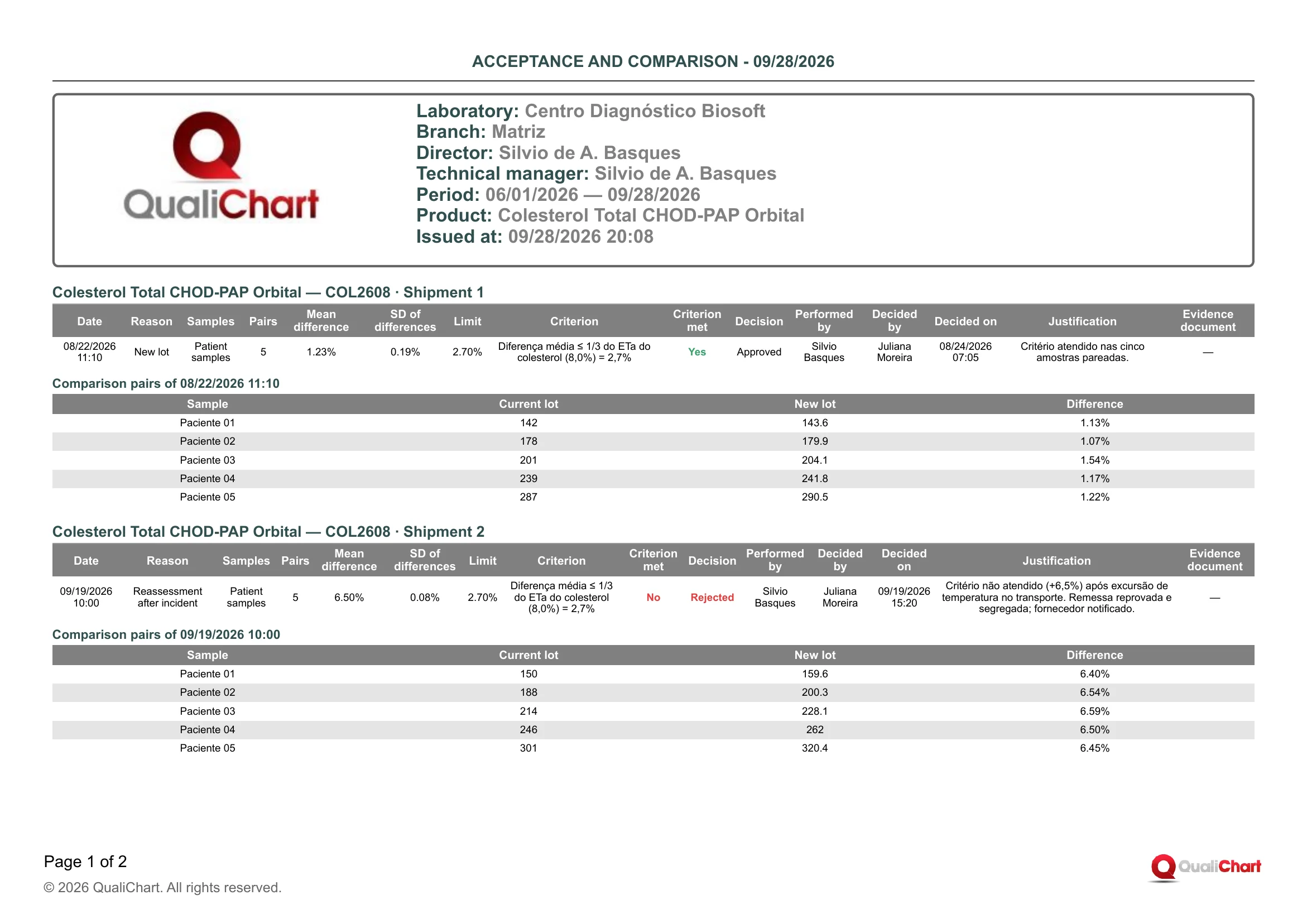
With Start 06/01/2026, End 09/28/2026 and Product / assay Colesterol Total CHOD-PAP Orbital, the PDF issued on 09/28/2026 20:08 has 2 pages and three blocks, all with Evidence document "—". In "COL2608 · Shipment 1", the study of 08/22/2026 11:10 (New lot, 5 pairs) gave a mean difference of 1.23%, SD 0.19% and limit 2.70%, with Criterion met Yes, performed by Silvio Basques and Approved by Juliana Moreira on 08/24/2026 07:05. In "COL2608 · Shipment 2", the Reassessment after incident of 09/19/2026 10:00 gave 6.50% with SD 0.08% (pairs from 6.40% to 6.59%, a constant shift) and showed No and Rejected in red, with a justification citing a temperature excursion during transport, shipment segregated and supplier notified. In "COL2609 · Shipment 1", on page 2, the limit changed to 3.00% (TEa of 9% instead of 8.0%) and the study of 09/28/2026 18:18 was Approved with 1.60%, a limit change that must be justified in an audit.
| Field | Data source | Use |
|---|---|---|
| Header | ||
| Period | Start and End fields of the issuing dialog. | Confirm that the range covers the audited lot changes. Only studies and waivers recorded within it are included. |
| Product | Product / assay filter of the report center, with the product's trade name. Printed only when the filter is used. | Indicates that the document covers a single product. Without this line, it covers all products of the branch. |
| Lot | Lot number filter of the report center, or the lot of the lot screen, with the shipment (for example, "COL2609 · Shipment 1"). Printed only when a lot is filtered. | Indicates that the document covers only that shipment. The other shipments of the same lot are not included. |
| Block for each shipment | ||
| ‹Product› — ‹Lot› · Shipment ‹n› (block title) | Product trade name and the Lot number and Shipment fields entered at receipt. | Each shipment with a study or waiver in the period has its own block. Shipments of the same lot each need their own acceptance. |
| Date | Date and time recorded automatically when clicking Record acceptance study or Record waiver, on the Acceptance tab of the lot screen. Not editable. | Shows when the comparison entered the system, not when the samples were measured. It is the date used by the period filter and in the title of the pairs table. |
| Reason | Reason field in section "1. Samples": New lot, New shipment, New formulation or Reassessment after incident, with New shipment suggested from shipment 2 onward. Waivers print "Waiver". | States why the study was performed. Reassessment after incident should have a corresponding occurrence in the Incidents and recalls report. |
| Samples | Strategy field in section "1. Samples": Patient samples, Control material or Patient and control. Waivers print "—". | The suggested strategy is Patient samples. Control material may not be commutable and may hide or exaggerate the difference, a limitation that should be stated in the Justification. |
| Pairs | Calculated: number of complete rows in the Paired results table; incomplete rows are ignored when recording. Waivers print "—". | Check that the number of samples follows the laboratory's acceptance protocol for the analyte. |
| Mean difference | Calculated when recording: mean of the pair differences, in Percentage (%) or in the assay unit according to the Measurement unit field, with two decimal places. In a rejected study whose rounded mean would equal the Limit, it is shown with four decimal places (for example, 2.7040% against 2.70%); in waivers, "—". | It is the estimated bias of the new lot relative to the current one; a negative value indicates lower results in the new lot. Compare it with the Limit. |
| SD of differences | Calculated when recording: sample standard deviation of the pair differences, in the same unit as the mean difference. It is 0 with a single pair and "—" in waivers. | A small SD with a high mean difference indicates a constant shift. A large SD indicates irregular differences and calls for analysis before approving. |
| Limit | Maximum accepted difference field in section "2. Acceptance criterion", in the unit chosen in Measurement unit. Waivers print "—". | It must be defined before the measurements. If it changes between lots of the same product, the reason must be stated in the Criterion. |
| Criterion | Criterion description field in section "2. Acceptance criterion"; when blank, the system records "‹Criterion source›: mean difference up to ‹limit›". Waivers print "—". | Shows where the limit comes from (fraction of TEa, manufacturer specification or documented local criterion). Compare it with the laboratory's acceptance procedure. |
| Criterion met | Calculated when recording: "Yes" (green) when the absolute value of the unrounded mean difference is less than or equal to the Limit, and "No" (red) otherwise. Waivers print "—". | With "No", the only decision the system accepts is Reject. With "Yes", the decision still rests with the approver. |
| Decision | Approve, Approve with restriction or Reject buttons in the "Decide the acceptance study" block, used by those with approval permission. Prints Approved, Approved with restriction, Rejected (in red), Pending or, for waivers, Waived with justification. | Confirm that no lot entered use with a Pending or Rejected study. A study left Pending when the lot was closed or recalled is kept only as a record. |
| Performed by | Logged-in user who recorded the study (execution permission) or the waiver (approval permission). | Identifies who recorded the comparison, not necessarily who processed the samples on the instrument. |
| Decided by | User who clicked Approve, Approve with restriction or Reject; for waivers, the same user who recorded it. Shows "—" while the study is pending. | Check the segregation of duties between executor and approver. With "Require different executor and approver" enabled in the Laboratory policy, the executor cannot decide, except for waivers. |
| Decided on | Date and time recorded when the decision is clicked; for waivers, the moment of recording. Shows "—" while the study is pending. | Compare it with the lot's first use in the Lot record report to show that release came before use. A long interval since the Date indicates a lot that waited for a decision. |
| Justification | Decision justification field, required when deciding, or Waiver justification. Shows "—" while the study is pending. | It should explain the decision, the restrictions of an Approved with restriction and the actions taken, such as segregating the shipment and notifying the supplier. |
| Evidence document | File attached in the Evidence document field of the "After approval (calibration, limits and evidence)" section or in the waiver form, printed as "‹number›-‹file name›". Shows "—" with no attachment. | Links the study to the file of the same name in the ZIP's evidence/ folder when documents are included. |
| Comparison pairs of ‹date and time› | ||
| Sample | Sample column of the Paired results table (optional, up to 120 characters). When blank, the pair number (1, 2, 3...) is shown. | Links each pair to the bench protocol. Use anonymous identifiers. |
| Current lot | "Previous lot result" column of the Paired results table, with up to 3 decimal places and no trailing zeros. | It is the reference for the calculation. Check that the samples cover the range of interest (low, normal and high). |
| New lot | "New lot result" column of the same table, with the same formatting. | Compare it with the Current lot, sample by sample. |
| Difference | Calculated per pair: (new lot − current lot) ÷ |current lot| × 100 in Percentage (%), or new lot − current lot in Assay unit, with two decimal places. | A difference that grows or changes sign with concentration indicates proportional bias, which the mean may hide. |
Reading cautions
- Only studies and waivers recorded on the Acceptance tab of the lot screen appear, and shipments with no study in the period are omitted without warning; to find lots without acceptance, use the Accepted column of the Documentary compliance report.
- Criterion met compares only the mean difference with the Limit, so dispersion and bias proportional to concentration are not part of the calculation and must be assessed by the approver.
- With the Assay unit option, Mean difference, SD of differences, Limit and Difference are shown without a unit of measurement (no mg/dL, for example), and with either option positive values are shown without "+".
- A Rejected study only rejects the lot if there is no other pending study and no approved study (with or without restriction) or waiver recorded after it, and the lot's current status does not appear here: check the lot screen or the Inventory and expiry dates report.
- Criterion source (except within the automatic Criterion text), Calibration verification required and Limit review required are not printed.
- The report covers only the branch selected in the session and omits lots deleted after the retention period of the Laboratory policy (default and minimum of 2 years after withdrawal), although art. 115 of RDC 978/2025 requires a minimum retention of 5 years.
11.7 Lot record
Brings together in a single document everything recorded about one shipment of a lot, from receipt to withdrawal from use: receipt and storage, effective expiry, acceptances, checklists, use on controls with the calibration status, and occurrences. It serves as evidence of the lot's life cycle in audits and inspections: where it came from, how it was accepted, where it was used and what happened to it. It also helps check whether the lot's record is complete before archiving it.
RDC 978/2025 requires recording at receipt the lot, the transport conditions, the date and whatever is needed for traceability (art. 100), prohibits revalidating expired supplies (art. 102), requires monitoring and notifying incidents and recalls (art. 90) and keeping records for at least 5 years (art. 115); ISO 15189:2022, clause 6.6, covers receipt, storage, segregation and acceptance testing, and CLSI EP26 guides the comparison between lots. The record only brings together the entries already made in the module for each shipment and does not demonstrate compliance by itself.
Where to issue it and filters
Reports › Critical Supplies › Report field › "Lot record", in the "Acceptance and use" group. Also in the "Reports and evidence" dialog of the lot screen, where it comes already checked and restricted to the open lot, and of the "Critical supplies" and "Suppliers" lists, where there is no lot filter and the record covers all lots of the branch. It is not offered in the dialog opened from a supplier's record. Any user with the supplies module enabled can issue it.
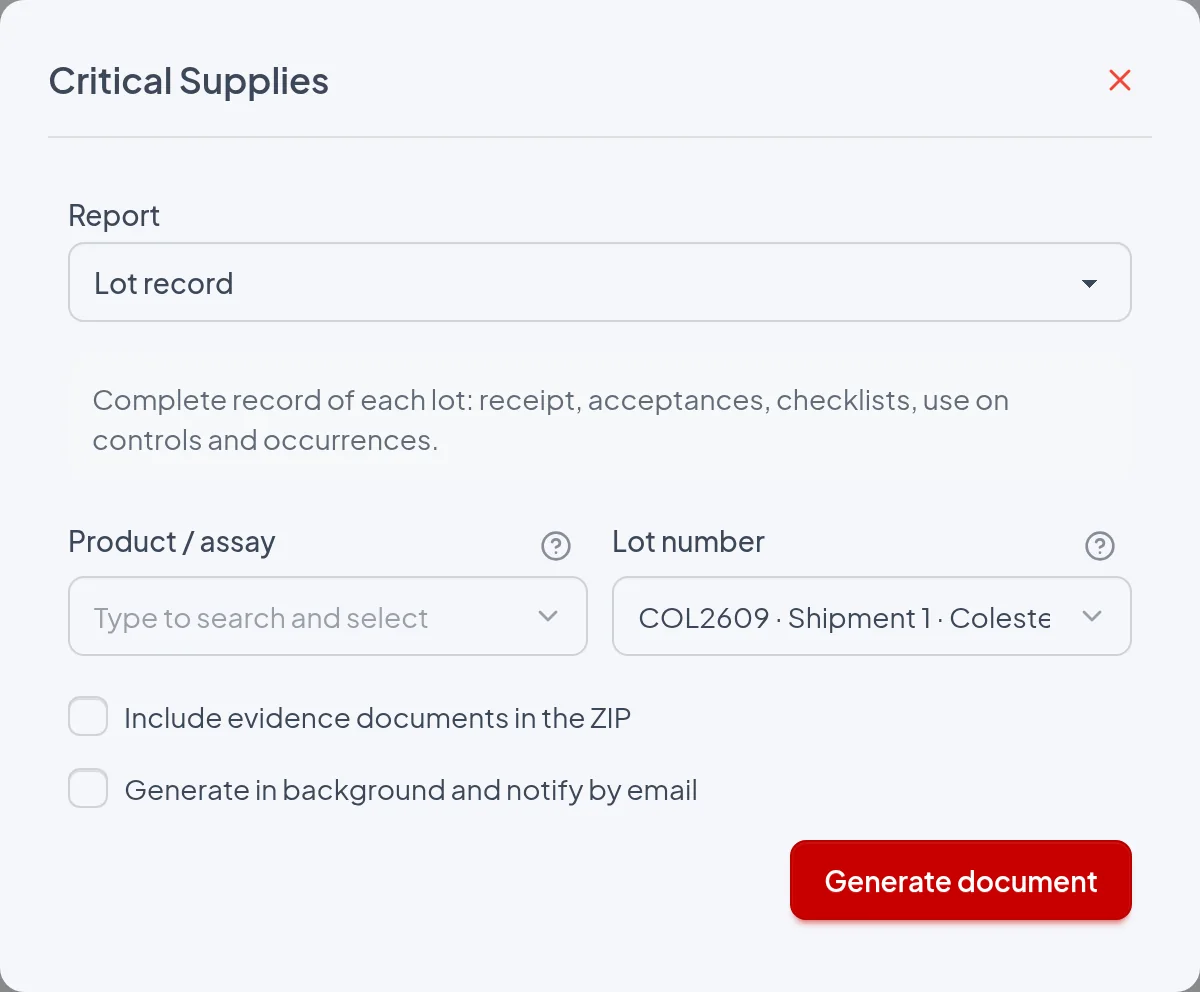
- Product / assay: Available only in Reports › Critical Supplies and limits the records to that product's lots. It also filters the Lot number list, and changing the product clears the chosen lot. When filled in, the header prints "Product: ‹name›".
- Lot number: Issues the record for a single shipment, chosen among the branch's non-archived lots ("‹lot› · Shipment ‹n› · ‹product›"), with search by lot, product, manufacturer or location; the header prints "Lot: ‹number› · Shipment ‹n›". Left blank, one record is issued for each non-archived lot of the branch (only of the chosen product, if any), including closed, rejected and recalled lots, in order of manufacturer expiry and receipt.
- Include evidence documents in the ZIP: Replaces the PDF with a ZIP containing "Lot record.pdf" and the evidence/ folder, with the attachments of the receipt, of the product record version in force at receipt (instructions for use and verification evidence), of the checklists, of the calibration resolutions, of the acceptances and of the occurrences printed in the record. Each file is named "‹code›-‹original name›", the same name used in the Evidence document column. Without a Lot number, the dialog warns "With documents, the package is sent by email unless a lot is chosen or, in the supplier report, a single supplier." and the report is generated in the background.
- Generate in background and notify by email: Queues the report and shows "Report queued. You will receive an email notification."; the email contains a link valid for 7 days to a ZIP, which is attached when it is under 10 MB. When unchecked, the download is immediate, except with evidence and no lot chosen. Recommended when issuing the record for all lots.
It has no period and the header prints no period line: the record shows the full history of the shipment, from any date, and the dialog's Start and End fields do not change it. Status, Effective expiry and Alerts are calculated at the date and time of issue. Regulatory registration and Instructions version come from the product record version in force on the receipt date.
The report
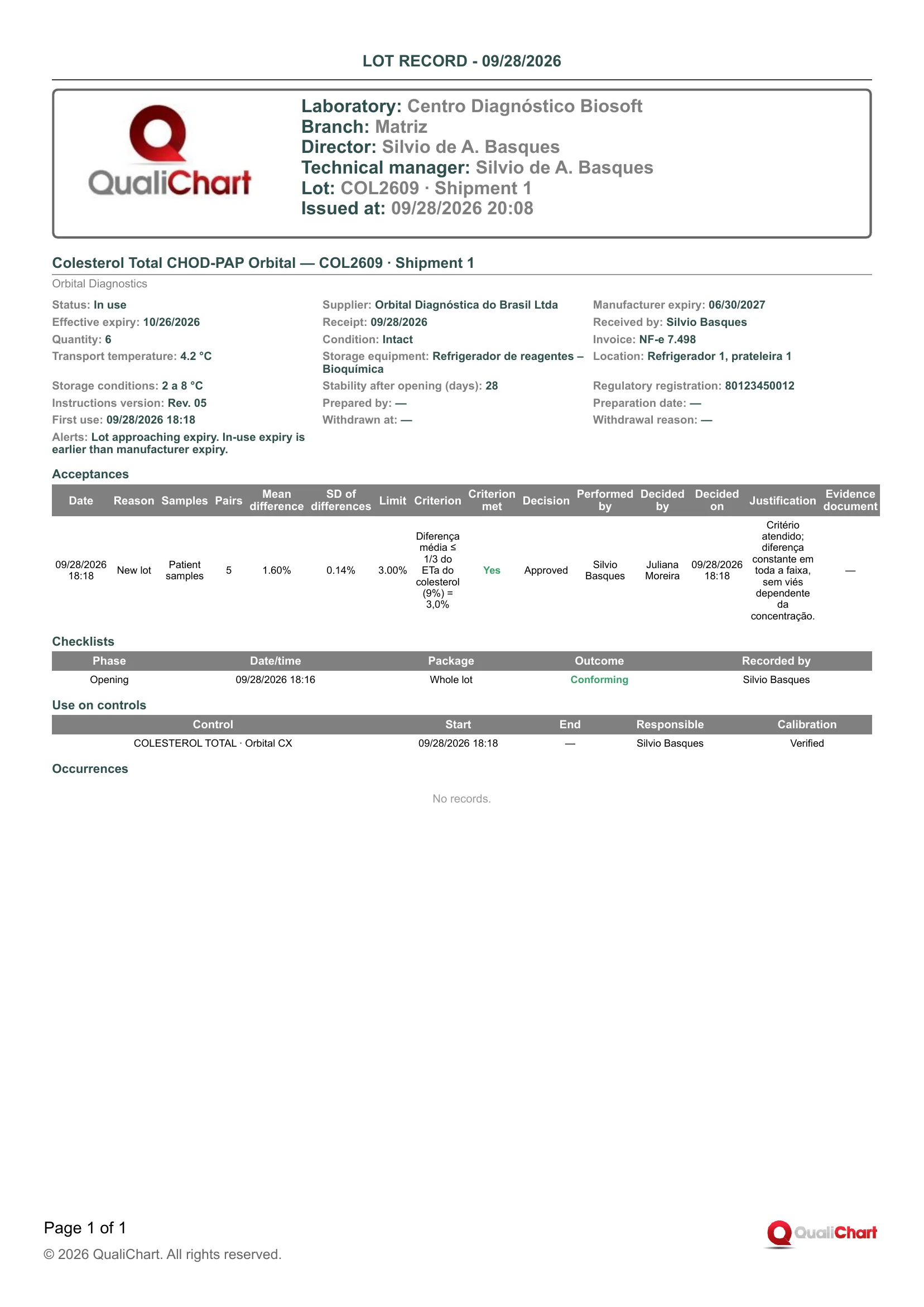
In the demonstration PDF, issued for lot COL2609 ("Lot: COL2609 · Shipment 1", "Issued at: 09/28/2026 20:08"), the record "Colesterol Total CHOD-PAP Orbital — COL2609 · Shipment 1" shows Status In use, Manufacturer expiry 06/30/2027 and Effective expiry 10/26/2026, consistent with the opening on 09/28/2026 18:16 and a Stability after opening of 28 days. The Alerts read "Lot approaching expiry. In-use expiry is earlier than manufacturer expiry.". The acceptance of 09/28/2026 18:18 (New lot, Patient samples, 5 pairs) had Mean difference 1.60%, SD of differences 0.14%, Limit 3.00%, Criterion met Yes and Decision Approved by Juliana Moreira, with Evidence document "—". In Use on controls, "COLESTEROL TOTAL · Orbital CX" has been in use since 09/28/2026 18:18 with Calibration Verified, and Occurrences shows "No records.".
| Field | Data source | Use |
|---|---|---|
| Header | ||
| Product | Printed only when the Product / assay filter was filled in. It is the product name in the product record. | Indicates that the report was limited to one product rather than covering all lots. |
| Lot | Printed when the record covers a single lot (Lot number filter or lot screen), as "‹number› · Shipment ‹n›". | Identifies the requested shipment. It must match the record title. |
| Lot block | ||
| Shipment | Record title: "‹Product› — ‹Lot number› · Shipment ‹n›", with the manufacturer from the product record right below, in gray. Lot and shipment come from Receipt › What arrived step. | Identifies exactly which delivery is documented. Each shipment has its own record, acceptance and checklists. |
| Status | Calculated by the system according to the lot's workflow (receipt, acceptance, declaration of use, occurrences and withdrawal). Values: Received, Under acceptance, Approved, In use, Suspended, Rejected, Recalled or Closed. | Shows whether the lot could be used on the issue date. Suspended, Rejected and Recalled require physical segregation. |
| Supplier | Receipt › What arrived step, Supplier field. Only accepts suppliers that are Approved or Conditionally approved on the receipt date. | Links the lot to the qualified supplier. Cross-check with the Qualified suppliers and evaluations report. |
| Manufacturer expiry | Receipt › What arrived step, Manufacturer expiry field, copied from the package. Locked after first use. | Expiry of the unopened product. The Effective expiry never goes beyond it. |
| Effective expiry | Calculated at issue: the earliest date among the Manufacturer expiry, the Assigned preparation expiry and each opening not yet closed plus the Stability after opening (days). Without an opening checklist, First use counts, and a Conforming closing of the whole lot stops the count. | Use-by date of the lot on the issue date. For runs performed after expiry, use Supply traceability. |
| Receipt | Receipt › What arrived step, Receipt date field. | Date the lot came in, required in the receipt record. |
| Received by | Automatic: user who saved the receipt. On screen it appears as Received by. | Identifies who recorded the delivery in the system, not necessarily who physically inspected it. |
| Quantity | Receipt › What arrived step, Quantity received field. Printed with up to 3 decimal places and no unit. | Reconciles the delivery with the invoice, in the laboratory's supply unit (kits, bottles). |
| Condition | Receipt › Inspection step, Condition on receipt field: Intact, Damaged, Temperature compromised or Discrepant. | Other than Intact, the lot needs an approved or waived acceptance before use. |
| Invoice | Receipt › Inspection step › Delivery documents and details, Invoice or equivalent document field. | Links the lot to the purchase document. |
| Transport temperature | Receipt › Inspection step, Transport temperature (°C) field. Printed with one decimal place. | Evidence of the transport conditions. Compare with Storage conditions. |
| Storage equipment | Receipt › Storage step, Temperature equipment field. Only accepts equipment whose range is compatible with the product's. | Indicates where to find the temperature records for the storage period. |
| Location | Receipt › Storage step, Storage location/department field. If empty, it takes the location of the chosen equipment. | Physical location for inventory, segregation and recall. |
| Storage conditions | Receipt › Storage step, Declared storage conditions field. It is suggested from the range in the product record and can be edited. | Condition required by the manufacturer. It must be consistent with the storage equipment. |
| Stability after opening (days) | Receipt › Storage step, Stability after opening (days) field. Locked after first use. | Basis for the Effective expiry after opening. If blank, opening does not shorten the expiry. |
| Regulatory registration | Product record › Instructions, registration and storage step, ANVISA registration/notification field. Taken from the product record version in force on the receipt date, or from the oldest one if the product was registered later. | Confirms the product's regulatory status when the lot arrived. Shows "—" for in-house or modified products. |
| Instructions version | Same product record step, Instructions version field, from the same version used for Regulatory registration. | Shows which instructions for use governed use when the lot arrived (art. 88). |
| Prepared by | Receipt › Storage step › Preparation or aliquoting in the laboratory, Prepared by field. | Person responsible for the prepared or aliquoted reagent, required on the label (art. 101). |
| Preparation date | Same Receipt section, Preparation date field. | Date of preparation or aliquoting, the same as on the prepared reagent label. |
| First use | Automatic: date and time of the first declaration of use on a control (Opening and use tab › 2. Entry into use on controls). For products without an analyte, it is the first opening or the release of the lot ("Start use" or acceptance decision). | Start of the lot's use. Compare with Decided on in Acceptances and with the opening. |
| Withdrawn at | Automatic: date and time of the first withdrawal from use (Confirm withdrawal, replacement on the controls, suspension, recall or rejection in acceptance). Later events do not change the date. | "—" means the lot has not been withdrawn from use. Compare with the End column of Use on controls. |
| Withdrawal reason | Exhausted, Expired or Replaced come from Confirm withdrawal (Replaced also when another lot takes over all controls); Incident, Recalled and Rejected are recorded by the corresponding event. A recall that reaches a lot already closed as Exhausted, Expired or Replaced keeps that reason. | Explains why the lot was withdrawn from use. Expired, Incident or Recalled call for a review of the runs close to the withdrawal. |
| Alerts | Calculated at issue from the effective expiry and the Expiry warning lead time (days), the certificate, the receipt condition, the supplier's current status and the storage equipment. For Closed, Rejected or Recalled lots, only "In-use expiry is earlier than manufacturer expiry." is printed. | Lists pending issues on the issue date. For a lot in use, each alert calls for an action: segregate, assess the delivery, re-evaluate the supplier or correct the storage. |
| Acceptances | ||
| Date | Date and time the study was recorded (Acceptance tab, Record acceptance study) or of the waiver. | It is not the decision date, which is shown in Decided on. |
| Reason | Acceptance tab, Reason field: New lot, New shipment, New formulation or Reassessment after incident. Shows "Waiver" when the acceptance was waived. | Justifies why the comparison was performed. |
| Samples | Acceptance tab, Strategy field: Patient samples, Control material or Patient and control. "—" for a waiver. | Patient samples are the suggested strategy, since control material may not be commutable between lots. |
| Pairs | Number of pairs entered in Paired results. "—" for a waiver. | It should follow the number of samples defined in the procedure for the criterion (CLSI EP26). |
| Mean difference | Calculated: mean of (new result − previous result) over the pairs, as a % of the previous result or in the assay unit, with two decimal places. Shown with four decimal places when rounding would make a rejected study look equal to the limit. | Estimate of the shift between the lots, compared with the Limit. |
| SD of differences | Calculated: standard deviation of the pair differences (0 with a single pair), in the unit of the Mean difference. | A high SD with a small mean may hide opposite differences across the range. |
| Limit | Acceptance tab, Maximum accepted difference field, in Percentage (%) or Assay unit. "—" for a waiver. | Numerical criterion defined before measurement. |
| Criterion | Acceptance tab, Criterion description field in section "2. Acceptance criterion" (free text); when blank, the system records "‹Criterion source›: mean difference up to ‹limit›". "—" for a waiver. | Shows where the limit comes from: a fraction of TEa, the manufacturer's specification or a local criterion. |
| Criterion met | Calculated: Yes when the absolute value of the Mean difference is less than or equal to the Limit, No otherwise. "—" for a waiver. | With No, the system only allows the study to be rejected. |
| Decision | Recorded by a user with approval permission in Decide the acceptance study or in Waive acceptance with justification. Values: Pending, Approved, Approved with restriction, Rejected or Waived with justification. | Formal release of the lot. A lot in use with a Pending or Rejected decision must be investigated. |
| Performed by | Automatic: user who recorded the study or the waiver. | Identifies who performed the comparison. |
| Decided by | Automatic: user who recorded the decision or the waiver. "—" while the study is pending. | With Require different executor and approver enabled in Settings, it cannot be the executor, except for waivers, which are recorded and decided by the same user. |
| Decided on | Automatic: date and time of the decision or the waiver. "—" while the study is pending. | It must precede the Start of use on controls when the product requires acceptance or the condition is not Intact. |
| Justification | Decision justification field, or the justification entered for the waiver. | Basis for the decision, mandatory for any conclusion. |
| Evidence document | Evidence document field of the study or the waiver, on the Acceptance tab. Shown as "‹code›-‹original name›", or "—" without an attachment. | Locates the file in the ZIP's evidence/ folder, which has the same name. |
| Checklists | ||
| Phase | Opening: Opening and use tab › 1. Opening (Open supply). Closing: Closing tab (Close use). | Shows whether the opening and the closing were checked. |
| Date/time | Event date and time field of the checklist: when the package was opened or its use was closed. | The opening date starts the stability-after-opening count. |
| Package | "Whole lot" or the Package identifier, when the checklist was for a Specific package. | Shows whether the check applies to the whole lot or to one bottle or kit. |
| Outcome | Calculated from the answers: Conforming, or Blocked when a blocking item was answered Nonconforming. On screen it appears as Check completed or Blocking issue. | A Blocked checklist prevents use until it is corrected or until the lot is closed. |
| Recorded by | Automatic: user who recorded the checklist or, if corrected, the correction. | Identifies who performed the check. |
| Use on controls | ||
| Control | Analyte · equipment of the controls checked in Lot record › Opening and use tab › 2. Entry into use on controls, when clicking Confirm entry into use. | Where the lot was used. The runs are in the Supply traceability report. |
| Start (date and time) | Date and time of the declaration of use on that control. | Marks the before and after of the change on the control charts. |
| End | Automatic: when another lot of the same type is declared on the control, when the lot is withdrawn, suspended, recalled or rejected, or when the analyte leaves the analyzer. | Delimits the lot's use on each control. "—" means use is still ongoing. |
| Responsible | Automatic: user who declared the use. | Identifies who made the change. |
| Calibration | Pending on a full reagent change or when the acceptance required verification, Not required in other cases. Verified or Waived with justification come from Resolve calibration requirement, in Control supplies › Lot change history › Calibration verification › Record. | "Not verified · use ended" indicates that use ended with verification still pending. Pending on a lot that already has runs must be resolved. |
| Occurrences | ||
| Date/time | Occurrences tab › Record incident or action, Occurrence date and time field (if blank, the moment of recording). | Locates the runs close to the event. |
| Type | Same form, Event type field: Incident, Recall or Field safety corrective action (FSCA). | A recall withdraws all shipments of the lot from use. An incident of Critical severity suspends the lot. |
| Severity | Same form, Severity field: Minor, Major or Critical. | Guides the priority of the investigation. |
| Description | Same form, Description field. | Account of the problem observed. |
| Action taken | Same form, Action taken field. | Action taken by the laboratory, to assess its effectiveness in the management review. |
| Notification reference | Same form, Notification reference field (Notivisa protocol number or manufacturer notice). | Evidence of the notification (art. 90). |
| Lot | Lot and shipment on which the occurrence was recorded ("‹lot› · Shipment ‹n›"). Includes recalls of the same product lot entered on another shipment, from any branch. | Shows whether the occurrence belongs to this shipment or arrived through a recall of another one. |
Reading cautions
- Status, Effective expiry and Alerts reflect the issue date, not the date the lot was used, and the Effective expiry reverts to the manufacturer or preparation expiry after a Conforming closing checklist for the whole lot.
- For Closed, Rejected or Recalled lots, the expiry, certificate, receipt condition, supplier and storage alerts are omitted, and the supplier alert always uses the supplier's current status.
- Checklists show only the current record (a correction replaces the original with no indication in the PDF), without the item-by-item answers or the closing data, and a closing checklist does not withdraw the lot from use by itself.
- The record does not print the acceptance pairs, the runs, the justification of the calibration resolution or, for occurrences, who was notified and the attachment; use Acceptance and comparison, Supply traceability, Incidents and recalls or the lot screen.
- A recall entered on another shipment appears in Occurrences with the originating Lot, but on a shipment already withdrawn from use it does not change Withdrawn at and, if that shipment was closed as Exhausted, Expired or Replaced, it does not change the Withdrawal reason either.
- A Rejected study only rejects the lot if there is no other pending study and no approved study (with or without restriction) or waiver recorded after it, and in that case Withdrawn at receives the decision date even if the lot was never used.
11.8 Supply traceability
Lists the branch's IQC runs in the period that have a recorded reagent or calibrator lot, with phase, analyte, equipment and the lots with their shipment. It is used to respond to a recall or an incident: starting from a lot, it shows which runs it was used in; starting from a period, it shows which lots each control used. The Link corrected column flags the runs whose lot was corrected after entry, with a justification.
RDC 978/2025 requires the laboratory to record, on receipt, the lot and whatever is needed for traceability (art. 100), to cooperate with recalls and field actions (art. 90), to maintain traceability of all supplies in its in-house methodology (arts. 130 and 158) and to keep records for at least 5 years (art. 115); ISO 15189:2022, clause 6.6, covers incidents and recalls. The report shows the IQC side of this traceability, with the runs and the reagent and calibrator lot recorded in each one; patient results must be traced in the LIS.
Where to issue it and filters
In Reports › Critical Supplies (visible when the critical supplies module is enabled), choose "Supply traceability" in the Report field, "Acceptance and use" group. It also appears in the window of the "Reports and evidence" button on the Critical supplies and Suppliers lists (no filters), on the Lot record (filters the open lot, with Start set to the receipt date) and on the Supplier record (filters the runs with lots received from that supplier). That window only has Start (January 1 of the current year, except on the Lot record), End (today) and the background checkbox, and selecting more than one report generates a ZIP. On both screens, a Start later than the End disables the Generate document button.
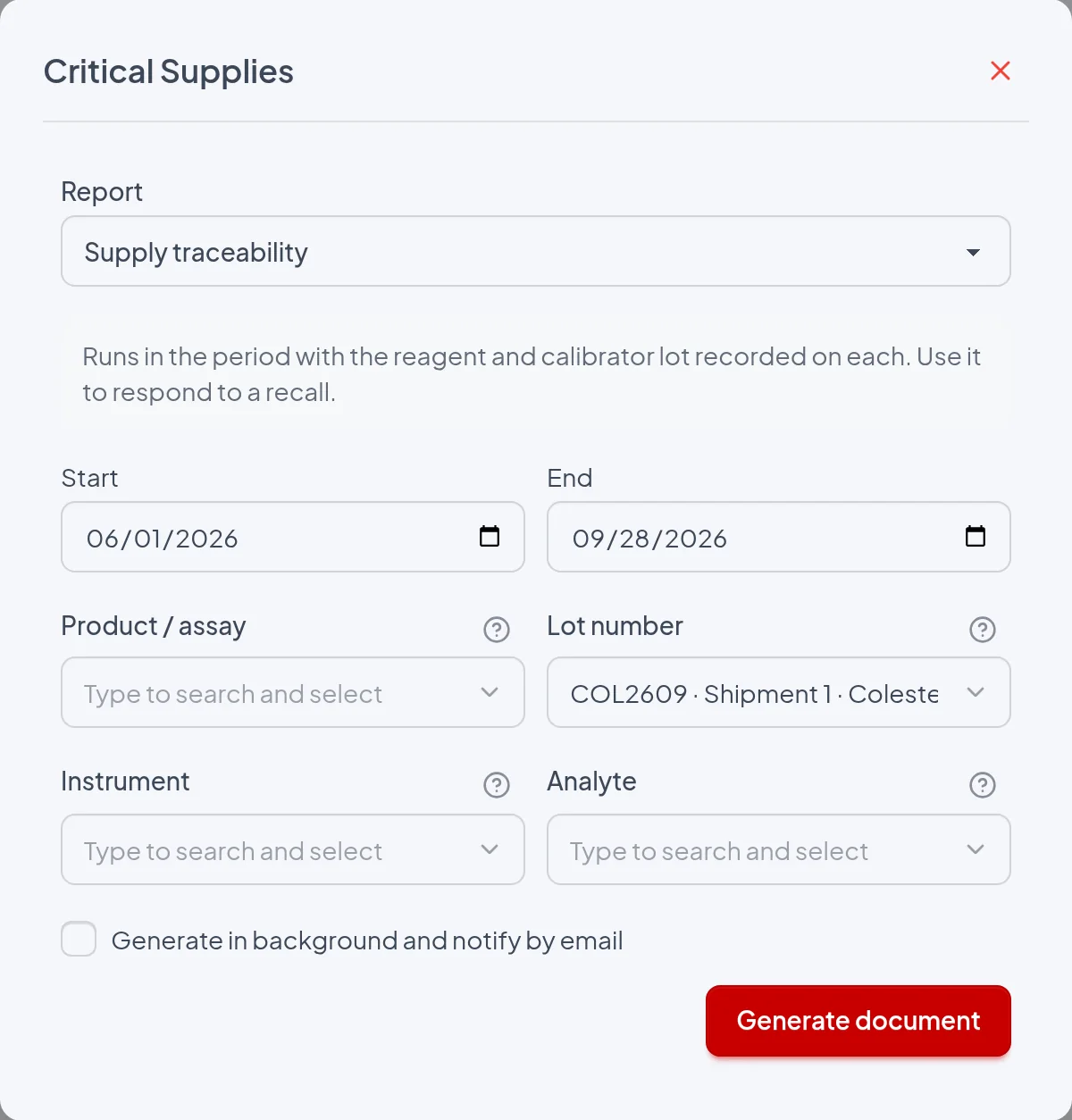
- Start: First date of the period, included in the search and compared with the run date. In Reports › Critical Supplies it defaults to the date one month ago. It is required and is printed under "Period".
- End: Last date of the period, also included, filled in with today's date. It cannot be earlier than Start. It is printed under "Period".
- Product / assay: Keeps only the runs whose reagent or calibrator lot belongs to this product, including archived lots, and prints "Product: ‹name›". When you choose the product, the Lot number list shows only its lots and any lot already chosen is cleared. If left blank, all products are included.
- Lot number: Keeps only the runs in which this shipment was recorded as reagent or as calibrator and prints "Lot: ‹number› · Shipment N". The list shows the current branch's lots in the format "‹number› · Shipment N · ‹product›", including critical consumable lots; archived lots are left out of the list, but their runs are still included through the product filter, the supplier filter or the Lot record. If left blank, all lots are included.
- Instrument: Keeps only the runs of the controls on this equipment and prints "Equipment: ‹name›". The list shows the current branch's equipment that has not been deleted. If left blank, all are included.
- Analyte: Keeps only the runs of the controls for this analyte and prints "Analyte: ‹name›". If left blank, all analytes are included.
- Generate in background and notify by email: When checked, the request is queued with the message "Report queued. You will receive an email notification." and the email contains a link, valid for 7 days, to a ZIP with the PDF, which is also attached when it is under 10 MB. When unchecked, the PDF is downloaded immediately as "Supply traceability.pdf". Exception: with no product, lot, equipment or analyte filter and outside the Lot and Supplier records, the request is queued when the branch has more than 1,000 runs in the period, counting all of them (with or without a lot, deleted and preparation runs).
The period is compared with the run date, with Start and End included; the lot's receipt date and entry-into-use date do not count. For a recall, use a period that covers the lot's entire life (from the Lot record, Start already comes set to the receipt date). The run date follows the server clock (UTC), so runs entered after 9 p.m. (Brasília time) get the next day's date and may be left out of a report issued in the evening with End = today.
The report
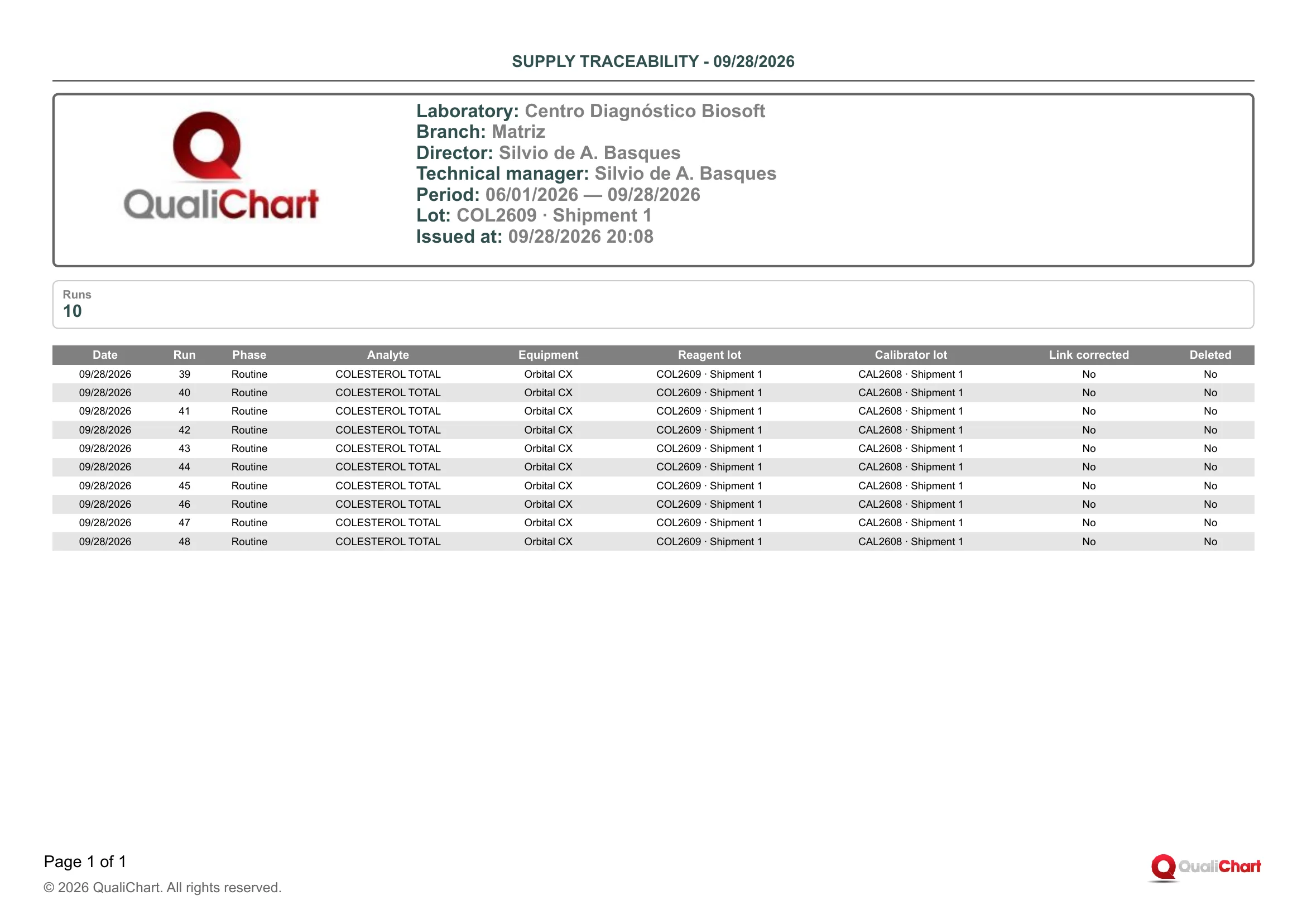
With Start 06/01/2026, End 09/28/2026 and Lot number COL2609 · Shipment 1, the header shows "Lot: COL2609 · Shipment 1" and the Runs card shows 10. The table lists runs 39 to 48, all from 09/28/2026 and in the Routine phase, for the analyte COLESTEROL TOTAL on the Orbital CX, with Reagent lot COL2609 · Shipment 1 and Calibrator lot CAL2608 · Shipment 1. Link corrected and Deleted are "No" on every row. If the manufacturer recalled COL2609, these 10 runs would be the IQC runs to review, and the patient total cholesterol results on the Orbital CX on 09/28/2026 would have to be checked in the LIS.
| Field | Data source | Use |
|---|---|---|
| Header | ||
| Period | Start and End dates chosen when issuing, in the format MM/DD/YYYY — MM/DD/YYYY. | Check that it covers the entire usage window of the lot under investigation. Runs outside it do not appear. |
| Product | Product / assay filter, with the name registered in Critical supplies. Printed only when filled in. | Indicates that the list is limited to the runs with lots of this product. |
| Lot | Lot number filter, or the open lot when the report is issued from the Lot record. Number and shipment entered on the Receipt tab. | Identifies the shipment under investigation. Other shipments with the same number are not included. |
| Supplier | Printed only when the report is issued from the Supplier record. Name registered in Suppliers. | Indicates that the list is limited to the runs with lots received from this supplier (Supplier field on the Receipt tab). |
| Equipment | Instrument filter, with the name registered in QualiChart. Printed only when filled in. | Indicates that the list is limited to the controls on this equipment. |
| Analyte | Analyte filter, with the name registered in QualiChart. Printed only when filled in. | Indicates that the list is limited to the controls for this analyte. |
| Summary | ||
| Runs | Calculated: number of rows in the table. It also counts deleted runs and preparation runs. | Sizes how many IQC runs to assess in an investigation or a recall. |
| Runs table | ||
| Date | Run date, recorded automatically by QualiChart when the run is entered or imported. Nobody types this field. | Bounds the lot's use in time. The first and last dates indicate the range of patients to check in the LIS. |
| Run | Sequential number of the run within the control (analyte and equipment), the same as the #N on the Traceability tab of the Lot record. Preparation, routine and deleted runs follow the same numbering. | Locates the run on the control panel to review values, violations and observations. It is not a report sequence number. |
| Phase | "Preparation" for a run entered in the Preparation phase of the control panel, before the material was activated. "Routine" for a run entered in the Active phase. | Preparation runs with a suspect lot may have gone into the material's mean and SD. Routine runs accompanied the analytical routine. |
| Analyte | Analyte of the control in which the run was entered. | Shows which tests the lot reached. Indicates the patient results to reassess. |
| Equipment | Equipment of the control in which the run was entered. | Shows which analyzers the lot was used on. Helps separate a lot problem from an equipment problem. |
| Reagent lot | Lot and shipment of the reagent declared in use on the control at entry (Lot record › Opening and use tab › Confirm entry into use), recorded automatically on the run. Shows "—" if no reagent was declared. | This is the key data in a recall: the rows with the recalled lot are the runs performed with it. A change in the date sequence shows when the switch took place. |
| Calibrator lot | Lot and shipment of the calibrator declared in use at entry; a calibrator closed as Exhausted or Replaced remains recorded until the next one is declared. Shows "—" if no calibrator was declared. | Traces a calibrator recall. Relates IQC deviations to the calibration in effect. |
| Link corrected | "Yes" (in orange) when the run's reagent or calibrator lot was corrected, with a justification, in Lot record › Traceability tab › Correct lot assignment (Approve acceptance permission). "No" in all other cases. | Points out the runs whose lot changed after entry. In an audit, check the justification for each correction. |
| Deleted | "Yes" (in red) when the run was deleted on the control panel. "No" in all other cases. | The run is still listed because the lot was used in it. Check the justification for the deletion and whether any result was released before. |
Reading cautions
- Only runs with a recorded reagent or calibrator lot are included, so runs from before the module was adopted on the control, or from controls with no declared lot, are left out, and the absence of rows does not prove that the lot was not used.
- Critical consumable lots (cuvettes, for example) are never recorded on runs, and filtering by one of them always produces an empty PDF.
- The report traces IQC runs of the branch you are logged into, not patient results, which must be assessed in the LIS over the same date range.
- The printed lot is the one declared in use on the control when the run was recorded, not a reading from the analyzer, and a change declared late is only reflected after using Correct lot assignment on each affected run.
- A corrected run appears only under the current lot, and the PDF does not show the previous lot or the justification, which are kept in the Supply audit trail and in the observation of the control's last run.
- The Lot number filter selects a single shipment, so if the same manufacturer lot arrived in several shipments, issue the report once per shipment or filter by Product / assay and look for the number in the lot columns.
11.9 Lot change impact on IQC
Lists the reagent, calibrator and critical consumable lot changes declared in the period, with one row per control (analyte · equipment) that started using the new lot. Each row shows the previous and new lot and shipment, who declared the change, the calibration verification status, the routine runs recorded with the lot, the Westgard violations associated with the change and the shift in the first runs. It lets the quality manager or the technical manager periodically check whether each change had IQC and a resolved calibration, prioritize investigations and present in audits the evidence of monitoring after the change.
RDC 978/2025 requires IQC at least at every lot change and every shipment of single-use products (art. 183), with reduction only under the terms of art. 184, and ISO 15189:2022 (clause 6.6) and CLSI EP26 address acceptance at lot change; following the instructions for use regarding calibration and monitoring the first runs after the change are good practices from the guide, not RDC requirements. The report shows, per control, the declared change, the calibration status, the routine runs recorded with the lot, the associated violations and the post-change shift: it is evidence of monitoring, it does not prove cause and it does not replace the acceptance study (Acceptance and comparison report).
Where to issue it and filters
Reports › Critical Supplies › Report field › group "Monitoring and occurrences" › "Lot change impact on IQC", with the filters Start, End, Product / assay, Instrument and Analyte. It can also be checked in the "Reports and evidence" dialog, opened by the button of the same name in the Critical supplies and Suppliers lists, which only offers Start and End, defaulting to January 1 of the current year through today. That dialog opens with another report already checked (Inventory and expiry dates or Qualified suppliers and evaluations), which must be unchecked to download only this PDF. The report is not offered in the lot record or the supplier record and always covers the current branch.
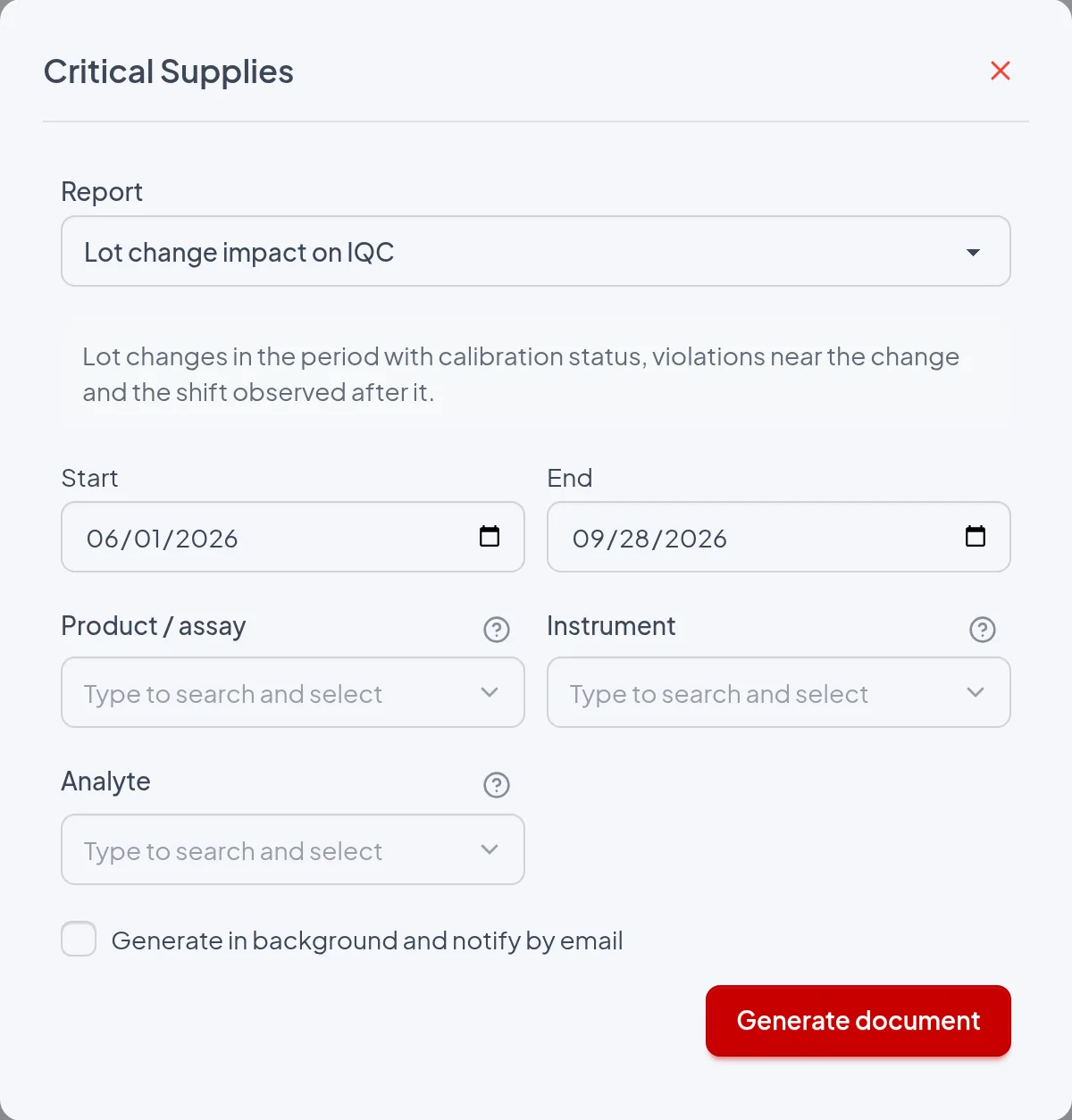
- Start: First day of the period: includes the changes whose Start falls from 00:00 on that day. It is required, and leaving it empty or later than End disables "Generate document". The default is one month ago in the report center and January 1 of the current year in the "Reports and evidence" dialog.
- End: Last day of the period: includes the changes with Start up to 23:59 on that day. It is required and defaults to today. It only limits which changes enter the list, not the runs, violations and shifts in each row.
- Product / assay: Keeps only the changes whose New lot belongs to the chosen product (the product of the Previous lot is not considered) and prints "Product: ‹name›" in the header. When empty, all products are included. When filled in, it prevents the report from being redirected to email because of the volume of runs.
- Instrument: Keeps only the changes on controls of that equipment and prints "Equipment: ‹name›" in the header. When empty, all equipment of the branch is included. When filled in, it also prevents the redirection to email because of volume.
- Analyte: Keeps only the changes on controls of that analyte and prints "Analyte: ‹name›" in the header. Together with Instrument, it restricts the report to a single control. When filled in, it also prevents the redirection to email because of volume.
- Generate in background and notify by email: Does not change the content: when checked, "Report queued. You will receive an email notification." appears and the email contains a link valid for 7 days to a ZIP with "Lot change impact on IQC.pdf", also attached as relatorio.zip when it is smaller than 10 MB. When unchecked, the PDF is downloaded immediately, except when Product / assay, Instrument and Analyte are empty and the branch has more than 1,000 runs dated in the period, counting deleted and preparation runs, in which case it goes to email anyway. "Include evidence documents in the ZIP" is not offered for this report.
The period is compared only with Start, the local date and time at which the lot was declared in use on the control, from 00:00 on the Start day to 23:59 on the End day. Runs after the change counts up to the end of the lot's use on that control, or up to issue if it is still in use, and Violations near the change and Post-change shift show what had been calculated at the time of issue, even after End. For this reason, issuing the same period again later may show different numbers.
The report
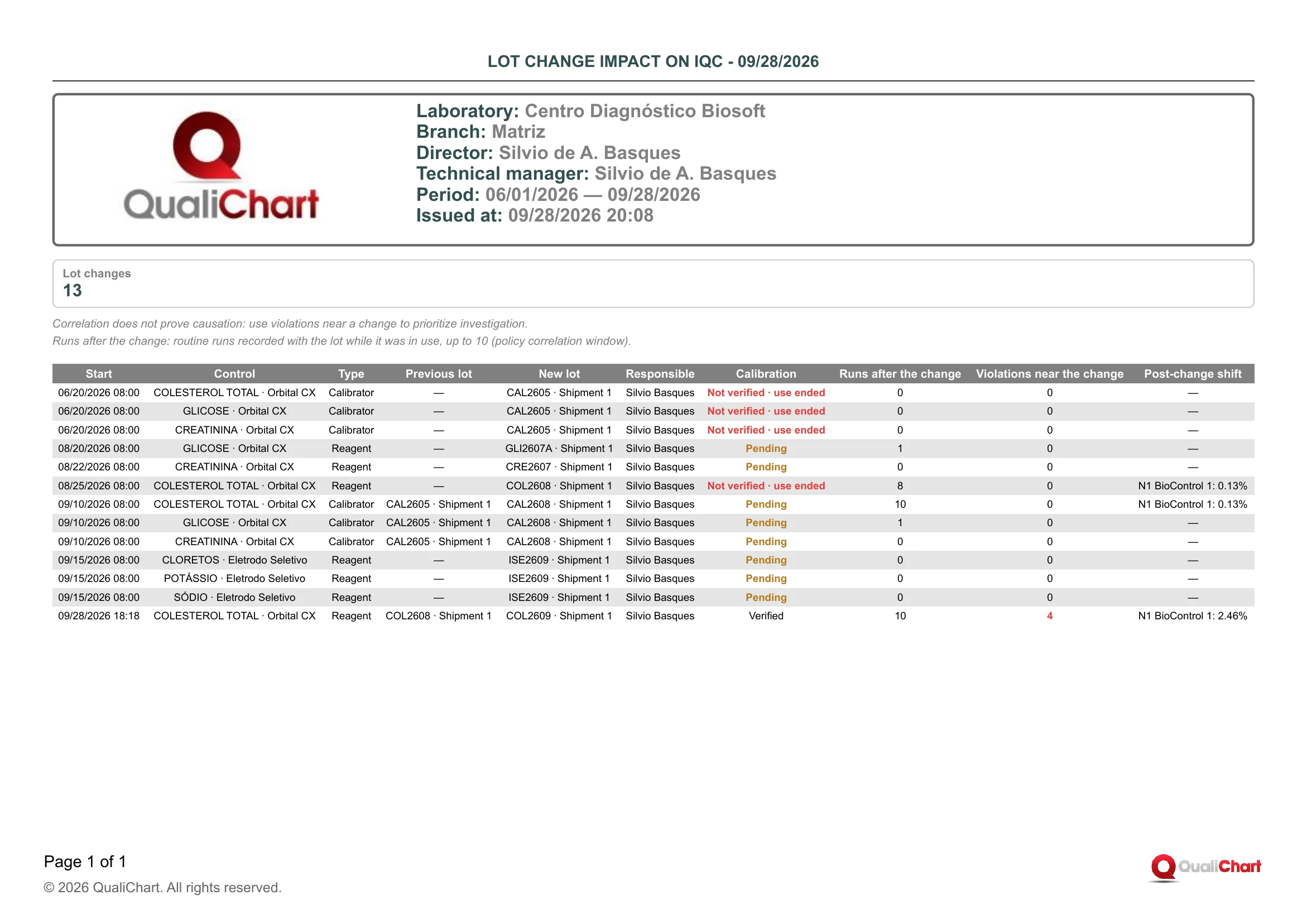
Demo PDF from Centro Diagnóstico Biosoft, Matriz branch, period 06/01/2026 — 09/28/2026, issued at 09/28/2026 20:08: one page, no filter lines, with "Lot changes" = 13 and the second note saying "up to 10". On 06/20/2026 08:00, calibrator CAL2605 · Shipment 1 went into use on COLESTEROL TOTAL, GLICOSE and CREATININA · Orbital CX with Previous lot "—", 0 runs after the change and Calibration "Not verified · use ended" in red. In the last row, from 09/28/2026 18:18, COL2608 · Shipment 1 was replaced by COL2609 · Shipment 1 on COLESTEROL TOTAL · Orbital CX, with Calibration "Verified", 10 runs after the change (the cap in the note), 4 violations near the change in red and "N1 BioControl 1: 2.46%" within the limit. In total, 8 rows are "Pending", 4 "Not verified · use ended" and 1 "Verified", and the rows for COL2608 (08/25) and CAL2608 on COLESTEROL TOTAL (09/10) show the same "N1 BioControl 1: 0.13%".
| Field | Data source | Use |
|---|---|---|
| Header | ||
| Period | Start and End dates chosen in the issue dialog, printed as MM/DD/YYYY — MM/DD/YYYY. | Confirms the interval in which the Start of the listed changes fell. In an audit, check that it covers the entire audited period. |
| Product | Name of the product chosen in Product / assay, from the Critical supplies › Assays register. It only appears when that filter is filled in. | Indicates that only changes to lots of that product were included. Without this line, all products were included. |
| Equipment | Name of the equipment chosen in the Instrument filter. It only appears when the filter is filled in. | Indicates that only controls of that equipment were included. |
| Analyte | Name of the analyte chosen in the Analyte filter. It only appears when the filter is filled in. | Indicates that only controls of that analyte were included. |
| Summary | ||
| Lot changes | Calculated: number of rows in the table, one per control affected by a declaration of use. | Measures the volume of changes, not of lots or declarations: a calibrator declared on 3 controls counts as 3. |
| Change table | ||
| Start (date and time) | Local date and time recorded when confirming "2. Entry into use on controls" in Lot record › Opening and use tab, with no option for a retroactive date. Declaring requires the Manage assays and use permission. | Separates before and after the change. Compare it with the change marker on the Levey-Jennings chart and with the calibration date. |
| Control | Analyte · equipment of each control checked in the declaration of use, with the names from the registers. | Tells which IQC chart to look at for the effect. A lot declared on several controls generates several rows. |
| Type | Supply type field of the product register (Critical supplies › Assays), printed as Reagent, Calibrator or Critical consumable. | Separates a reagent change, which creates a pending calibration when complete, from a calibrator change. For Critical consumable, Runs after the change, Violations near the change and Post-change shift show "—". |
| Previous lot | Lot of the same type last declared on that control before this change, printed as "‹Lot number› · Shipment ‹n›". "—" indicates the first declaration of that type on the control. | Tells what was replaced; rows with "—" are starts of use, with no before to compare. The same lot number with another shipment indicates a shipment change. |
| New lot | Lot declared in use, printed as "‹Lot number› · Shipment ‹n›". Lot number and Shipment (sequential number of the delivery of the same lot) come from Lot record › Receipt tab. | Identifies the suspect lot and shipment when there is a violation or shift. The Lot record contains acceptance, receipt and occurrences. |
| Responsible | User who confirmed the declaration of use, with the name from their user record. | Tells who is accountable for the change and should complete the calibration verification or the investigation. |
| Calibration | "Pending" (orange) arises from a complete reagent change or when the approved acceptance checked "Calibration verification required", and "Verified" or "Waived with justification" are recorded in Control supplies › Lot change history › Calibration verification › Record, with the Approve acceptance permission; the other cases show "Not required". "Not verified · use ended" (red) indicates that the verification was still pending when another lot was declared or the lot was withdrawn from that control. | Resolve the "Pending" rows while the lot is in use and treat "Not verified · use ended" as a nonconformity, since it can no longer be recorded. Revising the mean and SD due to a lot change is only accepted with the calibration verified, waived or not required. |
| Runs after the change | Calculated: routine runs of the control that recorded the row's lot as reagent or calibrator, entered between Start and the end of the lot's use, excluding deleted runs and the preparation phase. It stops at "Correlation window (runs)" in the Laboratory policy (default 10), a value printed in the second note, and shows "—" for consumables and qualitative controls. | Zero indicates that no routine run was entered with the lot while it was in use: check this against the requirement for IQC at every lot change and shipment. A value equal to the cap in the note means that number or more. |
| Violations near the change | Calculated: rejected, non-deleted runs associated with this change by a Westgard sequence rule (2:2s, 4:1s, 7x, 10x or 7T) started within "Correlation window (runs)" (default 10) or "Correlation window (days)" (default 7). In red when greater than zero; "—" for consumables and qualitative controls. | Points out where to investigate first (reagent, calibration, material), comparing before and after on the chart. Record the conclusion in the critical analysis of the nonconformity. |
| Post-change shift | Per active control material: (mean of the first N routine runs of the level with the new lot − mean in use) ÷ mean in use × 100, with N in "Runs for post-change assessment" and the limit in "Post-change shift limit (%)" (default 5 for both) in the Laboratory policy. It shows "N‹level› ‹material›: x.xx%" (negative when below the mean), with "(outside the limit)" and a red cell when any level exceeds the limit, and "—" before N runs, without a mean in use, for consumables or for qualitative controls. | Detects early a bias introduced by the new lot even without a Westgard violation; in red, investigate calibration, reagent and material. The details are in Control supplies › Post-change shift assessment, and it does not replace the acceptance study. |
Reading cautions
- Correlation does not prove causation: a violation near the change may come from the material, the equipment or the operator, and a change may shift patient results without violating any rule.
- Only runs entered with the supplies recorded on them count, on controls that adopted the module and after the adoption, and what counts is the time of entry in QualiChart, not the run date.
- Violations near the change counts rejected runs, not rules, and only associates them through sequence rules, so 1:3s or R:4s alone never appear in that column.
- Each run is associated with a single change, the most recent one within the window and of any type, so a reagent and a calibrator changed almost at the same time split the violations, and a violation associated with a consumable change does not appear, because that row prints "—".
- Nearby reagent and calibrator changes may be assessed with the same runs and show the same shift, like COL2608 and CAL2608 in the example, and the PDF does not print the N or the limit used.
- Changes whose New lot is archived and those from other branches are left out, and the report does not show partial changes, the acceptance result, the end-of-use date or calibration evidence, which are in the Lot record and in Control supplies › Lot change history.
11.10 Imprecision decomposition
For each quantitative control (analyte × equipment) that has had a reagent lot declared in use, splits the IQC imprecision in the period into variation within a single reagent lot (within-lot) and variation introduced by lot changes (between-lot). It also shows, for each control material level, total SD and CV, Sigma and how many runs have no recorded reagent lot. It supports the periodic IQC management review: it shows whether lot changes weigh on variation and where to strengthen new lot acceptance and limit review.
RDC 978/2025 (art. 183) requires IQC, at a minimum, at every lot change and every shipment of single-use products. ISO 15189:2022 (clause 6.6) calls for acceptance testing of new lots, CLSI EP26 guides that evaluation, and none of them requires decomposing imprecision. The report calculates the indicator the guideline suggests for the periodic review (how much lot changes contribute to the control's total variation). It is supporting evidence and does not replace IQC at the change or the acceptance of each lot.
Where to issue it and filters
Reports › Critical Supplies › Report field › "Monitoring and occurrences" group › "Imprecision decomposition". It is also available in the "Reports and evidence" dialog, opened by the button of the same name on the Critical supplies and Suppliers lists. That dialog does not have the Instrument and Analyte filters. The report does not appear in the dialog opened from the Lot record or from a supplier's record.
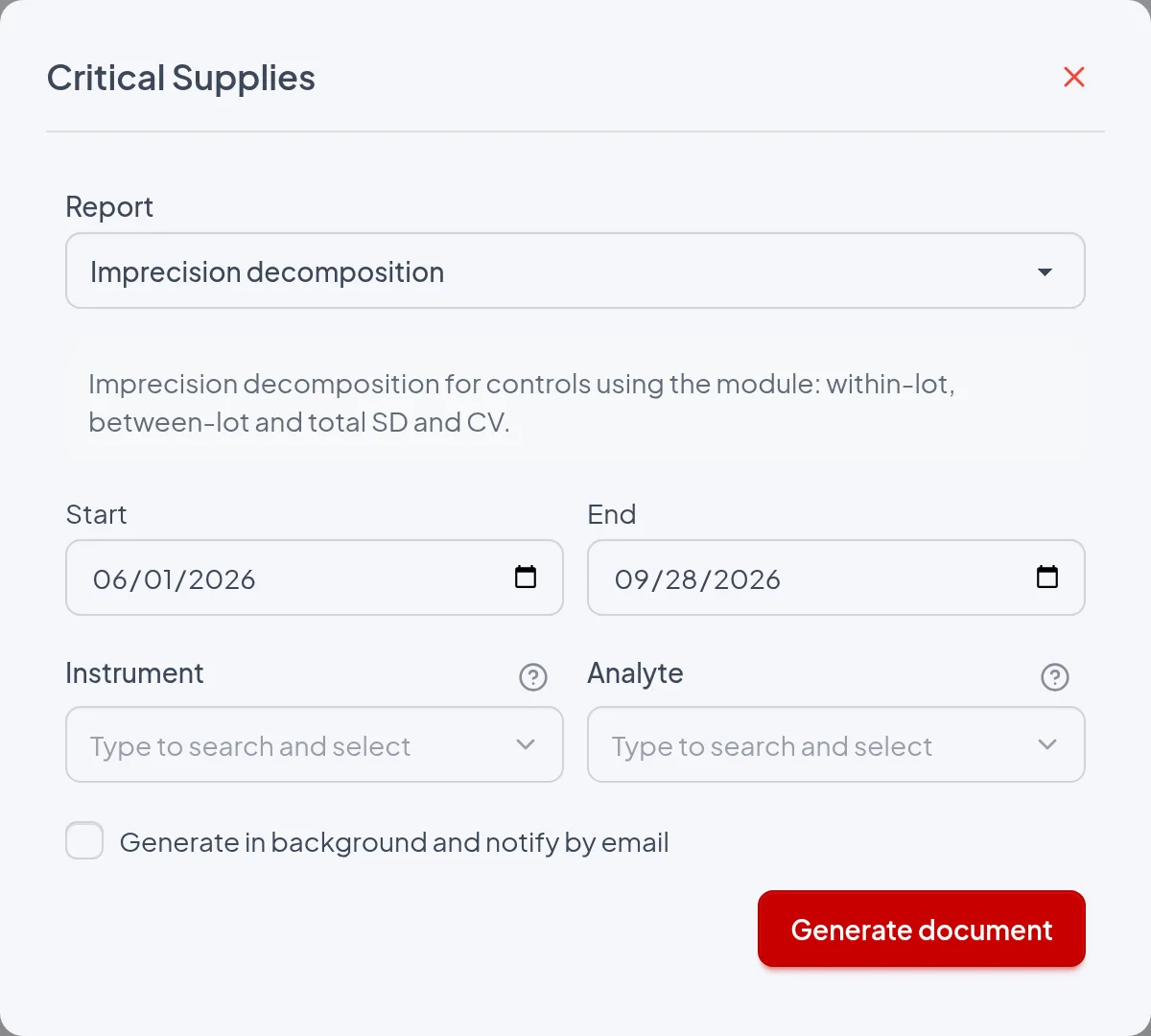
- Start / End: Required: only results from runs dated between Start and End, both days included, are counted, and the dates are printed in the header as "Period". If End is earlier than Start, the Generate document button is disabled; the "Reports and evidence" dialog also shows "The end date must be on or after the start date.". Default: from one month ago to today in Reports and from January 1 to today in the "Reports and evidence" dialog.
- Instrument: Restricts the report to that instrument's controls and prints the line "Equipment: ‹name›" in the header. If left blank, all instruments of the branch are included.
- Analyte: Restricts the report to that analyte's controls and prints the line "Analyte: ‹name›" in the header; combined with Instrument, only the control that matches both is printed. A qualitative analyte produces an empty report, because these analytes are excluded from the report. If left blank, all analytes are included.
- Generate in background and notify by email: The report becomes a task, the screen shows "Report queued. You will receive an email notification." and the PDF "Imprecision decomposition.pdf" arrives inside a ZIP file, through the link sent by email. This also happens without checking the option when Instrument and Analyte are blank and the branch has more than 1,000 runs in the period, counting all controls, preparation runs and excluded runs. If unchecked and below that limit, the PDF downloads immediately.
The period is compared with the date of the run entered in the Control Panel, including Start and End; the lot change date is not used. A control appears when it has had a reagent lot declared in use, on any date (Lot record › Opening and use tab › "2. Entry into use on controls"), and has a routine result in the period. Only levels with results in the period are printed, and a control with no rows is omitted.
The report
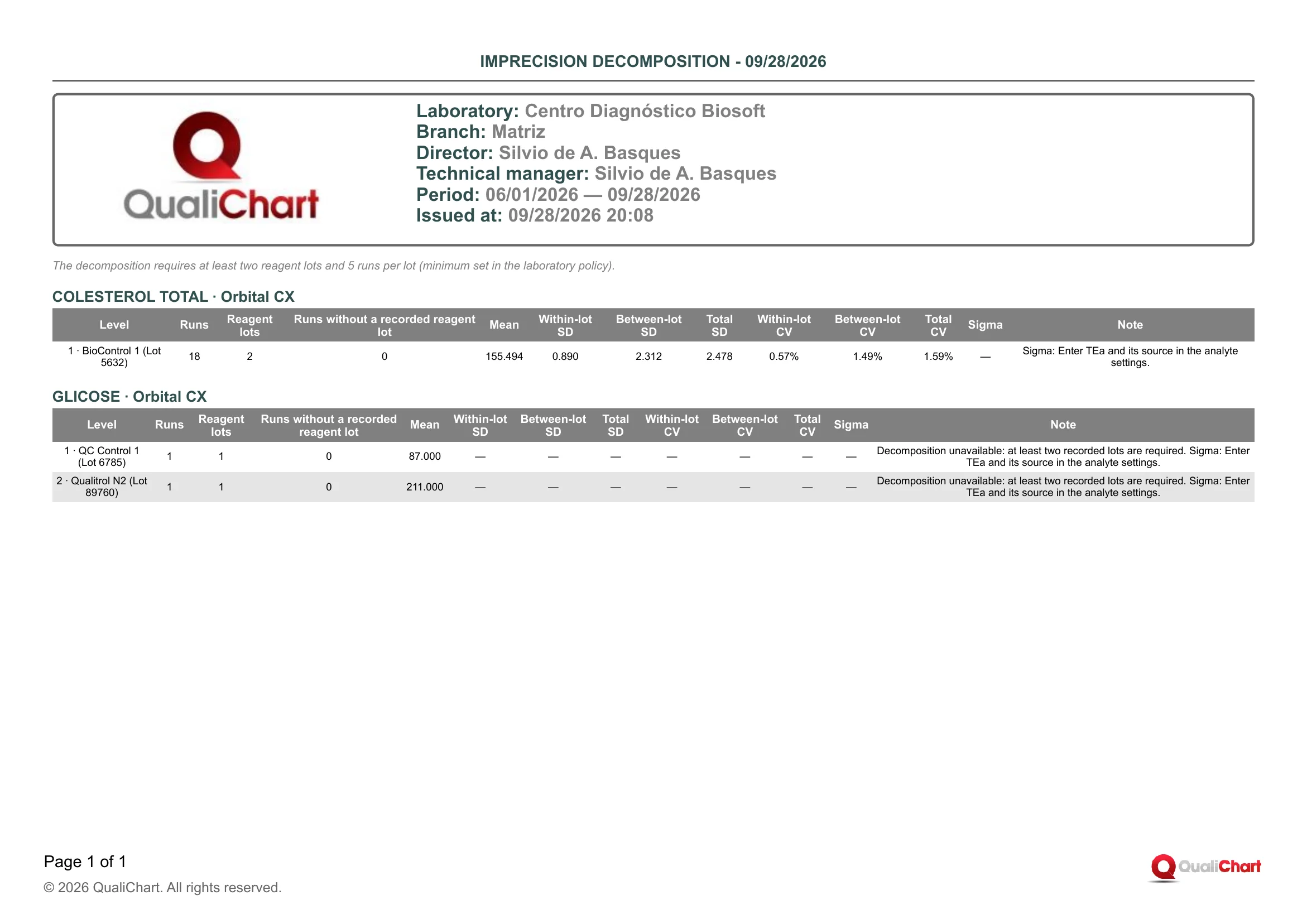
In the demo laboratory (Matriz branch, period 06/01/2026 — 09/28/2026, no filters), the note shows the minimum of 5 runs per lot and two blocks are printed. In COLESTEROL TOTAL · Orbital CX, "1 · BioControl 1 (Lot 5632)" has 18 runs, 2 reagent lots, 0 runs without a lot, Mean 155.494, Within-lot SD 0.890, Between-lot SD 2.312, Total SD 2.478 and Total CV 1.59%: at this level, lot changes weigh more than the imprecision within the lot. Sigma shows "—" with "Sigma: Enter TEa and its source in the analyte settings.", and even with TEa the 18 runs would still be below the 20 required. In GLICOSE · Orbital CX, "1 · QC Control 1 (Lot 6785)" and "2 · Qualitrol N2 (Lot 89760)" have 1 run and 1 lot each and show only the Mean (87.000 and 211.000) and "Decomposition unavailable: at least two recorded lots are required.".
| Field | Data source | Use |
|---|---|---|
| Header | ||
| Period | Start and End dates chosen in the dialog, in the format MM/DD/YYYY — MM/DD/YYYY. | Confirms the window of runs analyzed. For the management review, use the IQC review period, covering at least one lot change. |
| Equipment | Instrument filter in the dialog. Printed only when filled in. | Shows that the report was restricted to one analyzer. |
| Analyte | Analyte filter in the dialog. Printed only when filled in. | Shows that the report was restricted to one analyte. |
| Note below the header | ||
| The decomposition requires at least two reagent lots and ‹N› runs per lot (minimum set in the laboratory policy). | N is the value in effect at issue of the "Minimum runs per lot for decomposition" field (Critical supplies › Settings › Laboratory policy; default 5, minimum 2). | Records the criterion used and explains why some rows have no components. Do not lower the minimum just to produce numbers. |
| Block for each control | ||
| Block title (‹analyte› · ‹equipment›) | Names of the control's analyte and equipment, as registered. | Identifies the control. Each block is an analyte × analyzer pair. |
| Level | Text "‹level› · ‹material› (Lot ‹material lot›)", with the Level from the Analyte Association tab and the Name and Lot from the control material record. One row per control material with results in the period, ordered by level and material. | Identifies the level and the control material lot. An expected level that does not appear had no routine result in the period. |
| Runs | Calculated: routine results for that level in the period (last recorded value), including those without a reagent lot. Preparation runs, excluded runs and results, and results without a value are left out. | Shows whether there is enough data. Total CV requires 10 or more runs and Sigma 20 or more. |
| Reagent lots | Calculated: distinct reagent lots recorded on those runs; each run automatically records the lot declared in use on the control when it is entered. It also counts lots below the policy minimum, which are left out of the components. | With 0 or 1 lot there is no decomposition. With 2 or more, check the Note to see whether any lot was left out. |
| Runs without a recorded reagent lot | Calculated: how many of the results in Runs come from runs with no recorded reagent lot, usually entered before the control had a reagent lot declared. Highlighted when greater than 0. | These results count in Mean, Total SD and Total CV, but not in the components. If they belong to a known lot, consider correcting the lot assignment before using the numbers. |
| Mean | Calculated: arithmetic mean of all results counted in Runs. Three decimal places, in the analyte's unit, which is not printed. | Compare with the control's Mean in use and with the material's Mean (Xm). It is the mean used for the Sigma bias. |
| Within-lot SD | Calculated by one-way ANOVA (random effects), grouping results by the run's reagent lot and using only lots that reach the minimum: square root of the within-lot variance. Shows "—" when there is no decomposition. | It is the method's imprecision within a single lot. Compare with the control's SD in use and with the precision stated in the IFU. |
| Between-lot SD | Calculated by the same ANOVA: square root of (between-lot mean square − within-lot mean square) ÷ effective size per lot, set to 0 when negative. Shows "—" when there is no decomposition. | Shows how much lot changes shift results. If it is similar to or greater than the Within-lot SD, strengthen new lot acceptance and verification after the change. |
| Total SD | Calculated: with decomposition and no runs without a lot, square root of the sum of the within-lot and between-lot variances. Otherwise, sample SD of all results for the level ("—" with fewer than 2). | Long-term variation, across lot changes. If the control's SD in use is much smaller, consider reviewing the limits. |
| Within-lot CV | Calculated: Within-lot SD ÷ mean of the results of the lots in the decomposition × 100, with 2 decimal places and %. | Compare with the repeatability or intermediate precision CV stated in the IFU. |
| Between-lot CV | Calculated: Between-lot SD ÷ mean of the results of the lots in the decomposition × 100, with 2 decimal places and %. | The larger it is relative to the Within-lot CV, the more lot changes explain the variation. In that case, the acceptance of each lot (CLSI EP26) becomes more important. |
| Total CV | Calculated: Total SD ÷ mean × 100, with 2 decimal places and %. Printed only with 10 or more runs, the same CV minimum used in the Control Panel. | Compare with the Maximum imprecision in the analyte settings, since the report does not make this comparison. It is the CV used in Sigma. |
| Sigma | Calculated: (TEa − |bias%|) ÷ Total CV, with 2 decimal places; the bias compares the Mean with the material's Mean (Xm), and TEa is the larger of TEa (%) and Absolute TEa converted to % of Xm in the analyte settings. Shows "—" without TEa, with an unassayed material or no Xm, with fewer than 20 runs, or with a non-positive mean or CV. | Above 6, performance is excellent; below 3, consider stricter control rules. With "—", the reason is in the Note. |
| Note | Automatic texts in sequence: decomposition unavailable (fewer than two lots or runs per lot below the minimum), "‹n› lot(s) with fewer runs than the minimum were left out of the decomposition.", negative between-lot variance set to zero, and "Sigma: ‹reason›". Shows "—" when there is no warning. | Explains missing or limited numbers in the row. To obtain components, extend the period or wait for more runs of the second lot; for Sigma, correct the indicated setting. |
Reading cautions
- Only the reagent lot recorded on the run separates the groups, so calibrator changes, recalibrations and maintenance within the same lot count as within-lot variation.
- Each run's lot is the one declared in use at the time of entry, so a run processed before the change but entered after it keeps the new lot until Lot record › Traceability tab › Correct lot assignment is used.
- With runs without a recorded reagent lot, Total SD is the observed SD of all results and does not reconcile with the two components; without them, lots below the minimum count in Runs and Mean but are left out of Total SD and Total CV.
- With 2 or 3 lots, or with a Between-lot SD of 0.000 due to a negative estimate, the between-lot component is highly uncertain and does not prove the absence of an effect, so compare successive periods before deciding.
- The Note shows only the first missing Sigma prerequisite (TEa, target, number of runs, CV), and the TEa and Mean (Xm) used are those registered at issue, applied to the whole period.
- A high Between-lot CV does not indicate which lot or the cause: investigate with "Lot change impact on IQC" and "Acceptance and comparison".
11.11 Incidents and recalls
Brings together the period's occurrences on the branch's critical supply lots (incidents, recalls and field safety corrective actions, FSCA), including recalls of the same lot recorded on another shipment or branch and the FSCAs linked to them. Each occurrence shows severity, description, action taken, notification, responsible person, current lot status, related record and evidence document, followed by the branch's IQC runs that were recorded with the lot. It is used to respond to a recall, document the investigation and notification of an event, and present these records in audits or in the management review.
RDC 978/2025, art. 90, requires the laboratory to monitor occurrences with the products it uses, notify through Notivisa when applicable and cooperate with field actions, which are the responsibility of the manufacturer or registration holder (RDC 67/2009, RDC 551/2021 and ISO 15189:2022, clause 6.6), and art. 115 requires the records to be kept for at least 5 years. The report shows what was recorded in the Occurrences tab of the lot record and the runs recorded with the lot; notification in Notivisa and assessment of clinical impact remain the laboratory's responsibility.
Where to issue it and filters
In Reports › Critical Supplies, choose "Incidents and recalls" in the Report field, group "Monitoring and occurrences". It is also available in the dialog of the "Reports and evidence" button on the Critical supplies and Suppliers lists (all lots of the branch) and on the lot record (open lot fixed), where you can select several reports, which come together in a ZIP; it does not appear in the dialog of a supplier's record. Issuing it requires no specific module permission, but recording occurrences, in Lot record › Occurrences tab › Record incident or action, requires "Manage assays and use".
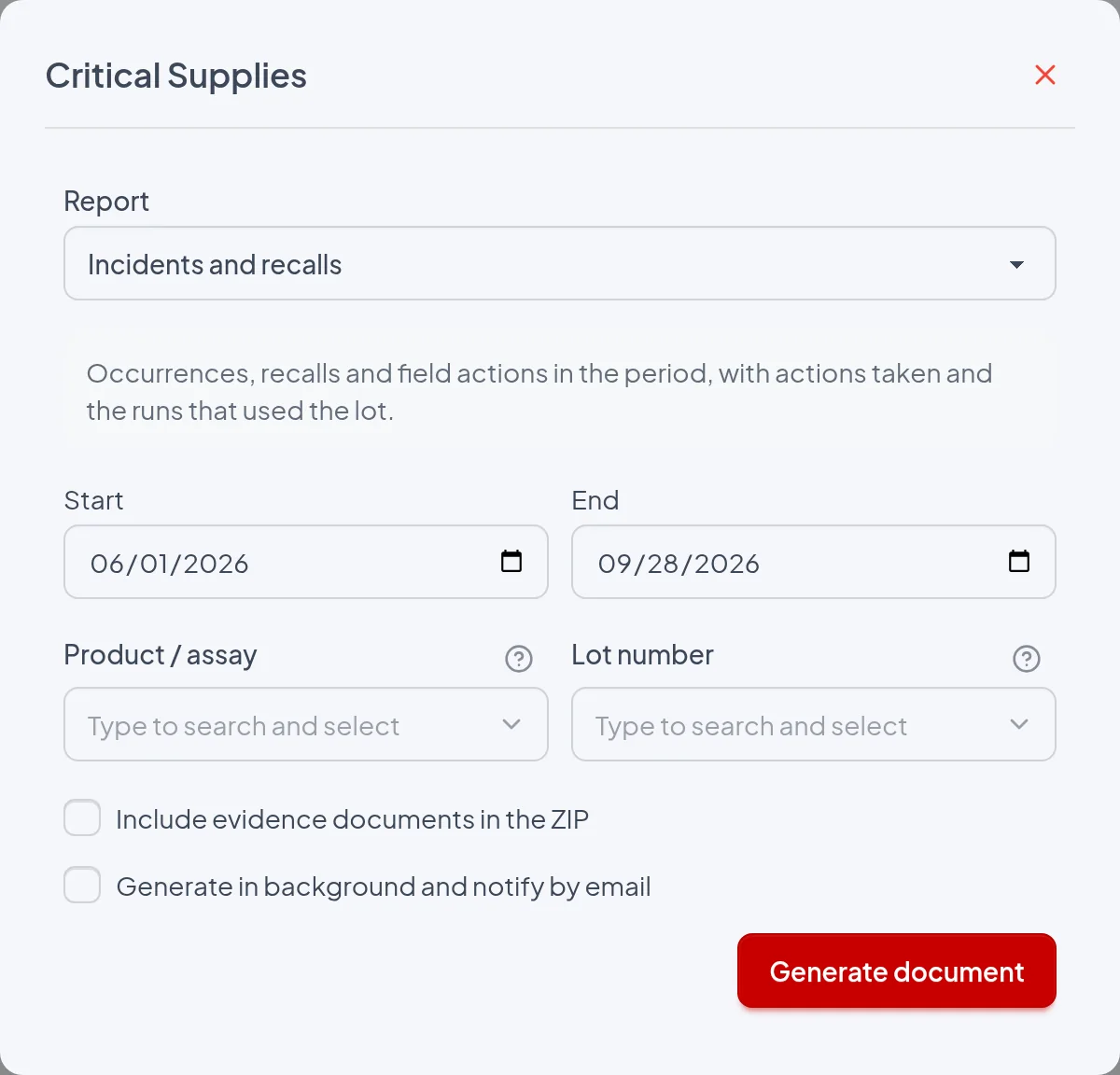
- Start: Required; it is compared with the occurrence Date/time from 00:00 of that day, in the user's time zone, and is printed in the header under "Period". In Reports › Critical Supplies the default is one month before today; in the "Reports and evidence" dialog, January 1 of the current year, or the lot's receipt date when opened from the lot record. It does not limit the "Runs that used the lot" table.
- End: Required; it is the last day of the period, included up to 23:59 in the user's time zone, and the default is today. If it is earlier than Start, the Generate document button is disabled, and the "Reports and evidence" dialog also shows "The end date must be on or after the start date.".
- Product / assay: Only exists in Reports › Critical Supplies; limits the report to occurrences on lots of that product, including archived ones, and prints the "Product" line in the header. When a product is chosen, the Lot number list shows only its lots and any lot already chosen is cleared. When blank, all products of the branch are included.
- Lot number: Limits the report to occurrences recorded on that shipment, recalls recorded on any shipment of the same lot (same product and number, in any branch) and FSCAs linked to those recalls, and prints the "Lot" line in the header. The list does not show archived lots, which are only included when the field is blank. In the dialog opened from the lot record, the lot is fixed.
- Include evidence documents in the ZIP: Generates a ZIP with "Incidents and recalls.pdf" and the evidence/ folder, which contains the file attached to each printed occurrence, with the same name shown in Evidence document. Other lot documents, such as the invoice or certificates, are not included. With no lot chosen, the package goes to the background and the dialog warns "With documents, the package is sent by email unless a lot is chosen or, in the supplier report, a single supplier.".
- Generate in background and notify by email: The report is queued, the dialog shows "Report queued. You will receive an email notification." and the email contains a link to the ZIP valid for 7 days; the ZIP is also attached when it is smaller than 10 MB. Even with the option unchecked, generation goes to the background when Product / assay and Lot number are blank and the branch has more than 1,000 runs dated within the period, or when there are documents without a chosen lot. The report content does not change.
The period is compared with the occurrence Date/time, with the Start and End days taken in full in the user's time zone; the date the record was entered in the system is neither used nor printed (check it in the Supply audit trail). An FSCA recorded on another shipment or branch is only included when both it and the recall it is linked to fall within the period. The "Runs that used the lot" table is not limited by the period and lists the runs recorded with the lot on any date, before or after the occurrence.
The report
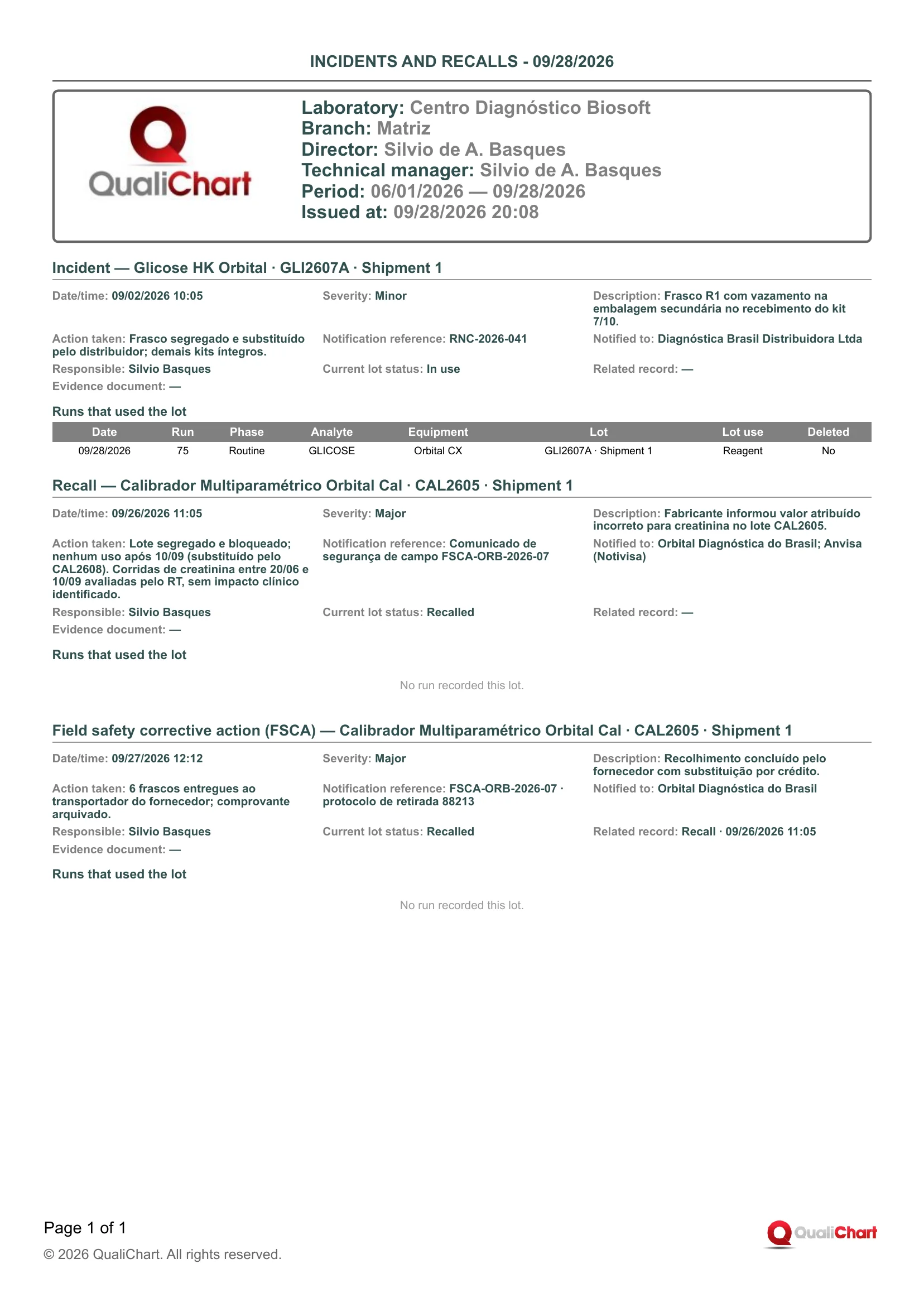
The demonstration PDF (Centro Diagnóstico Biosoft, Matriz branch, period 06/01/2026 — 09/28/2026, without the Product and Lot lines) has three blocks on one page. The Incident on Glicose HK Orbital · GLI2607A · Shipment 1, of 09/02/2026 10:05 with Minor severity, Notification reference RNC-2026-041 and Current lot status In use, lists run 75 of 09/28/2026 (Routine, GLICOSE, Orbital CX, Reagent, Deleted No), after the event. The Recall of Calibrador Multiparamétrico Orbital Cal · CAL2605 · Shipment 1, of 09/26/2026 11:05, notified to "Orbital Diagnóstica do Brasil; Anvisa (Notivisa)" and with Current lot status Recalled, shows "No run recorded this lot.", although the Action taken mentions creatinine runs assessed by the technical manager. The Field safety corrective action (FSCA) of 09/27/2026 12:12 has Related record "Recall · 09/26/2026 11:05", which links it to the recall.
| Field | Data source | Use |
|---|---|---|
| Header | ||
| Period | Start and End fields of the dialog, printed as Start — End. | Confirm that the range covers the dates of the occurrences you need to demonstrate. |
| Product | Product / assay filter. Printed only when filled in. | Records that the document covers only the lots of that product. |
| Lot | Lot number filter or the fixed lot of the lot record, printed as ‹number› · Shipment ‹n›. Only appears when there is a lot. | Records the shipment-level scope, which includes recalls of the same lot recorded on other shipments or branches. |
| Block for each occurrence | ||
| Incident / Recall / Field safety corrective action (FSCA) | Start of the block title. Comes from the Event type field in Lot record › Occurrences tab › Record incident or action. | A recall withdraws all shipments of the same lot from use in all branches; an FSCA is the field action linked to an earlier record and does not change the lot status. In an audit, locate each recall and the FSCA that concludes it. |
| Shipment | Rest of the title: product, lot number and shipment on which the occurrence was recorded, as in the Receipt tab of the lot record. | Identifies the affected delivery. Check that product and number match the manufacturer's notice. |
| Date/time | "Occurrence date and time" field, which does not accept a future date and can be backdated. When blank, the time of recording is used. | It is the event's reference date. Use it to measure the response time until the action taken and the notification. |
| Severity | Severity field (Minor, Major, Critical), based on the laboratory's assessment. | Sets the review priority. An Incident with Critical severity suspends the lot and blocks entries until another lot is declared, unless it was already closed, recalled or rejected. |
| Description | Description field (required, free text). | Check that the text is enough to investigate the cause and notify the manufacturer or the authority. |
| Action taken | "Action taken" field (required, free text). | It is the evidence of the action taken (segregation, replacement, contact with the manufacturer, assessment of the runs). Check that it is consistent with the severity. |
| Notification reference | "Notification reference" field (required, up to 240 characters): notice, alert, protocol or internal NCR. | Links the record to the manufacturer's notice, the Notivisa protocol or the internal nonconformity. |
| Notified to | "Notified manufacturer/authority" field (optional). When blank, "—" is printed. | Shows who the event was reported to. When notification is mandatory, check that Anvisa (Notivisa) is listed. |
| Responsible | User who recorded the occurrence, filled in automatically. | Indicates who is accountable for the record, not necessarily who carried out the action taken. |
| Current lot status | Status, on the issue date, of the shipment on which the occurrence was recorded: Received, Under acceptance, Approved, In use, Suspended, Rejected, Recalled or Closed. | Confirm that a recalled or suspended lot is not still In use. It is not the status on the occurrence date. |
| Related record | "Related incident record" field (required for FSCA): an occurrence already recorded on the same shipment. Printed as ‹Type› · ‹Date/time› of the linked record, or "—". | Links the FSCA to the recall or incident it concludes. Check that each recall has an FSCA that closes it. |
| Evidence document | File attached in the record's Evidence document field, printed as ‹code›-‹file name›. With no attachment, "—" is printed. | Confirm that each occurrence has its evidence. In the ZIP with documents, the file is in the evidence/ folder with the same name. |
| Runs that used the lot | ||
| Date | Run date, recorded automatically when the run is entered or imported in IQC. | Places in time the results that may have been affected. Compare it with the Date/time and with the period covered by the notice. |
| Run | Run number in the IQC entry. | Locates the run in the control to review results, violated rules and released reports. |
| Phase | Preparation for runs entered in the control's preparation phase; Routine for the others. | Separates routine runs, which accompany the release of results, from preparation runs. |
| Analyte | Analyte of the control in which the run was entered. | Shows which tests used the lot. |
| Equipment | Equipment of the control in which the run was entered. | Shows where to segregate the supply and review the IQC. |
| Lot | Shipment recorded on the run, as ‹number› · Shipment ‹n›. It is saved at entry from the lot declared in use (Opening and use tab) and can be corrected in the Traceability tab. | In a recall, shows which shipment each run used, because the table brings together all shipments of the lot in the branch. |
| Lot use | Reagent or Calibrator, according to the shipment's role in the run. | With a reagent, the effect is limited to the runs performed with it. With a calibrator, assess all runs performed under that calibration. |
| Deleted | Yes, highlighted, when the run was deleted in IQC; No for the others. | Check the reason for deletion before removing the run from the impact assessment. |
| No run recorded this lot. | Sentence printed in place of the table when no run of the branch has the shipment recorded (for a recall, no shipment of the lot in the branch). | In that case, document in Action taken how the lot's use was assessed. |
Reading cautions
- Runs entered before the lot's use was declared or before the module was activated are not recorded with it, so "No run recorded this lot." does not prove that the lot was not used.
- Being in the table indicates use of the lot, not an affected result: it includes deleted and preparation runs, from any date and with no row limit, and assessing the impact on patient reports is the responsibility of the technical manager, recorded in Action taken.
- For calibrators, the table may include runs entered after the calibrator ran out, because the calibration performed with it remains valid until another calibrator is declared.
- A recall or FSCA recorded on another shipment or branch shows, in the title and in Current lot status, the shipment where it was recorded, without indicating the branch, and only the recall brings together in the table the runs of the shipments of the same lot in this branch.
- When filtering by Lot number, incidents recorded on other shipments of the same lot are not included, and an FSCA from another shipment is only included when it is linked to a recall included in the report.
- Notification reference and Notified to are text entered by the user: the system neither sends nor verifies the notification in Notivisa.
11.12 Supply management review
Brings together in a single document the branch's critical supply indicators for the period: receipts, acceptances, occurrences, IQC nonconformities near lot changes, performance by supplier, suppliers to re-evaluate and products with the most violations near changes. It serves to bring data to the periodic management review and to supplier re-evaluation, and to decide where to investigate first. It does not replace the formal supplier evaluation, which remains recorded in the supplier's record.
RDC 978/2025 requires supplier qualification criteria (arts. 79 to 81), receipt records (art. 100), monitoring of incidents and field actions (art. 90) and IQC at every lot change and shipment of single-use products (art. 183), and ISO 15189:2022 (clause 6.8) requires supplier performance evaluation and re-evaluation; neither of them prescribes this report. The report only gathers these records as indicators for the periodic review and re-evaluation, as the guide recommends, and the PDF can be kept as a record of the review for the minimum period of 5 years (art. 115).
Where to issue it and filters
In the Reports › Critical Supplies menu (visible when the critical supplies module is enabled), choose "Supply management review" in the Report field, under the "Management and audit" group; no special permission is required. It can also be selected in the "Reports and evidence" dialog, opened by the button of the same name on the Critical supplies and Suppliers lists. It is not offered in the lot record dialog or in a supplier record's dialog. It always covers the branch the user is logged into.
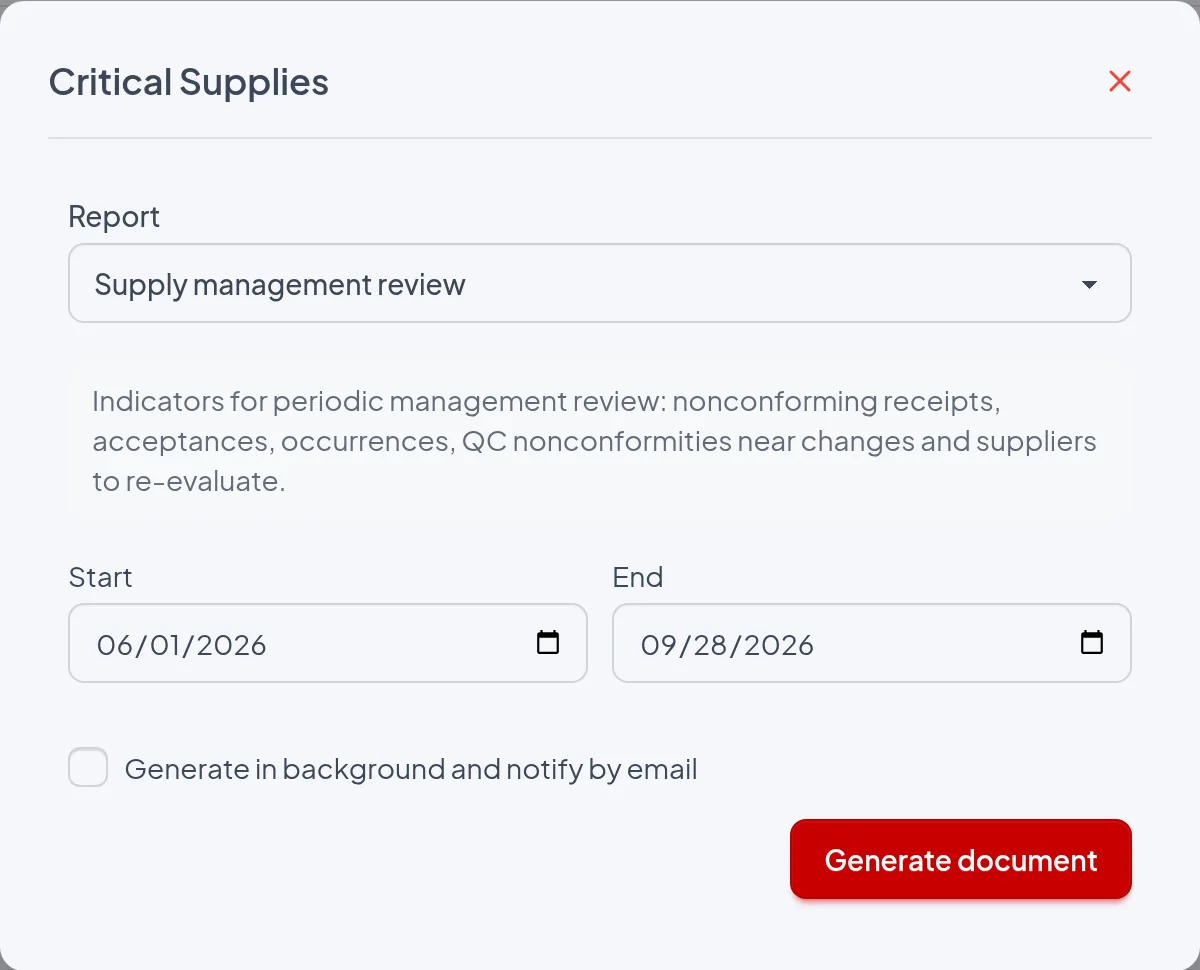
- Start: Required; first day of the period, inclusive. It is prefilled with the date one month ago in the report center and with January 1 of the current year in the "Reports and evidence" dialog. If empty or later than End, the "Generate document" button is disabled.
- End: Required; last day of the period, included through the end of the day in the user's time zone, prefilled with today's date. It cannot be earlier than Start.
- Generate in background and notify by email: Does not change the content: when checked, the request is scheduled and a link valid for 7 days arrives by email, with the relatorio.zip package attached when it is smaller than 10 MB; when unchecked, the PDF is downloaded immediately. If the branch has more than 1,000 runs dated in the period, counting all controls as well as deleted and preparation-phase runs, the request goes to the background even with the box unchecked.
- Include evidence documents in the ZIP: Does not appear for this report in the report center and, in the "Reports and evidence" dialog, only appears when another report with evidence is selected. This report adds no documents to the package, and checking the box in that dialog sends the package by email.
Each block uses the record's own date: Receipt date for receipts and rejected lots, the date and time the study or waiver was recorded for acceptances (not "Decided on"), Occurrence date and time for incidents and recalls, and the run date for IQC nonconformities and the product table. Therefore, an incident in the period counts even on a lot received before Start, and the change correlated with a run in the period may have been made before Start. The table of suppliers without a current approval ignores the period and shows the status on the issue date.
The report
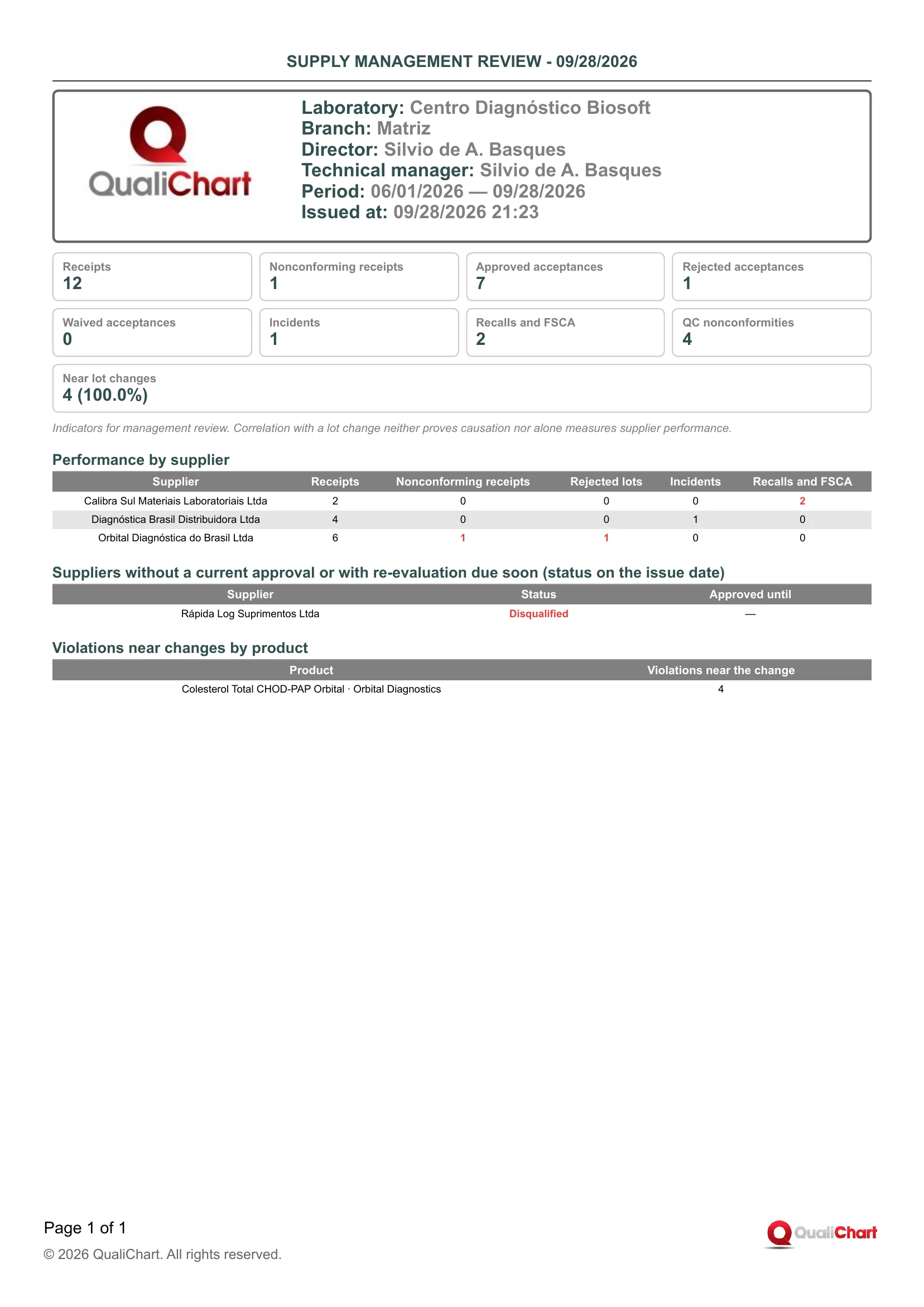
In the demo laboratory (Matriz branch), with the period 06/01/2026 — 09/28/2026, the summary shows 12 receipts, 1 nonconforming, 7 approved acceptances, 1 rejected, 0 waived, 1 incident, 2 recalls and FSCA, 4 QC nonconformities and Near lot changes "4 (100.0%)". In Performance by supplier, Orbital Diagnóstica do Brasil Ltda has 6 receipts with 1 nonconforming and 1 rejected lot in red, and Calibra Sul Materiais Laboratoriais Ltda has 2 recalls and FSCA in red. Rápida Log Suprimentos Ltda appears as Disqualified, with Approved until "—", and the product table lists "Colesterol Total CHOD-PAP Orbital · Orbital Diagnostics" with 4. Reading: all rejections in the period occurred near cholesterol changes, which is where the investigation should start, confirming in the lot record who delivered these lots before linking them to Orbital.
| Field | Data source | Use |
|---|---|---|
| Header | ||
| Period | Start and End dates chosen when issuing the report. | Confirm that it matches the management review cycle, for example the quarter or the year. |
| Summary | ||
| Receipts | Branch shipments with a Receipt date in the period (Lot record › Receipt tab). Archived lots are not included. | Volume of deliveries in the period. It is the basis for reading Nonconforming receipts. |
| Nonconforming receipts | Shipments in the period with a Condition on receipt other than Intact (Damaged, Temperature compromised or Discrepant). | Points to transport, packaging or documentation problems. See in the supplier table which suppliers account for them. |
| Approved acceptances | Studies recorded in the period (Lot record › Acceptance tab) whose current conclusion is Approved or Approved with restriction. Each study counts once. | How many comparisons released new lots. Check the approvals with restriction in the Acceptance and comparison report. |
| Rejected acceptances | Studies recorded in the period whose current conclusion is Rejected (Reject button). | Signals variation between lots or a storage failure. Recurring values go into the supplier re-evaluation. |
| Waived acceptances | Waivers recorded in the period with the Waive acceptance with justification button. | Releases made without a comparison. Check whether each justification meets the laboratory's policy. |
| Incidents | Occurrences of the Incident type with an Occurrence date and time in the period (Lot record › Occurrences tab), in the branch's non-archived lots. | Measures the reliability of the product in use. The details are in the Incidents and recalls report. |
| Recalls and FSCA | Occurrences of the Recall or Field safety corrective action (FSCA) type dated in the period, in the branch's non-archived lots. | Field actions that reached the laboratory. See the actions taken and affected runs in the Incidents and recalls report. |
| QC nonconformities | Runs dated in the period, from controls that use the supply module and saved with the supply record, with at least one violation of a rule set to Reject; each run counts once. Deleted runs, preparation-phase runs and runs entered before the module was adopted are excluded. | Shows how many IQC rejections occurred in the controls tracked by the module. It is the basis for the Near lot changes proportion. |
| Near lot changes | Of these runs, how many the system correlated with a lot change of the control, according to the Correlation window (runs) and Correlation window (days) in the Laboratory policy. The proportion over QC nonconformities appears in parentheses; it shows "—" when there was no nonconformity. | Indicates where to investigate first, without proving the cause. It should match the "IQC nonconformities near lot changes" panel on the Critical supplies list for the same period. |
| Note below the summary | ||
| Indicators for management review. Correlation with a lot change neither proves causation nor alone measures supplier performance. | Fixed report text. | A reminder that the numbers guide the investigation and are not, on their own, a supplier score. |
| Performance by supplier | ||
| Supplier | Supplier entered at receipt (Receipt tab) for the lots received or with an occurrence in the period. Lots without a supplier go on the "No supplier" row, which is always last. | One row per supplier with activity in the period, in alphabetical order. Suppliers with no receipt or occurrence in the period do not appear. |
| Receipts | Shipments from this supplier with a Receipt date in the period. | Basis for comparing failures between suppliers with different volumes. |
| Nonconforming receipts | Shipments from this supplier in the period with a Condition on receipt other than Intact. In red when greater than zero. | Take recurring delivery problems to the supplier re-evaluation. |
| Rejected lots | Shipments from this supplier received in the period whose current status is Rejected. In red when greater than zero. | Points to variation between lots of this supplier's product. Check the studies in the Acceptance and comparison report. |
| Incidents | Occurrences of the Incident type dated in the period in this supplier's lots, even if received before Start. | Measures the reliability of the product in use, by supplier. |
| Recalls and FSCA | Occurrences of the Recall or Field safety corrective action (FSCA) type dated in the period in this supplier's lots. In red when greater than zero. | Consider them in the re-evaluation and check the response given by the supplier. |
| Suppliers without a current approval or with re-evaluation due soon (status on the issue date) | ||
| Supplier | Active suppliers (Critical supplies › Suppliers) that are currently neither Approved nor Conditionally approved, or whose Approval valid until date falls within the Expiry warning lead time (days) of the Laboratory policy. Sorted by name. | Work list: schedule the re-evaluation in the supplier record (Record evaluation) or stop buying from disqualified suppliers. |
| Status | Current status based on the most recent evaluation: Evaluation expired, Disqualified or Not evaluated in red; Approved or Conditionally approved highlighted as a warning when the approval expires within the warning period. | Red: receipt refuses lots from this supplier. Warning: re-evaluate before expiry so that the next receipts are not blocked. |
| Approved until | Approval valid until from the most recent evaluation; if it was left blank when approving, the evaluation date plus the Supplier re-evaluation interval (months) applies. Shows "—" for a disqualified or never-evaluated supplier. | Deadline to complete the re-evaluation. A date already past corresponds to the Evaluation expired status. |
| Violations near changes by product | ||
| Product | Product of the lot that went into use in the correlated change, printed as "Commercial name · Manufacturer" from the product record. One row per product. | Shows which products concentrate rejections near changes. Products with no correlation in the period do not appear. |
| Violations near the change | QC nonconformities runs correlated with a lot change of this product, in descending order. The column total equals Near lot changes. | Start the investigation at the top: acceptance, calibration after the change and the Lot change impact on IQC report for these lots. |
Reading cautions
- Correlation is not causation: the counters show the system's automatic suggestion and do not consider whether the team confirmed or replaced the "Lot change" cause in the run's critical analysis.
- Only violations of 2:2s, 4:1s, 7x, 10x and 7T (even when set to Alert) generate a correlation, so a run rejected only by 1:2s, 1:3s or R:4s counts in QC nonconformities but not in Near lot changes.
- The correlation measures the distance between the change and the first run of the violated sequence using the policy window in force when the run was saved, and changing the Correlation window does not recalculate older runs, which are only re-evaluated when a run of the control is corrected.
- Acceptances are counted by the date the study was recorded, with its current conclusion, so pending studies and decisions made in the period on studies recorded before Start are not included, and Rejected lots (current status of the shipments received in the period) may differ from Rejected acceptances.
- The report covers the whole branch, with no product, lot or supplier filter, and does not match the performance panel in the supplier record, which adds up all branches since the last evaluation.
- Archived lots are left out of the receipt, acceptance and occurrence counters and of the supplier table, but the changes made with them remain in the IQC cards and in the product table.
11.13 Supply audit trail
Lists in chronological order every creation, change and deletion recorded in the period in the critical supplies module: when, by whom, in which record and what changed. It is used to answer the auditor about the integrity of the records, for example who approved an acceptance, who changed the status of a lot or when a calibration became verified. It also helps check the separation between who performs and who approves, and reconstruct the history of a lot during an investigation.
According to the guide, RDC 978/2025 requires records to be kept for at least 5 years (art. 115) and, for in-house methodology, traceability and a systematic approval process for all supplies (arts. 130 and 158), but none of these rules defines the format of an audit trail. The report prints the history that the system records automatically (user, date and time, content before and after), which cannot be edited or deleted through the screens, as supporting evidence; compliance depends on the laboratory's procedures and decisions.
Where to issue it and filters
Reports › Critical Supplies in the side menu (visible when the supplies module is enabled), group "Management and audit", option "Supply audit trail". The option only appears for Super Administrator, Laboratory Administrator and users with the "View audit trail" permission, granted in Critical supplies › Settings › Permissions by person; everyone else receives a permission error. The report is not in the reports dialog opened from the supply list, the lot record or the supplier record, and it does not offer the option to include evidence documents. The full content of each record (before and after) is in Critical supplies › Settings › "View audit trail", with the same permission, from newest to oldest and not separated by branch.
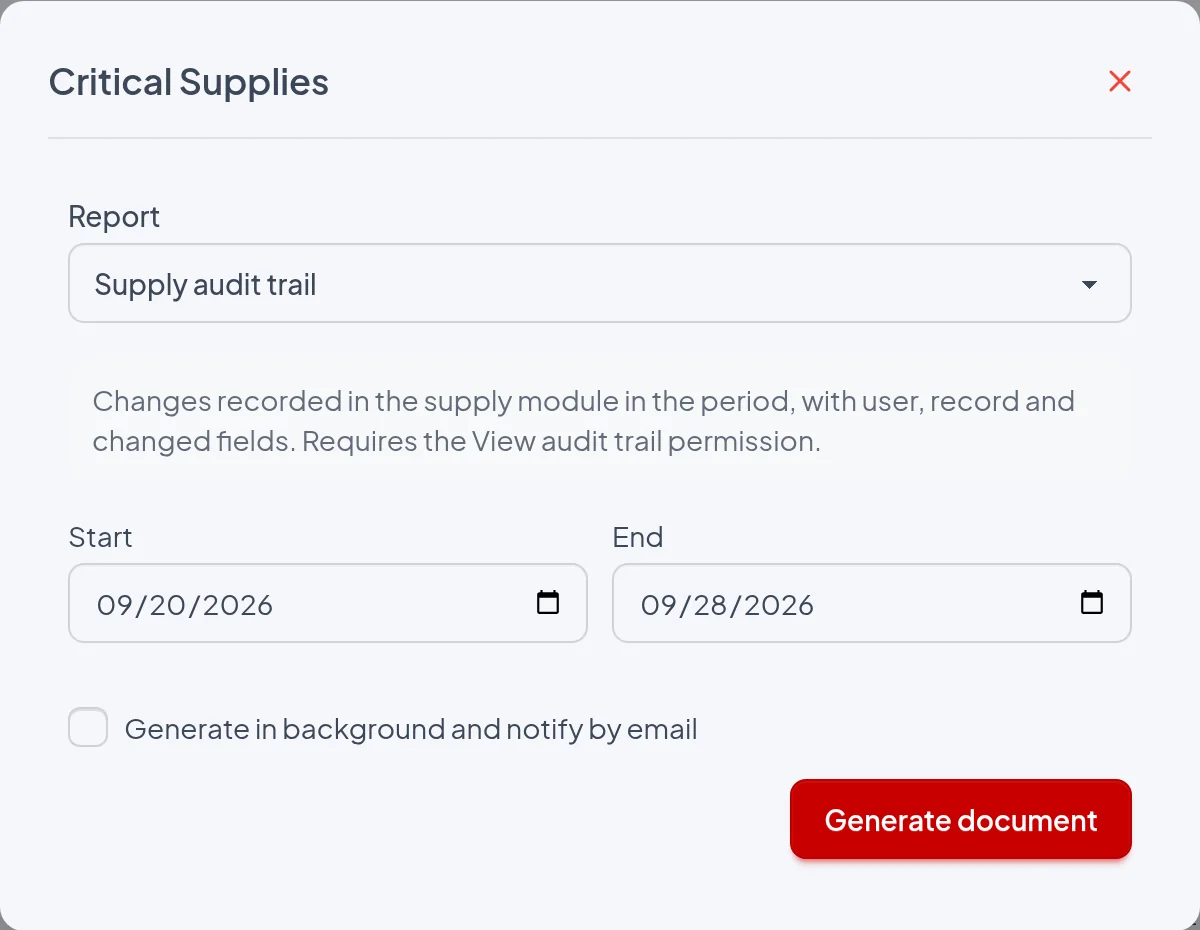
- Start: Required: includes changes recorded from 00:00 on that day, in the time zone of the person issuing the report. The dialog suggests the date one month ago and does not accept a date later than End.
- End: Required: includes changes recorded until the end of that day (23:59:59). The dialog suggests today's date. With Start or End empty or reversed, the Generate document button is disabled.
- Generate in background and notify by email: When checked, the report is queued and an email arrives with a download link, valid for 7 days, to a ZIP containing the file "Supply audit trail.pdf"; if it is under 10 MB, the ZIP is also attached. When unchecked, the PDF downloads immediately, because the audit trail is never moved to the background on its own. For long periods, check this option.
The period is compared with the date and time each change was recorded (Date column), not with the dates entered in the forms, such as Receipt date, Evaluation date or Occurrence date and time. That is why a backdated entry appears in the period in which it was recorded. In the example, Checklist 1, with "Occurrence date and time: 06/20/2026 07:40", appears in the period 09/20/2026 to 09/28/2026 because it was recorded on 09/28/2026 03:18.
The report
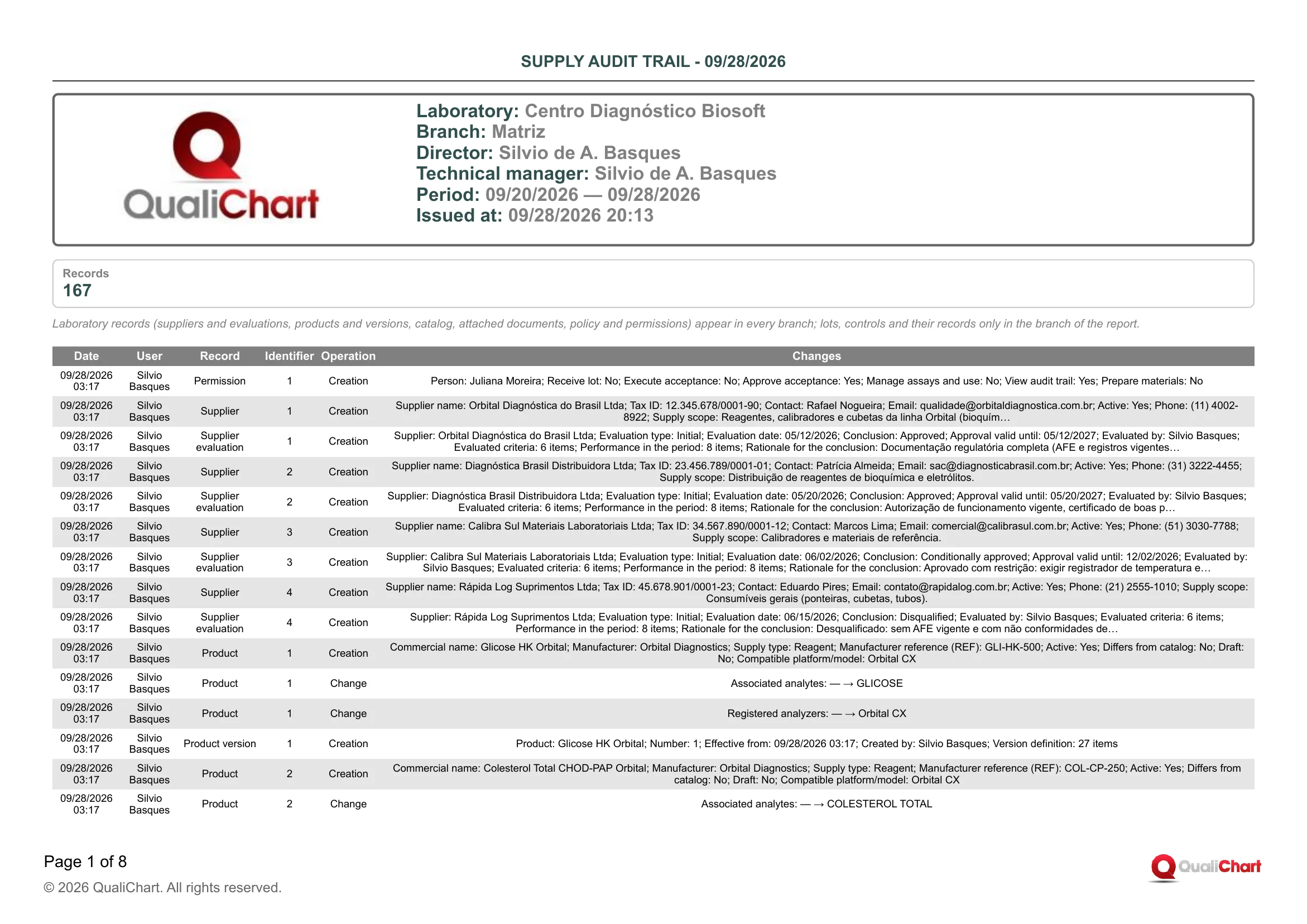
In the demo PDF for Centro Diagnóstico Biosoft, branch Matriz, with period 09/20/2026 — 09/28/2026, the box shows Records 167 over 8 pages, all rows are dated 09/28/2026 and only Silvio Basques and Juliana Moreira appear. Acceptance 7 for lot COL2608 · Shipment 2 was created by Silvio with "Mean difference: 6.496" and "Maximum accepted difference: 2.7", Juliana recorded "Decision: Pending → Rejected" and then Lot 7 changed to "Status: Under acceptance → Rejected". At 18:18, Juliana changed Lot change 13 (COL2609 · Shipment 1, "Previous lot: COL2608 · Shipment 1") with "Calibration: Pending → Verified" and "Linked intervention: — → Orbital CX · 09/28/2026 18:18". The creation of Limit revision 1 shows "Before: Mean in use 153.6, SD in use 2.1; After: Mean in use 156.8, SD in use 2".
| Field | Data source | Use |
|---|---|---|
| Header | ||
| Period | Start and End dates chosen in the dialog, printed as MM/DD/YYYY — MM/DD/YYYY. | Confirm that it covers the window requested by the auditor or the investigation. What counts is the date the changes were recorded. |
| Summary | ||
| Records | Count of the module's creations, changes and deletions recorded in the period, within the branch scope. It includes those beyond the limit of 5,000 printed rows. | Shows the volume of activity. Above 5,000, the table is incomplete and you need to issue shorter periods. |
| Records table | ||
| Date | Date and time at which the system recorded the operation, in the time zone of the person issuing the report. No one types or edits this value. | Shows the actual sequence of entries, for example whether the acceptance decision came after its execution. Compare it with the entered dates shown in Changes to find backdated entries. |
| User | Name of the user logged in at the time of recording, stored in the trail and not updated afterwards. Under support access, the name of the support person appears followed by "(support access)". | Identifies who is responsible for each action and the separation between who performs and who decides. In the example, Silvio Basques created the acceptances and Juliana Moreira recorded the decisions. |
| Record | Record type, according to the critical supplies screen where the action took place: Policy, Permission, Catalog, Product, Product version, Document, Supplier, Supplier evaluation, Lot, Checklist, Acceptance, Product/control link, Lot change, Occurrence, Run lot revision or Limit revision. Correlation and Post-change shift are calculated by the system from the runs. | Shows the process step: Acceptance carries the decisions, Lot change the entry into use and the calibration. Lot also carries the status changes made by the system on acceptance, use, closing and recall. |
| Identifier | Internal number of the record within its type, assigned by the system. It is not the lot number or the invoice number. | Follow the same record across rows: in the example, the "Lot 12" rows tell the life of lot COL2609 · Shipment 1. The Creation row shows which lot, product or control the number corresponds to. |
| Operation | Creation (record created), Change (fields modified) or Deletion (record removed). | Check who is responsible for, and the justification of, any Deletion and any Change to an acceptance, evaluation or occurrence already decided. Lots are never deleted: archiving appears as a Change with "Archived: No → Yes". |
| Changes | For Creation and Deletion, up to 10 filled-in fields as "Field: value", starting with those that identify the record; for Change, up to 12 changes as "Field: before → after" (for grouped data, only the changed subfield, such as "Receipt details › Invoice or equivalent document: NF 1 → NF 2"), and the remainder appears as "+N fields". Other records and people appear by name (such as "COL2609 · Shipment 1" or "Orbital CX · 09/28/2026 18:18"), with translated options, Yes/No, dates as MM/DD/YYYY, numbers with up to 3 decimal places and "—" for empty. | Shows what changed, such as the lot Status (Received → Under acceptance → Approved → In use → Closed), the acceptance Decision with Decided by, and Calibration going from Pending to Verified with Calibration decided by. |
Reading cautions
- Only records from the critical supplies module are included: IQC runs, interventions, temperature equipment and user registration are left out, and the lot recorded in each run only appears when the link is corrected (Run lot revision); for the runs, use Supply traceability.
- The scope is per branch and there is no filter by lot, product, supplier or user: laboratory records (suppliers and evaluations, products and versions, catalog, attached documents, policy and permissions) appear in any branch, but lots, controls and their records only in the branch where they were recorded, so issue the trail in each branch to cover the whole laboratory.
- The Changes column is a summary: small lists and groups are written out in full ("Violated rules: 2:2s", "Associated analytes: — → CLORETOS, POTÁSSIO, SÓDIO"), larger ones only as a count ("Version definition: 27 items"), texts over 60 characters end in "…" and "+N fields" indicates omitted fields, so check the full content in View audit trail or on the record's screen.
- The names of lots, products, people and other records cited in Changes come from the current registration at the time of issue, while the User column keeps the name at the time of the change, and a reference to a record that no longer exists appears as "#number".
- Correlation and Post-change shift, including deletions of these types, are automatic recalculations made when a run is recorded, edited or deleted or when the run's lot link is corrected, and the User in the row is whoever triggered the recalculation, not whoever made a decision.
- At most 5,000 rows are printed, from oldest to newest, and only changes made in QualiChart by a logged-in user appear, excluding adjustments made directly in the database or by scripts outside the application.
12. Settings and permissions
- In Settings, grant the permissions per user: receive lot, execute and approve acceptance, manage products and use, prepare materials and view the audit trail. Users with any of these permissions find Critical supplies in the building menu.
- Set the laboratory policy: segregation between who performs and who approves, expiry alerts, statistical windows, supplier re-evaluation and record retention.
- Turn on the opening and closing checklists, if the laboratory requires them.
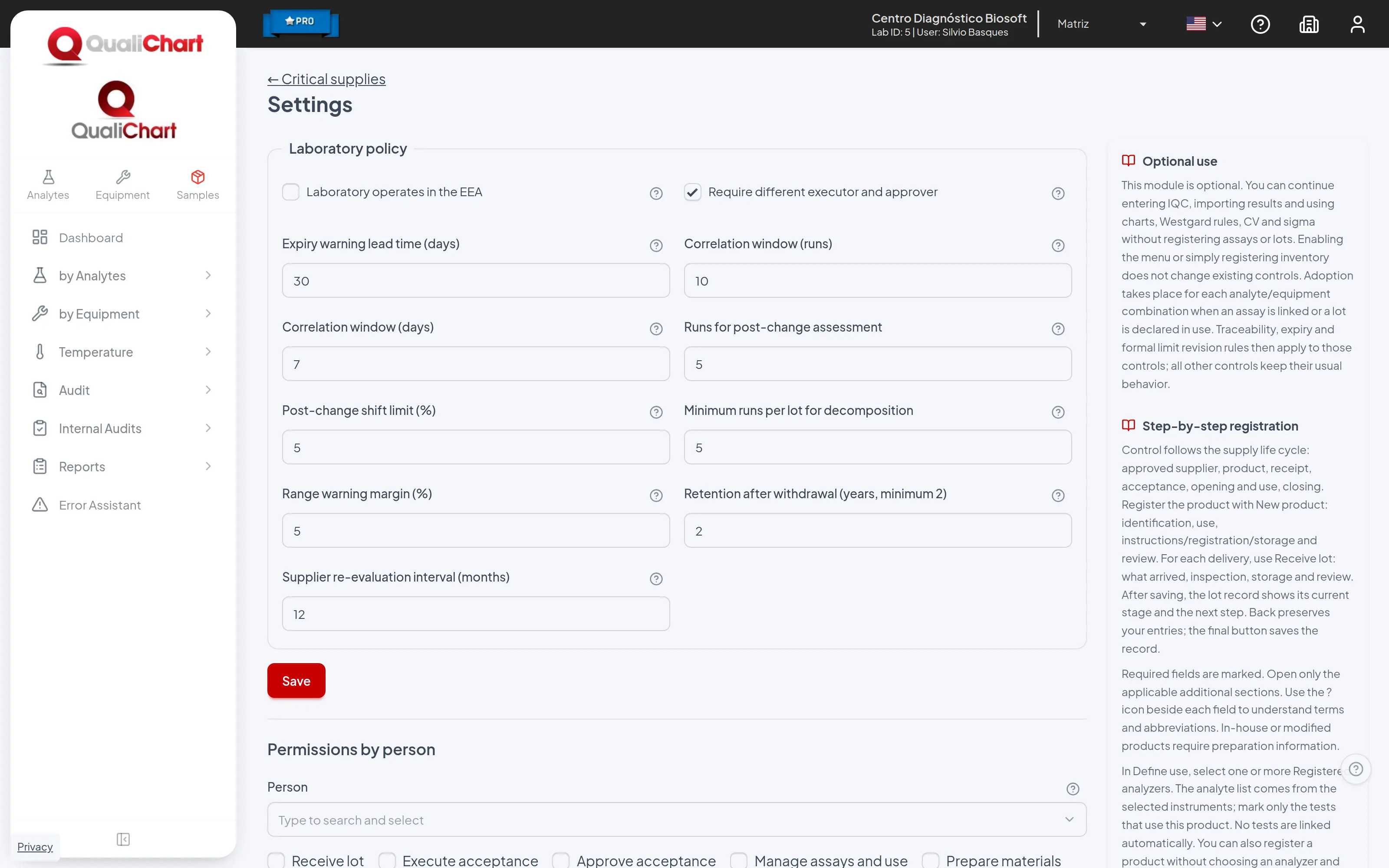
To understand the standards behind each step, read the guide to critical supply control in the clinical laboratory.